The 60-second verdict
Quick answer: a useful process-exception register shows the expected process, actual variation, evidence, impact, temporary control, authorised approver, expiry or review trigger and closure owner. AI can draft the entry from a voice note, but it cannot authorise the exception or decide that it is safe to continue.
Decision focus: use the method below only where it produces a recoverable source, a verifiable output and a clear next action. If one of those fails, change the workflow rather than trusting a polished summary.
Evidence basis and limits
- Decision factors covered: Define the affected process; Capture the complete exception; Classify the record correctly.
- Evidence rule: Claims are weighted by consequence: capture failure, changed meaning, access and recovery matter more than polished wording.
- Boundary: Examples and workflow recommendations must be tested with representative recordings, the intended users and the actual approval process before rollout.
Temporary workarounds become permanent weaknesses when nobody records why the normal process was bypassed. A structured voice note can preserve the circumstances while they are fresh, provided the verified result enters the controlled register.

Define the affected process
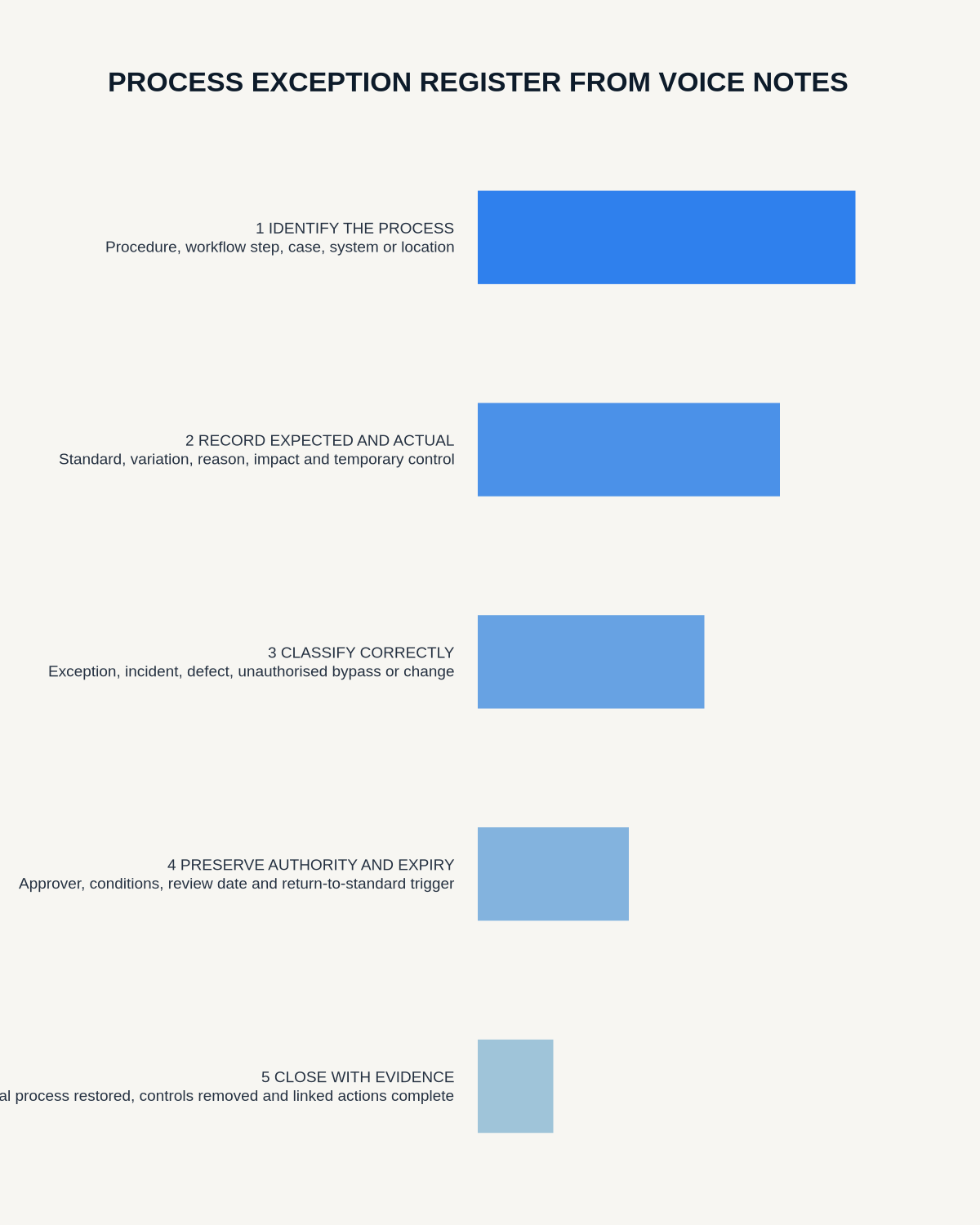
State the procedure, workflow step, customer case, system or location affected. Reference the current approved process and version. Record only the information needed to explain the deviation, excluding unrelated personal, customer or security details.
Capture the complete exception
- Process reference: the procedure or control affected.
- Expected standard: what should normally happen.
- Actual variation: what happened or is proposed instead.
- Evidence: the source supporting the need and current facts.
- Impact: safety, quality, customer, cost, data or compliance effect.
- Temporary control: the safeguard while the exception remains open.
- Authority: the person permitted to approve it.
- Duration: expiry date, review point or return-to-standard trigger.
- Closure: owner, evidence and final status.
Classify the record correctly
An exception is not a general place to store every problem. A control failure may require an incident or issue record. A future exposure may belong in the risk register. A permanent alteration needs formal change control. Repeated renewal is not a substitute for correcting the process.
Preserve authority and conditions exactly
Record who approved the variation, when, what evidence was considered and every condition attached. “Allowed for this case until Friday” must not become “approved process.” Check the final register wording against the actual approval source.
Separate facts from suspected cause
Use labels such as observed, reported, confirmed and under investigation. A system outage may explain the immediate workaround, but the underlying cause may still require analysis.
Link related records
Connect the exception to any incident, issue, risk, customer case or change request using stable identifiers. Avoid copying inconsistent status across several disconnected files.
Review repeated exceptions
Analyse entries by process, team, reason, duration and outcome. Repeated exceptions may reveal an unrealistic process, unclear ownership, weak training, unreliable systems, insufficient capacity or routine bypass of a necessary control.
Close every exception deliberately
- Confirm whether the normal process has resumed.
- Verify that temporary controls were removed or replaced.
- Complete any customer, operational or compliance follow-up.
- Link the approved permanent change where applicable.
- Record closure evidence and accountable acceptance.
- Apply the source-audio retention rule.
Workflow choice matrix for How to Create a Process Exception Register from Voice Notes
Choose the method that protects the source and reduces downstream correction. The table makes the non-hardware options explicit.
| Condition | Preferred route | Why |
|---|---|---|
| High-risk or mixed work | Governed hybrid | Separate capture, review, approval and retention rather than trusting one tool. |
| Recording is refused, prohibited or unnecessary | Manual notes / no recording | Respecting the boundary is the correct workflow, not a product failure. |
| In-person, mobile or unreliable-connectivity work | Dedicated recorder | Independent capture and a recoverable local source are usually more resilient. |
| Repeatable remote work with approved integrations | Cloud software | Automation and central collaboration may outweigh device independence. |
Frequently asked questions
Is every workaround a process exception?
No. It may be an incident, defect, unauthorised bypass or permanent change.
Can AI approve an exception?
No. Approval must come from the authorised person through the controlled process.
When should it become a change request?
When the variation is intended to become permanent, is repeatedly renewed or shows that the current process no longer works.
Useful resources
- Association for Project Management change-control guidance
- How to Create an Issue Log from Meeting Recordings
- How to Draft Change Requests from Meeting Transcripts
- How to Update a Risk Register from Recorded Discussions
Final exception checklist
- Expected and actual process clear
- Evidence-supported reason recorded
- Impact and temporary control visible
- Authority exact and traceable
- Expiry or review trigger present
- Closure supported by evidence
On this page
Related guides
See whether Halo fits this workflow
Review the NERALVO Halo specifications, included services, delivery information and current offer only after completing the guide.
Found an error or an out-of-date claim? Email support@neralvo.com with the article address and a supporting source.