Reviewed and updated: 21 July 2026.
The 60-second verdict
An AI voice recorder for long lectures must capture the lecturer from a realistic seat, last through the busiest study day and help turn hours of speech into usable revision material. Battery and storage alone do not make a good student workflow.
Best fit: Long Lectures who need recoverable audio and human-verified notes in an authorised workflow. Use another method when: recording is prohibited, a participant declines or the approved process requires manual notes.
Quick verdict: confirm recording and AI-processing permission first, test from the seat normally used, count errors in technical language and measure the time required to create verified study notes before choosing a device.
Evidence basis and limits
- Decision factors covered: Permission is the first criterion; Calculate the real workload; Run a real lecture-hall test.
- Evidence rule: A claim earns weight only when the source, date, configuration and limitation are clear enough for a reader to check.
- Boundary: Examples and workflow recommendations must be tested with representative recordings, the intended users and the actual approval process before rollout.
Permission is the first criterion
University, lecturer, module and accessibility rules can differ. Before buying, confirm:
- Which lectures may be recorded
- Whether guest speakers or seminars are treated differently
- Whether classmates may be captured
- Whether external AI transcription is allowed
- Whether recordings are for personal study only
- How accessibility arrangements apply
- When files must be deleted
Permission to record does not automatically permit sharing, publication or uploading to every service.
Calculate the real workload
| Input | What to calculate |
|---|---|
| Lectures per week | Total recording hours |
| Longest day | Battery plus safety margin |
| Maximum lecture length | Continuous-file reliability |
| Processing time available | Whether backlog will form |
| Connectivity | Offline capture and later sync needs |
Run a real lecture-hall test
- Obtain permission for a sample.
- Sit in the position normally used.
- Keep the recorder away from laptop fans, typing and paper movement.
- Capture the lecturer, one audience question and a short quiet passage.
- Include names, dates, formulas or specialist terms where possible.
- Review the original audio before the transcript.
- Count material errors.
- Time the complete process from recording to finished revision notes.
A quiet desk test at home does not prove performance across lecture-hall distance and reverberation.
Score the details that matter
- Technical terms
- Names of researchers or theories
- Dates and figures
- Formula wording
- Negative or qualifying language
- Audience questions
- Lecturer emphasis
- References to slides or diagrams
A fluent transcript can still teach the wrong fact.
Check the complete study workflow
- Name the file by module, date and topic.
- Transfer or synchronise it reliably.
- Correct key terms against slides and reading.
- Group content under learning objectives.
- Create a concise summary in your own words.
- Turn important points into retrieval questions.
- Link diagrams, formulas and slide numbers.
- Move verified material into the normal study system.
- Delete unnecessary source copies under course rules.
Features that support learning
| Feature | Useful role | Human check |
|---|---|---|
| Searchable transcript | Find an explanation quickly | Correct terminology |
| Summary | Create an overview | Restore qualifications and omissions |
| Translation | Support comprehension | Verify technical meaning |
| Mind map | Show relationships | Check oversimplification |
| Export | Move notes into the study system | Check formatting and access |
Use recordings for active revision
Replaying entire lectures is slow. Within a day:
- Write a one-page explanation
- Create definition and comparison questions
- Build worked examples
- Mark unclear points for the lecturer or reading
- Schedule spaced review
The recording should reduce uncertainty, not replace retrieval practice.
Battery and storage tests
Check:
- Real continuous-recording duration
- Battery remaining after the longest day
- Charging opportunities
- Battery-ageing margin
- Remaining-storage visibility
- Behaviour when storage is nearly full
- Recovery after interrupted transfer
Large capacity should provide resilience, not encourage permanent accumulation.
Compare dedicated hardware with a phone app
A phone app may be enough for occasional use. Dedicated hardware can separate recording battery and storage, reduce notification conflicts and provide physical controls. Test both from the same seat and compare the time required to produce the same checked revision pack.
Protect classmates and course content
Remove student names, personal disclosures and irrelevant discussion. Keep recordings and generated notes within the approved study purpose and sharing rules.
Where NERALVO Halo fits
Assess Halo against the long lectures workflow matrix provides NOTE mode, 64GB local storage, up to 35 hours of recording and Bluetooth synchronisation with DOWAY. DOWAY supports transcripts, summaries, templates, translations, mind maps and exports, with one year of DOWAY Max included.
The quoted capacity does not guarantee clear speech from every lecture hall. Test placement, lecturer distance, room acoustics and specialist vocabulary before relying on it.
Lecture-recorder checklist
- Recording and AI-processing rules confirmed
- Weekly hours calculated
- Longest day tested
- Normal seat used
- Raw audio reviewed
- Technical errors counted
- Transfer and naming tested
- Revision workflow completed
- Classmate information protected
- Backlog-prevention routine defined
- Total subscription cost understood
Cloud software, a dedicated recorder or manual notes?
For Long Lectures, the right answer changes with the setting. This matrix deliberately gives each method a situation where it can be the strongest choice.
| Situation | Best starting point | Reason |
|---|---|---|
| scheduled online lessons or staff meetings | Cloud meeting software | Auto-join and central collaboration can remove routine admin. |
| classroom, lecture or campus discussions | Dedicated recorder | Dedicated hardware suits movement, variable rooms and offline source capture. |
| recording is not permitted or a learner objects | Manual notes or an approved alternative | A clear alternative respects policy and participant choice. |
| mixed teaching and administrative work | Governed hybrid | One governed process prevents gaps between desk and field work. |
Frequently asked questions
Should a whole day be one file?
No. Separate files by lecture or topic so they remain searchable and easier to manage.
Can a transcript replace attending?
No. It can miss diagrams, demonstrations, emphasis and interaction, and it may contain errors.
Is storage the main priority?
No. Permission, room audio and a reliable processing habit matter more.
How soon should a lecture be processed?
Ideally within a day, while context and slide references remain fresh.
Choose for learning after the lecture
The best lecture recorder reduces simultaneous note-taking pressure and helps create active revision without producing an unmanageable audio archive.
Related guides
Profession workflow
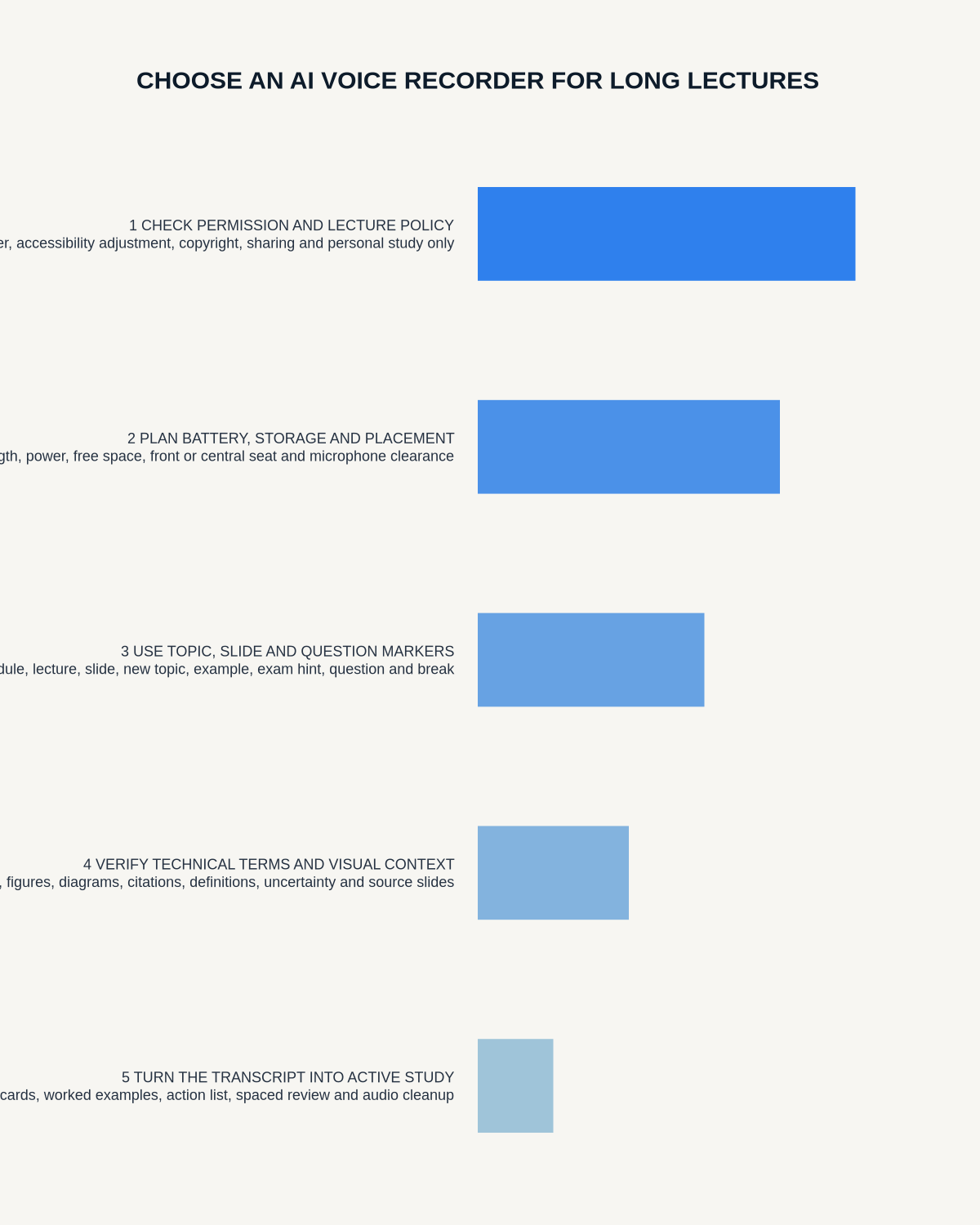
Visual map for AI Voice Recorder for Long Lectures: A Real-Seat Student Test
- Prepare the approved useDefine purpose, safe position, permission and the required formal record.
- Capture context firstState the case, asset, person, location or event identifier before detail.
- Human-verify evidenceCheck technical terms, units, names, dates, decisions and uncertainty.
- Complete the formal recordTransfer only verified information and apply access and retention controls.
On this page
Related guides
See whether Halo fits long-form study capture
After checking permission and your institution’s rules, compare Halo’s stated battery, storage and export workflow with the way you actually study.
Found an error or an out-of-date claim? Email support@neralvo.com with the article address and a supporting source.