The 60-second verdict
Quick answer: when an AI voice recorder is out of storage, stop safely, protect existing files, verify what has transferred, remove only confirmed duplicates or expired material and run a new test recording before returning the device to service.
Decision focus: use the method below only where it produces a recoverable source, a verifiable output and a clear next action. If one of those fails, change the workflow rather than trusting a polished summary.
Evidence basis and limits
- Decision factors covered: Stop capture and record the incident; Protect existing files; Create a storage inventory.
- Evidence rule: The decision is based on the complete capture-to-action workflow, not a single feature or marketing accuracy percentage.
- Boundary: Examples and workflow recommendations must be tested with representative recordings, the intended users and the actual approval process before rollout.
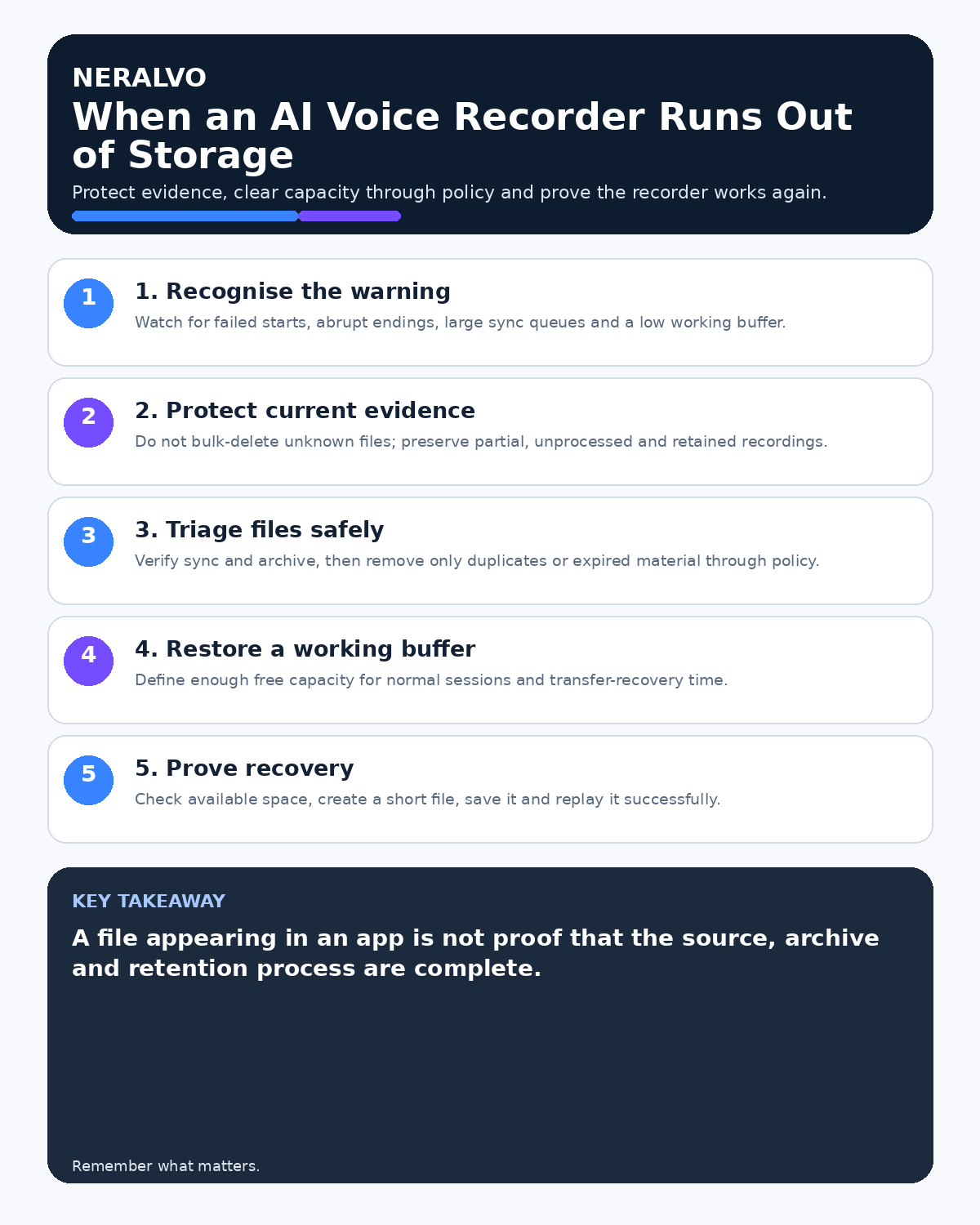
Storage-full incidents create two risks: the next recording may fail, and rushed cleanup may delete the only source copy. Treat storage recovery as a controlled file-verification process rather than pressing “delete all.”

Stop capture and record the incident
Do not assume the current file is complete. Note the meeting or task, approximate warning time, device and affected period. Use the approved fallback if important work must continue.
Protect existing files
Do not format the device or delete files in bulk. Keep the recorder physically secure and avoid repeated transfer attempts through unapproved accounts or networks.
Create a storage inventory
For each file, record:
- source filename or identifier;
- recording date and duration;
- business purpose and owner;
- whether transfer completed;
- destination and verification status;
- retention or deletion status.
Verify transferred copies
- Open the destination copy.
- Check duration and file size.
- Replay the beginning, middle and end.
- Confirm the correct meeting or task.
- Check whether the source audio—not only the transcript—is available.
- Record who completed the verification.
A cloud entry or generated transcript does not prove the original audio transferred completely.
Delete in a controlled order
Remove accidental, empty and duplicate files first. Then remove files whose approved retention period has ended and whose required outputs are verified. Do not delete material subject to an incident, legal hold, investigation or another formal requirement.
Confirm usable capacity
After clearing space, check the available capacity and estimate whether it supports the next approved recording. Define a minimum working buffer for important meetings or field visits so the device is not returned to service with only marginal free space.
If capacity remains unexpectedly low, investigate hidden duplicates, failed transfers or device faults.
Run a new test recording
Create a short labelled test, replay it and verify transfer before returning the recorder to service. Record the result if the device is used for important business work.
How NERALVO Halo storage should be managed
View Halo specifications against the evidence checklist includes 64GB local storage, but local capacity still requires an active archive, retention and deletion process. Verify that required source audio has reached its authorised destination before removing the device copy, and check whether DOWAY, local downloads, shared folders or exported files create additional copies that need separate control.
Prevent recurrence
- Set a capacity check before long sessions.
- Process files on a defined schedule.
- Use retention rules instead of available space.
- Monitor unprocessed-file count and age.
- Assign device and file ownership.
- Test storage warnings during acceptance testing.
Workflow choice matrix for What to Do When an AI Voice Recorder Runs Out of Storage
Choose the method that protects the source and reduces downstream correction. The table makes the non-hardware options explicit.
| Condition | Preferred route | Why |
|---|---|---|
| High-risk or mixed work | Governed hybrid | Separate capture, review, approval and retention rather than trusting one tool. |
| Recording is refused, prohibited or unnecessary | Manual notes / no recording | Respecting the boundary is the correct workflow, not a product failure. |
| In-person, mobile or unreliable-connectivity work | Dedicated recorder | Independent capture and a recoverable local source are usually more resilient. |
| Repeatable remote work with approved integrations | Cloud software | Automation and central collaboration may outweigh device independence. |
Frequently asked questions
Can I delete files after seeing a transcript?
Only after verifying the required source and final record under the retention process.
Should the recorder be formatted?
Not as the first response. Inventory and verify the files before any destructive action.
What if the current recording stopped early?
Mark the gap, use other evidence and follow the incident or meeting-record process.
Useful resources
- ICO storage-limitation guidance
- How to Prevent Recording Interruptions
- How to Add Spoken Markers to Long Recordings
- View Halo specifications against the evidence checklist
Final recovery checklist
- Recording stopped safely
- Existing files protected
- Inventory completed
- Destination copies verified
- Deletion authorised and controlled
- Capacity and working buffer confirmed
- Test recording passed
- Recurring checks scheduled
On this page
Related guides
See whether Halo fits this workflow
Review the NERALVO Halo specifications, included services, delivery information and current offer only after completing the guide.
Found an error or an out-of-date claim? Email support@neralvo.com with the article address and a supporting source.