The 60-second verdict
Quick answer: podcasters can use AI transcription to create an edit map before opening the timeline, but quotations, facts, rights, confidential sections and editorial meaning must be checked against the source audio. The transcript is a navigation layer, not the finished episode.
Best fit: Podcasters who need recoverable audio and human-verified notes in an authorised workflow. Use another method when: recording is prohibited, a participant declines or the approved process requires manual notes.
Evidence basis and limits
- Decision factors covered: Why editing from a raw transcript wastes time; The purpose → sections → moments → checks → cuts → assembly → approval workflow; Use the five-marker edit map.
- Evidence rule: Claims are weighted by consequence: capture failure, changed meaning, access and recovery matter more than polished wording.
- Boundary: Examples and workflow recommendations must be tested with representative recordings, the intended users and the actual approval process before rollout.

Check whether NERALVO Halo fits podcasters work can support permitted interviews, field recordings and host notes. It cannot clear rights, verify claims or replace the master audio workflow.
Why editing from a raw transcript wastes time
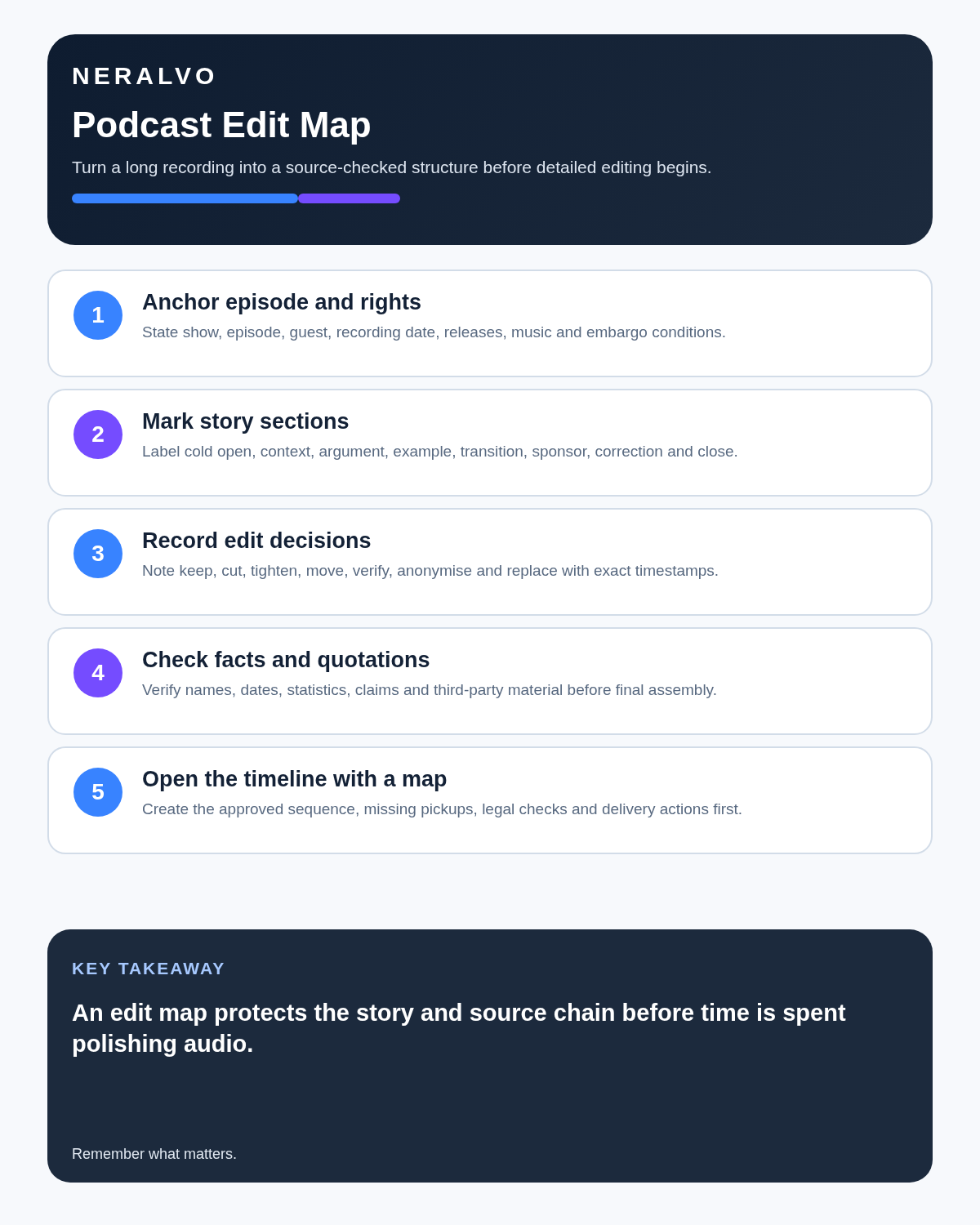
A long transcript presents every word with similar visual weight. The producer still needs to identify the narrative arc, strongest moments, repetition, verification needs and rights risks. Building that map first reduces unnecessary timeline work.
The purpose → sections → moments → checks → cuts → assembly → approval workflow
| Stage | Question | Output |
|---|---|---|
| Purpose | What should the listener understand or feel? | Editorial objective |
| Sections | Which story blocks create the journey? | Episode structure |
| Moments | Which exact source clips carry value? | Timestamped selects |
| Checks | What needs factual, legal or rights review? | Verification list |
| Cuts | What can be removed without changing meaning? | Edit decisions |
| Assembly | How will narration, clips and transitions combine? | Timeline plan |
| Approval | Who signs off content and release? | Published master |
Use the five-marker edit map
| Marker | Meaning | Next action |
|---|---|---|
| KEEP | Clear, relevant material | Retain and trim only for pace |
| CLARIFY | Useful idea with confusing wording or missing context | Add narration, a pickup, source context or a cleaner explanation |
| CUT | Repetition, tangent or low-value section | Remove while preserving continuity and meaning |
| CHECK | Name, claim, quotation, date, statistic or rights issue | Verify before publication |
| PROMO | Strong standalone moment | Prepare a clip, caption, trailer or chapter hook |
Apply the marker to an exact timestamped passage. A section may carry more than one marker—for example KEEP and CHECK.
Agree recording and publication terms before the interview
- Guest agrees to recording and intended publication.
- Video and separate tracks are identified.
- Editing and promotional quotation rights are clear.
- Off-record or restricted sections have a defined process.
- Any factual or full-edit review is agreed.
- Raw audio, transcripts and unused material have a retention rule.
The guest release or booking agreement should match the actual production workflow.
Record for the edit
Use brief verbal or written markers where they help:
- Restart after a false beginning.
- Spell names and specialist terms.
- Repeat critical numbers clearly.
- Mark a claim requiring fact-checking.
- Identify a possible opening or promotional clip.
- Record room tone where useful.
Do not interrupt every natural answer for production convenience. The markers should support the conversation rather than dominate it.
Correct the transcript before mapping
- Speaker labels.
- Guest, organisation and product names.
- Dates, figures and technical terms.
- Negative wording.
- Overlap and inaudible sections.
- Potentially publishable quotations.
Create a timestamped edit map
| Field | Example use |
|---|---|
| Section | Opening, origin, conflict, evidence, resolution |
| Timestamp | Exact in and out point |
| Moment | Quotation or scene description |
| Function | Hook, evidence, character, explanation or transition |
| Marker | KEEP, CLARIFY, CUT, CHECK or PROMO |
| Check | Fact, attribution, consent, privacy or rights |
| Edit | Keep, shorten, move, combine or cut |
| Production | Music, narration, pickup, sound design or clearance |
Use a controlled post-recording sequence
- Preserve the original audio and create working copies.
- Back up the project before transcription or editing.
- Generate the transcript with timestamps and speakers.
- Correct guest names, terminology and material attribution.
- Apply the five edit markers.
- Build the episode structure from the strongest passages.
- Open the audio timeline at the selected timestamps.
- Listen through every proposed edit for meaning, rhythm and continuity.
- Complete fact, rights and privacy checks.
- Create captions and promotional assets from the corrected source.
- Complete editorial and release approval.
Protect editorial context
A transcript edit is not automatically a safe audio edit. Removing a sentence may create an unnatural jump, detach a pronoun from its subject or remove a qualification that changes the claim.
Do not combine separate answers into a new position, move a reaction so it appears to follow a different statement or remove uncertainty in a way that makes the guest sound more definite. Listen across every edit boundary.
Build a fact-check ledger
| Field | Record |
|---|---|
| Claim | Exact statement or checked paraphrase |
| Timestamp | Source location |
| Speaker | Person responsible for the statement |
| Evidence needed | Official source, report, record or expert review |
| Status | Pending, verified, qualified, removed or attributed |
| Final wording | Approved script, description or caption language |
A recording proves that the statement was made, not that the claim is accurate. Do not place an unsupported claim in the title, show notes or social clip merely because the guest delivered it confidently.
Control rights and permissions
- Guest recording and publication permission.
- Music and archive clips.
- Third-party recordings.
- Private or off-record sections.
- Location and event restrictions.
- Minors and vulnerable participants.
- Sponsor and brand approvals.
Use AI for production support, not invention
AI can suggest chapters, titles, show notes and social clips, but verify quotations and do not fabricate claims, guest positions or timestamps. Keep promotional wording aligned with the actual episode rather than exaggerating a minor tangent.
Check captions and accessibility
Create captions from the corrected transcript. Verify names, technical terms, punctuation, speaker changes and significant sound cues. Automatic captions are a starting point, particularly where people overlap, accents vary or audio quality changes.
Ensure chapter titles, show notes and written summaries do not introduce claims or wording absent from the approved episode.
Choose the right source recording
For remote interviews, separate local tracks or an approved platform recording may provide better editing control than a single room recording. For in-person interviews, microphone placement and monitoring matter more than transcription quality.
A portable recorder may serve as a main source or synchronised backup where the production and guest agree. Test the actual setup and retain an appropriate backup for high-value recordings.
Archive the source properly
Preserve the original master, edit project, rights records, fact-check record, final script and published master. Apply a deliberate retention decision to convenience transcripts and AI exports rather than keeping every duplicate indefinitely.
Do not upload private pre-interview discussion, contact details or unrelated conversation to promotional tools merely because it is present in the file.
How NERALVO Halo fits podcasters
NERALVO Halo includes NOTE mode, supported CALL mode, 64GB local storage, up to 35 hours of recording and Bluetooth sync with DOWAY. DOWAY provides transcripts, summaries, speaker-separated notes, templates, translations, mind maps and exports, with one year of DOWAY Max included.
Test the real microphone placement and keep a professional backup where the recording is critical. Halo does not replace multitrack capture, rights clearance, editorial review or project backup.
Cloud software, a dedicated recorder or manual notes?
For Podcasters, the right answer changes with the setting. This matrix deliberately gives each method a situation where it can be the strongest choice.
| Situation | Best starting point | Reason |
|---|---|---|
| scheduled remote meetings | Cloud meeting software | Calendar automation and shared integrations are usually the strongest advantage. |
| in-person or mobile work | Dedicated recorder | Independent capture reduces reliance on an active phone or laptop. |
| recording is refused or prohibited | Manual notes or an approved alternative | The boundary takes priority over convenience. |
| mixed online and offline work | Governed hybrid | Use each method only in the setting it actually fits. |
Frequently asked questions
Can the transcript replace listening to the episode?
No. Timing, tone, overlap, continuity and sound quality require source review.
Can AI choose clips automatically?
It can suggest moments, but editorial value, context, factual risk and rights need human review.
Does guest interview permission cover every reuse?
Not necessarily. Follow the agreed release and rights scope.
Can a CHECK marker remain unresolved at publication?
Only if the material is removed, clearly qualified or attributed under the approved editorial decision.
Final podcast checklist
- Editorial purpose clear.
- Recording and publication terms agreed.
- Original audio preserved and backed up.
- Transcript corrected.
- KEEP, CLARIFY, CUT, CHECK and PROMO markers applied.
- Story sections and timestamped selects mapped.
- Facts, allegations and quotations verified.
- Rights and confidential sections controlled.
- Edits preserve meaning.
- Captions and promotion match the source.
- Source and final masters archived correctly.
Bottom line: an edit map should reduce searching without replacing listening. Use the corrected transcript to locate, classify and verify material, then make editorial decisions against the source audio.
Related guides
See the guides for journalists, content creators and videographers.
On this page
Related guides
See whether Halo fits this workflow
Review the NERALVO Halo specifications, included services, delivery information and current offer only after completing the guide.
Found an error or an out-of-date claim? Email support@neralvo.com with the article address and a supporting source.