The 60-second verdict
Quick answer: choose a phone-mounted AI voice recorder only after testing the exact phone, case, calling apps and detached table position. Magnetic attachment improves carrying convenience; it does not prove call compatibility or balanced meeting audio.
Decision focus: use the method below only where it produces a recoverable source, a verifiable output and a clear next action. If one of those fails, change the workflow rather than trusting a polished summary.
Evidence basis and limits
- Decision factors covered: Test the exact physical setup; Score the fit; Treat every mode separately.
- Evidence rule: Claims are weighted by consequence: capture failure, changed meaning, access and recovery matter more than polished wording.
- Boundary: Examples and workflow recommendations must be tested with representative recordings, the intended users and the actual approval process before rollout.
Test the exact physical setup
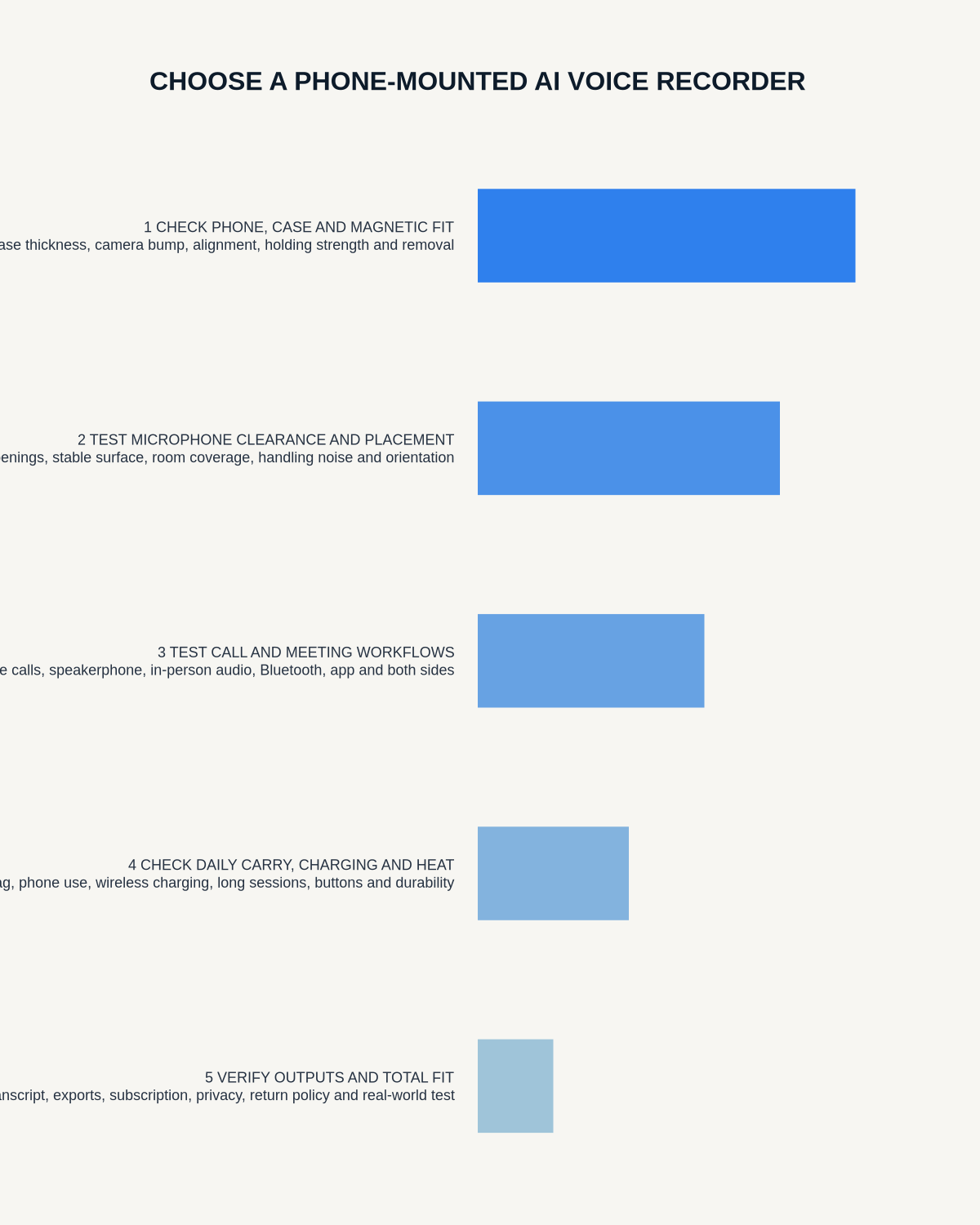
- Attach it to the real phone and case.
- Check stability during normal handling.
- Confirm camera, buttons and charging remain usable.
- Carry it in the usual pocket or bag.
- Test detachment and central table placement.
- Check accidental activation.
Score the fit
| Area | Pass condition |
|---|---|
| Attachment | Stable during ordinary use |
| Controls | Deliberate and accessible |
| Phone functions | Camera, charging and handling remain practical |
| Detached use | Records independently on a table |
| Carry | No detachment or accidental start |
Treat every mode separately
- Room meeting: several speakers at normal distance.
- Mobile call: both sides on the exact handset.
- Business calling app: one test per critical app.
- Private note: rapid deliberate capture.
- Detached use: independent recording without phone handling.
Run a room test
Detach it, use the largest normal meeting, include a quiet distant speaker, names, numbers and an action, then review source audio before the transcript.
Run a call test
Use the exact phone, case and app. Confirm both voices, include a name, date and conditional action, and repeat after relevant phone or app changes.
Check battery, storage and data flow
Verify the busiest-day capacity, low-storage warnings, interrupted sync recovery, local source access, AI processing, export and deletion of every copy.
Total cost
Include hardware, compatible case or ring, charging accessories, AI plan, correction time, replacement risk and future phone changes.
Build a compatibility matrix before buying
List every phone, case, operating-system version and calling application that matters. Test each combination rather than treating one successful call as proof of general compatibility. Record the date and result, because audio routing can change after a handset, app or operating-system update.
| Test | Pass condition | Retest trigger |
|---|---|---|
| Physical fit | Stable, controls and microphones clear | New phone, case or magnetic ring |
| Room capture | Quiet and distant speakers remain intelligible | New room or placement |
| Phone call | Both sides captured with usable source audio | Phone or operating-system update |
| Calling app | Expected audio route works consistently | Application update |
| Sync and export | Original file transfers and opens correctly | App or account change |
Check real-world failure modes
- A thick or misaligned case weakens the magnetic hold.
- The recorder covers a camera, microphone, charging port or phone control.
- Pocket movement causes accidental starts or handling noise.
- Attached placement favours the phone owner and misses other speakers.
- A call app changes audio routing and captures only one side.
- A low battery, full storage or failed sync is noticed only after the conversation.
For each failure, decide whether there is a visible warning, a recovery method and a safer alternative. Never rely on an untested call route for an important conversation.
Plan consent, privacy and deletion
Physical attachment can make a recorder less obvious. Tell participants what is being recorded, why it is needed, who can access it and how long it will be retained. Use the applicable law and your organisation’s policy, and provide a practical alternative when someone does not agree.
Trace the file from the device through the phone, synchronisation service, transcription provider, downloads, shared folders and backups. A complete deletion test should account for every copy rather than only clearing the handset.
Use a simple buying decision rule
Choose the recorder only if the exact physical setup stays secure, every required audio mode passes, detached placement produces useful meeting audio, original files remain accessible, and the ongoing workflow is affordable and understandable. If any critical route fails, use a different approved method for that job.
Phone-mounted recorder compatibility questions
Should the recorder stay attached during a meeting?
Only when that position gives balanced audio. For group meetings, a visible central table position often works better.
Does a strong magnet prove the case is compatible?
No. It proves only physical hold. You must still test microphone clearance, controls, heat, charging, audio and safe carrying.
Retest after important changes
Repeat critical tests after a phone, case, operating-system, calling-app, firmware or recorder-app change. Keep one short reference recording and the same scoring checklist so you can tell whether the new setup improved or weakened capture.
Where NERALVO Halo fits
Check whether NERALVO Halo fits this workflow uses a slim magnetic format with NOTE mode, supported CALL mode, 64GB local storage, up to 35 hours of recording and Bluetooth synchronisation with DOWAY.
Workflow choice matrix for How to Choose a Phone-Mounted AI Voice Recorder
Choose the method that protects the source and reduces downstream correction. The table makes the non-hardware options explicit.
| Condition | Preferred route | Why |
|---|---|---|
| Repeatable remote work with approved integrations | Cloud software | Automation and central collaboration may outweigh device independence. |
| In-person, mobile or unreliable-connectivity work | Dedicated recorder | Independent capture and a recoverable local source are usually more resilient. |
| Recording is refused, prohibited or unnecessary | Manual notes / no recording | Respecting the boundary is the correct workflow, not a product failure. |
| High-risk or mixed work | Governed hybrid | Separate capture, review, approval and retention rather than trusting one tool. |
Frequently asked questions
Does magnetic attachment guarantee call recording?
No. Physical fit and audio routing are separate.
Will every case work?
No. Material, thickness and ring placement matter.
Can it work away from the phone?
Test independent detached recording before relying on it.
Final checklist
- Exact phone and case tested
- Detached table use works
- Room and every critical call route pass
- Status, battery and storage are clear
- Sync recovery, export and deletion are understood
Related AI voice recorder guides
Workflow map
Visual map for How to Choose a Phone-Mounted AI Voice Recorder: A Real-World Test
- Define the decisionState the question, required output and acceptance rule.
- Capture the sourceUse the approved route and preserve context, identity and limitations.
- Verify material detailsReplay or check names, numbers, negatives, decisions and actions.
- Move into the real recordAssign an owner, retain evidence and apply the deletion rule.
On this page
Related guides
See whether Halo fits this workflow
Review the NERALVO Halo specifications, included services, delivery information and current offer only after completing the guide.
Found an error or an out-of-date claim? Email support@neralvo.com with the article address and a supporting source.