The 60-second verdict
Quick answer: use an AI voice recorder in a board meeting only through an approved governance process, with clear participant information, restricted access, exact decision language, preserved dissent and formally approved minutes as the authoritative record.
Best fit: Board Meetings who need recoverable audio and human-verified notes in an authorised workflow. Use another method when: recording is prohibited, a participant declines or the approved process requires manual notes.
Evidence basis and limits
- Decision factors covered: Why board-meeting notes require a higher standard; Recording, transcript and approved minutes are different records; Confirm authority before recording.
- Evidence rule: The decision is based on the complete capture-to-action workflow, not a single feature or marketing accuracy percentage.
- Boundary: Examples and workflow recommendations must be tested with representative recordings, the intended users and the actual approval process before rollout.
Board discussions can include strategy, finance, legal risk, people decisions and confidential commercial information. A device such as View Halo specifications for board meetings use can support accurate drafting, but it must not create an uncontrolled parallel archive.
Governance distinction: the audio recording, AI transcript, draft minutes and approved minutes are different records. Only the formally approved minutes are the authoritative board record.
Why board-meeting notes require a higher standard
A missed caveat or incorrectly attributed resolution is more serious than an ordinary meeting-note error. The objective is not to create the longest transcript. It is to create a controlled evidence trail from the permitted discussion to the approved governance record.
Recording, transcript and approved minutes are different records
| Record | Purpose | Status | Typical handling |
|---|---|---|---|
| Audio recording | Supports accurate drafting and checking | Source material | Restricted access and defined deletion or retention |
| AI transcript | Searchable working text | Unverified draft | Corrected against audio before reliance |
| Draft minutes | Proportionate governance account | Subject to review | Version-controlled until approved |
| Approved minutes | Formal record of proceedings and decisions | Authoritative record | Stored in the official minute book or corporate system |
Under section 248 of the Companies Act 2006, a company must record minutes of directors’ meetings and keep them for at least 10 years. That obligation applies to the minutes; it does not mean every source recording must automatically be retained for the same period.
Confirm authority before recording
The chair, company secretary or governance lead should settle the process before the agenda begins. Check:
- Who has authority to approve the recording?
- Have directors, attendees, advisers and observers been informed?
- What specific purpose will the audio serve?
- Which approved system will hold the audio and transcript?
- Who may access, download or export it?
- Which agenda items may require the recording to pause?
- When will source audio be reviewed for deletion?
- What alternative note process applies if recording stops?
Use decision-status language
- Information received: no decision requested.
- Proposal: an option under consideration.
- Resolution: the exact authorised outcome.
- Condition: approval depends on another event or check.
- Conflict: an interest and the action taken.
- Dissent: a material objection or vote against.
- Action: task, owner and deadline.
Use the agenda as the capture structure
State the agenda item and document title aloud before debate begins. Useful verbal markers include:
- “The decision requested from the board is…”
- “The principal risk is…”
- “For the minutes, the declared conflict is…”
- “The board resolves that…”
- “Authority is delegated to…”
- “The action owner is… and the due date is…”
What good board minutes should capture
- Date, time, location and meeting format
- Directors present, attendees and apologies
- Quorum and chair
- Declarations of interest and how conflicts were managed
- Documents or reports considered
- Material questions, challenge and alternative options
- Key risks and dependencies
- Resolutions and voting outcome where relevant
- Delegated authority and financial limits
- Actions, owners, deadlines and review points
- Time the meeting closed
A polished summary that omits dissent, unresolved risk or a condition attached to approval can be dangerously misleading.
Use a controlled post-meeting workflow
- Secure the source immediately.
- Confirm the recording is complete and note pauses or closed sessions.
- Correct director names, figures, dates, legal terms and speaker attribution.
- Mark unclear passages rather than guessing.
- Extract resolutions and actions separately.
- Draft proportionate minutes by agenda item.
- Complete chair, governance and board review.
- Update decision, conflict, authority and action registers.
- Apply the approved retention or deletion decision.
Board-minute drafting template
Agenda item:
Paper or information considered:
Decision requested:
Material discussion and challenge:
Risks, conflicts or conditions:
Resolution:
Delegated authority:
Action, owner and deadline:
Follow-up or review date:
Handle restricted agenda items deliberately
The board may decide that recording should pause for privileged legal advice, individual employment matters, whistleblowing reports, security incidents, transaction negotiations or discussions outside the approved processing scope. The minutes should still record the necessary governance facts through the authorised restricted process.
Board decision-control toolkit
The strongest workflow creates a traceable chain between the agenda, evidence, discussion, authority, resolution, implementation and later review.
| Control field | What to record | Verification source |
|---|---|---|
| Agenda item | Stable item number, paper title and decision requested | Approved agenda and board pack |
| Evidence status | Actual, forecast, estimate, legal advice, management opinion or external report | Named paper, system or adviser |
| Authority | Board, committee, named director or delegated role | Articles, terms of reference or authority schedule |
| Conflict position | Interest declared, participation restriction and action taken | Conflict register and chair’s ruling |
| Decision status | Approved, rejected, deferred, conditional or noted | Chair-confirmed wording |
| Implementation | Owner, deadline, budget, dependency and reporting route | Action register |
| Review trigger | Date, threshold, event or evidence that reopens the decision | Decision log |
Resolution-verification protocol
- Read the exact wording back. State the proposed resolution in one complete sentence.
- Confirm the decision body. Check authority and quorum.
- Record conditions separately. Preserve legal, funding or third-party dependencies.
- Preserve dissent and abstention. Do not manufacture unanimity.
- Connect the resolution to execution. Name the owner, deadline and delegated limit.
- Reconcile all records. Approved minutes, decision logs and action registers should agree.
Use a three-level recording risk matrix
| Level | Typical material | Control |
|---|---|---|
| Standard governed capture | Routine performance, operational and project decisions | Approved recording and normal verification |
| Restricted capture | Financing, acquisition, cyber incident, senior remuneration or regulatory response | Smaller access group and explicit deletion review |
| Pause or alternative record | Privileged advice, whistleblowing or individual employment matters | Stop recording and use the restricted-note process |
The first 72 hours after the meeting
- Within two hours: secure the source, label gaps and restrict access.
- Within one working day: correct names, figures, resolutions, conflicts and ownership.
- Within two working days: circulate the controlled draft, not a raw transcript.
- Within three working days: update decision, risk, authority and action records.
Measure whether the process is improving
Track corrected draft resolutions, actions without owners, overdue board actions, decisions reopened because conditions were lost and working files retained beyond policy.
Common board-recording mistakes
- Starting without authority or participant awareness
- Treating the transcript as the minute
- Allowing sensitive audio to remain on personal devices
- Failing to record conflicts, conditions or delegated limits
- Accepting AI-generated figures and names without checking
- Circulating the full transcript too widely
- Keeping audio with no review date
- Deleting source material during an investigation or legal hold
How NERALVO Halo fits a controlled board workflow
NERALVO Halo provides NOTE mode, supported CALL capture, 64GB local storage, up to 35 hours of recording and Bluetooth sync with DOWAY. DOWAY supports transcripts, summaries, speaker-separated notes, templates, translations, mind maps and exports, with one year of DOWAY Max included.
Suitability must still be assessed against the organisation’s confidentiality, device-management, security and retention requirements. Halo can support drafting; it cannot approve minutes or certify governance compliance.
Cloud software, a dedicated recorder or manual notes?
For Board Meetings, the right answer changes with the setting. This matrix deliberately gives each method a situation where it can be the strongest choice.
| Situation | Best starting point | Reason |
|---|---|---|
| scheduled remote meetings | Cloud meeting software | Native remote-meeting workflows can be more efficient here. |
| in-person or mobile work | Dedicated recorder | A separate battery and recoverable local source improve resilience. |
| recording is refused or prohibited | Manual notes or an approved alternative | Manual notes are the correct control when recording is unavailable. |
| mixed online and offline work | Governed hybrid | A hybrid can combine automation with reliable physical capture. |
Frequently asked questions
Must every board meeting be recorded?
No. Companies must create and retain minutes, but audio recording is a separate governance choice.
Can AI-generated minutes be approved without human verification?
No. Resolutions, figures, attribution, conflicts, actions and material qualifications must be checked.
Should the transcript be sent to every director?
Not automatically. Distribute the approved governance record and restrict source material according to need.
Do board recordings need to be kept for 10 years?
The statutory 10-year requirement applies to directors’ meeting minutes. Source-audio retention depends on purpose, policy, legal holds and other obligations.
Final board-meeting checklist
- Authority and participant information confirmed
- Purpose and authorised audience defined
- Conflicts and dissent preserved
- Resolutions and conditions verified
- Actions assigned with authority and deadlines
- Approved minutes identified as authoritative
- Decision and action registers updated
- Audio access and retention controlled
Bottom line: AI recording can reduce board-minute drafting effort, but disciplined governance determines whether the resulting record is reliable.
Related AI voice recorder guides
Profession workflow
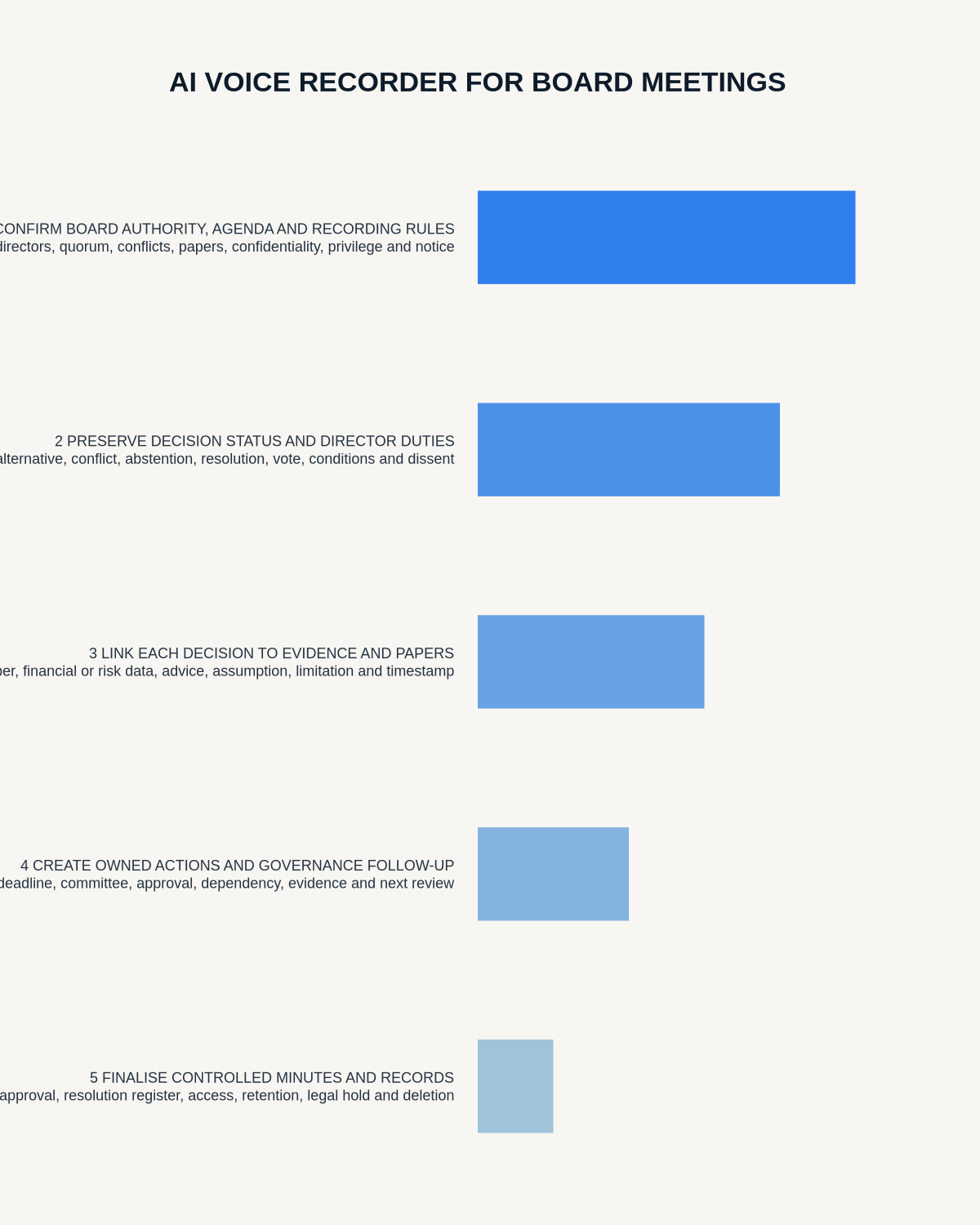
Visual map for AI Voice Recorder for Board Meetings: Decisions, Governance and Action Tracking
- Prepare the approved useDefine purpose, safe position, permission and the required formal record.
- Capture context firstState the case, asset, person, location or event identifier before detail.
- Human-verify evidenceCheck technical terms, units, names, dates, decisions and uncertainty.
- Complete the formal recordTransfer only verified information and apply access and retention controls.
On this page
Related guides
See whether Halo fits this workflow
Review the NERALVO Halo specifications, included services, delivery information and current offer only after completing the guide.
Found an error or an out-of-date claim? Email support@neralvo.com with the article address and a supporting source.