The 60-second verdict
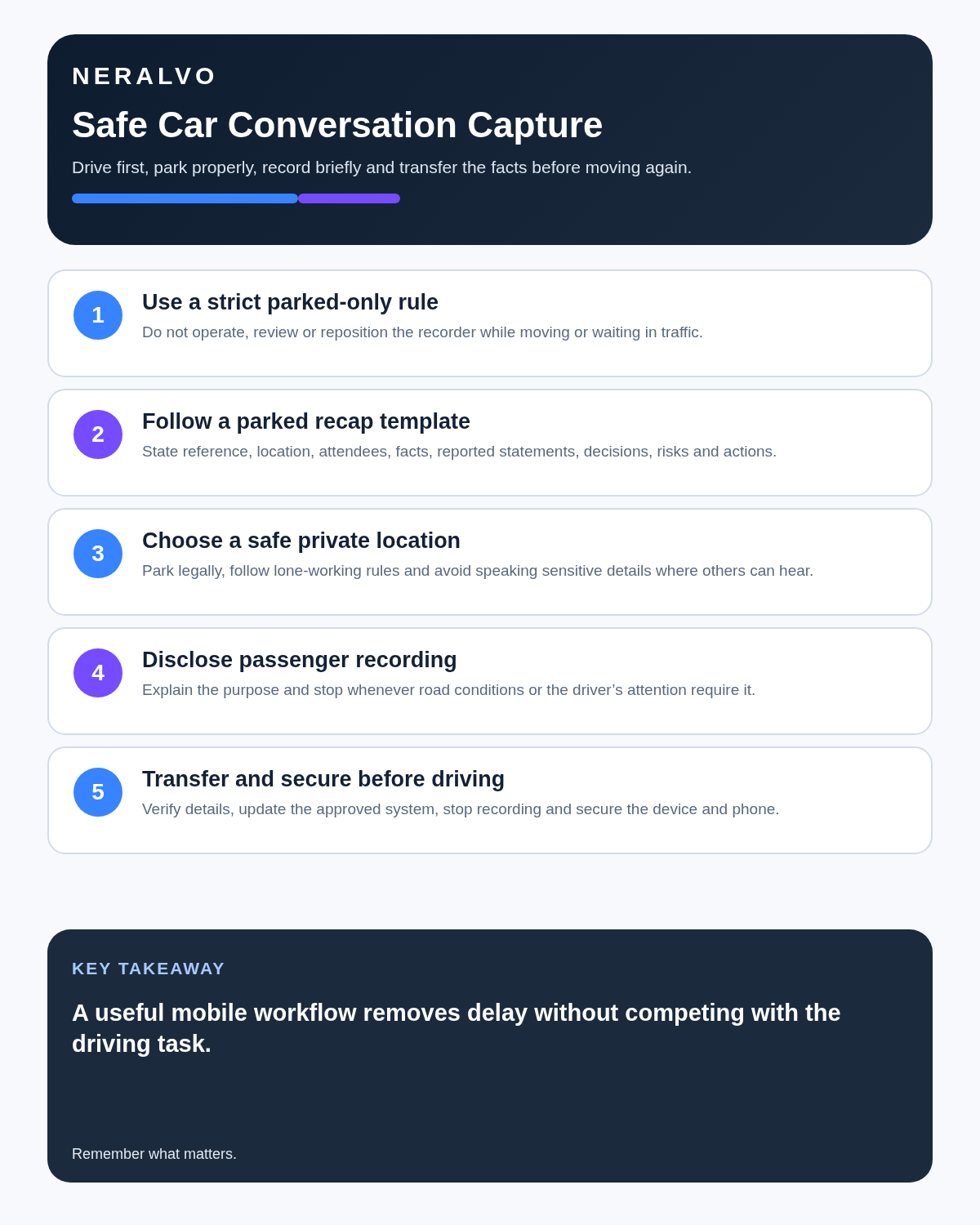
Quick answer: use an AI voice recorder in a car only when the vehicle is safely and legally parked. The strongest use case is a short, structured post-visit debrief completed before driving away, followed by verification and transfer into the authorised CRM, case-management or project system.
Best fit: Car Conversations who need recoverable audio and human-verified notes in an authorised workflow. Use another method when: recording is prohibited, a participant declines or the approved process requires manual notes.
Safety rule: never start, stop, reposition, review or correct a recording while driving or while temporarily stopped in traffic. A compact recorder does not make device interaction safe behind the wheel.
Evidence basis and limits
- Decision factors covered: Why parked debriefs are useful; Use a strict driving-state rule; Choose a suitable place to stop.
- Evidence rule: Claims are weighted by consequence: capture failure, changed meaning, access and recovery matter more than polished wording.
- Boundary: Examples and workflow recommendations must be tested with representative recordings, the intended users and the actual approval process before rollout.
Why parked debriefs are useful
Details from client visits, property inspections, site work, interviews and appointments can fade quickly. A short debrief completed while safely parked can preserve observations, statements, risks and next actions while the context is still fresh.
The recording should be treated as a temporary capture source rather than the permanent business record. The final verified information belongs in the system your organisation already uses.
Use a strict driving-state rule
| Vehicle state | Recording rule |
|---|---|
| Moving | Do not operate, review or reposition the device. |
| Stopped at lights or in congestion | Still treat the task as driving. Do not interact with the recorder. |
| Pulled over somewhere unsafe or unlawful | Continue to a lawful, secure parking place. |
| Safely and legally parked | Create the debrief before setting off again. |
| Passenger-led conversation | Use only where permitted, transparent and non-distracting to the driver. |
Choose a suitable place to stop
- Park lawfully and fully secure the vehicle.
- Avoid live traffic lanes, loading areas and places where stopping creates risk.
- Consider personal safety, lighting and surroundings.
- Close windows where traffic noise affects accuracy.
- Do not dictate confidential information where pedestrians or nearby vehicles can overhear it.
- Move to a private office or approved secure call for highly sensitive material.
Use a structured parked-debrief template
- Reference: client, case, property, project or job number.
- Context: date, time, location and purpose of the visit.
- Attendance: who was present and each person’s role.
- Direct observations: what you personally saw, heard, measured or checked.
- Reported information: what another person told you, attributed clearly.
- Documents or evidence: photographs, forms, readings or records that require linking.
- Decision or current position: what was agreed, rejected or left unresolved.
- Risk or uncertainty: missing evidence, conflicting accounts or urgent concerns.
- Actions: task, owner, deadline and destination system.
- Follow-up: who needs confirmation and by when.
Separate observation, report and interpretation
| Evidence type | Example | How to record it |
|---|---|---|
| Direct observation | A visible crack approximately 30 cm long | State what was observed and how it was measured. |
| Reported statement | The occupier said the leak began on Monday | Attribute the statement and avoid presenting it as independently verified fact. |
| Interpretation | The damage may be consistent with prolonged moisture | Label it as an assessment and record the basis and uncertainty. |
| Decision | An inspection was authorised for Friday | Record who authorised it, any conditions and the confirmed date. |
This separation strengthens accuracy and prevents a fluent AI summary from turning assumptions into facts.
Verify high-risk details before leaving
- Names and spellings.
- Addresses, room numbers and locations.
- Dates and times.
- Measurements, quantities and monetary amounts.
- Reference, serial or case numbers.
- Who made each statement or commitment.
- Negatives such as “not approved” or “no access granted.”
- Action owners and deadlines.
Where practical, repeat critical details during the visit and invite correction. Do not rely on transcription to distinguish similar numbers or names automatically.
Passenger conversations need their own controls
A passenger may operate an approved recorder, but that does not remove the need for participant notice, confidentiality and driver safety. Avoid detailed discussions that distract the driver, and postpone sensitive or decision-heavy conversations until everyone is safely parked.
Do not record passengers, clients or colleagues without following the applicable legal, professional and organisational process. Explain the purpose, intended use, access and retention.
Audio quality inside a vehicle
| Noise source | Risk | Control |
|---|---|---|
| Engine or ventilation | Continuous low-frequency masking | Switch off safely while parked where appropriate. |
| Open windows and traffic | Words and numbers can be obscured | Close windows and choose a quieter parking place. |
| Phone notifications | Interruptions and privacy exposure | Use an approved quiet mode before recording. |
| Loose objects and mounts | Rattling and vibration | Place the recorder on a stable surface while stationary. |
| Multiple occupants | Overlap and incorrect attribution | Use names, one speaker at a time and a brief read-back. |
Review the debrief before driving
- Confirm that the file exists and plays correctly.
- Check that the reference, date and location are stated.
- Correct obvious names, figures and terminology while context is fresh.
- Mark any uncertainty instead of guessing.
- Confirm that urgent risks have entered the proper escalation route.
- Secure the device and phone before moving.
Do not begin detailed editing if it delays safe departure or creates pressure. The full verification can be completed later in an approved workspace.
Transfer the information into the official system
- Open the correct CRM, case, property, inspection or project record.
- Enter verified facts in a concise, professional format.
- Attribute reported statements properly.
- Link relevant photographs, forms and source documents.
- Record decisions, conditions and authority.
- Create actions with one owner and one deadline.
- Complete required escalation or safeguarding steps.
- Reconcile the final entry against the source audio.
- Apply the retention or deletion rule to the recording and transcript.
Do not let the transcript become a shadow record
A parked voice note can create duplicate information across the recorder, transcription app, email, CRM and personal notes. Identify one authoritative destination. Once the checked record and required evidence have been transferred, remove temporary copies according to policy.
Different materials may need different retention periods. Source audio, raw transcript, corrected working note and final case entry should not automatically be kept for the same length of time.
Privacy and confidentiality
Car debriefs can contain personal data, commercially sensitive details, health information, addresses and third-party allegations. Use an approved account and storage route, restrict access and avoid speaking sensitive details in a public car park where they can be overheard.
For organisational use, define the purpose, lawful basis, audience, retention period and response process for access requests, complaints or legal holds.
How NERALVO Halo fits
Check whether NERALVO Halo fits car conversations work provides NOTE mode for parked debriefs, supported CALL capture for compatible permitted workflows, 64GB local storage, up to 35 hours of recording and Bluetooth transfer to DOWAY for transcripts and structured summaries. One year of DOWAY Max is included from activation.
Halo is most valuable here as a deliberate post-visit capture tool. It should be positioned and operated only while safely parked and must not be used in a way that distracts the driver.
Common mistakes
- Starting the recorder while moving.
- Treating a traffic light as an opportunity to operate the device.
- Dictating confidential information with windows open in a public place.
- Mixing observations with assumptions.
- Failing to attribute statements made by others.
- Leaving urgent actions only inside the transcript.
- Keeping duplicate recordings indefinitely.
- Using a personal account for business-sensitive material.
Cloud software, a dedicated recorder or manual notes?
For Car Conversations, the right answer changes with the setting. This matrix deliberately gives each method a situation where it can be the strongest choice.
| Situation | Best starting point | Reason |
|---|---|---|
| scheduled remote meetings | Cloud meeting software | Calendar automation and shared integrations are usually the strongest advantage. |
| in-person or mobile work | Dedicated recorder | Independent capture reduces reliance on an active phone or laptop. |
| recording is refused or prohibited | Manual notes or an approved alternative | The boundary takes priority over convenience. |
| mixed online and offline work | Governed hybrid | Use each method only in the setting it actually fits. |
Frequently asked questions
Can I make a hands-free voice note while driving?
The safest workflow is to wait until the vehicle is safely and legally parked. Even hands-free interaction can create cognitive distraction, and organisational rules may prohibit it.
Can I operate the recorder while waiting at traffic lights?
No. Continue to treat the task as driving and wait until safely parked.
Can a passenger control the recorder?
Only where recording is permitted, participants are informed and the discussion does not distract the driver.
Should the recording remain the official record?
Usually not. Transfer verified facts, decisions and actions into the authorised business system.
What if I cannot remember whether a detail was observed or reported?
Return to the source audio and supporting evidence. Mark uncertainty rather than converting memory into fact.
How long should the car debrief be?
Keep it focused. A structured two-to-five-minute note is often more useful than an unplanned long recording.
Final parked-debrief checklist
- Vehicle safely and legally parked.
- Location suitable for confidentiality and personal safety.
- Correct client, case or project reference stated.
- Observations, reports and interpretations separated.
- Names, numbers and dates verified.
- Risks and urgent matters escalated.
- Actions include owner and deadline.
- Official system updated.
- Source retention or deletion decided.
- Device secured before driving.
Bottom line: the safest and most useful car-recording workflow is a short parked debrief completed while details are fresh, then verified and transferred into the authoritative system before temporary copies are removed.
Related guides
Profession workflow
Visual map for AI Voice Recorder for Car Conversations: Parked Debriefs, Safety and Accurate Field Notes
- Prepare the approved useDefine purpose, safe position, permission and the required formal record.
- Capture context firstState the case, asset, person, location or event identifier before detail.
- Human-verify evidenceCheck technical terms, units, names, dates, decisions and uncertainty.
- Complete the formal recordTransfer only verified information and apply access and retention controls.
On this page
Related guides
See whether Halo fits this workflow
Review the NERALVO Halo specifications, included services, delivery information and current offer only after completing the guide.
Found an error or an out-of-date claim? Email support@neralvo.com with the article address and a supporting source.