The 60-second verdict
Quick answer: screenwriters can use an AI voice recorder as a portable scene laboratory for dialogue tests, beat walks, character work, pitch rehearsals and development-note triage. Spoken fragments need clear project, scene and draft labels before they become useful screenplay material.
Best fit: Screenwriters who need recoverable audio and human-verified notes in an authorised workflow. Use another method when: recording is prohibited, a participant declines or the approved process requires manual notes.
Evidence basis and limits
- Decision factors covered: Use the character → objective → obstacle → action → change test; Five recording exercises for screenwriters; 1. The two-chair dialogue test.
- Evidence rule: A claim earns weight only when the source, date, configuration and limitation are clear enough for a reader to check.
- Boundary: Examples and workflow recommendations must be tested with representative recordings, the intended users and the actual approval process before rollout.

Screenwriting is written for the eye but tested through sound. A line that appears sharp on the page may feel false when spoken, and a pitch that looks complete in bullet points may take too long to explain. Assess Halo against the screenwriters workflow matrix can support rapid experiments while the screenplay file and version history remain authoritative.
Use the character → objective → obstacle → action → change test
- Character: whose scene it is.
- Objective: what they want now.
- Obstacle: who or what prevents it.
- Action: what they do rather than explain.
- Change: what is different by the end.
Five recording exercises for screenwriters
1. The two-chair dialogue test
Record both characters, changing position or speaking direction for each voice. Do not perform it perfectly. Listen for whether each character pursues a different objective, uses distinct vocabulary and interrupts in a believable way.
Mark:
- Lines that explain what the audience already understands.
- Answers that arrive too easily.
- Places where conflict disappears.
- Words either character could say without changing the scene.
- The line or silence that actually turns the scene.
2. The beat-walk
Walk through the sequence aloud without writing dialogue. State the character’s goal, obstacle, new information and changed decision at each beat. If two consecutive beats do the same job, the sequence may be static.
The transcript becomes a diagnostic outline rather than prose to paste into the screenplay.
3. The pitch stopwatch
Record four versions of the project:
- One-sentence premise.
- Thirty-second hook.
- Two-minute story explanation.
- Five-minute development pitch.
Compare where each version becomes confusing. Repeated setup may show that the central engine, protagonist goal or stakes are not clear enough.
4. The character contradiction interview
Answer questions in character: what do you want, what will you never admit, what do you misunderstand about another character and what would make you leave the room? The purpose is not to create final dialogue but to discover contradiction that can produce behaviour.
5. The development-notes triage
| Note type | Meaning | Next action |
|---|---|---|
| Required change | Decision from the person with authority | Add to revision plan |
| Problem signal | A reaction showing confusion or weakness | Diagnose cause before rewriting |
| Optional idea | One possible solution | Test against alternatives |
| Commercial constraint | Budget, format, audience or schedule issue | Confirm scope |
| Open question | No decision yet | Seek clarification |
This prevents an AI summary from turning every comment into an approved instruction.
Label the scene and idea immediately
State project, episode or feature, current draft number, sequence, scene, location, time, characters and idea type. Separate dialogue, visual action, backstory, structural notes and pitch language.
Use visible idea status:
- Unplaced fragment.
- Scene possibility.
- Outline decision.
- Draft page.
- Revision note.
- Approved current version.
Move experiments into a controlled screenplay
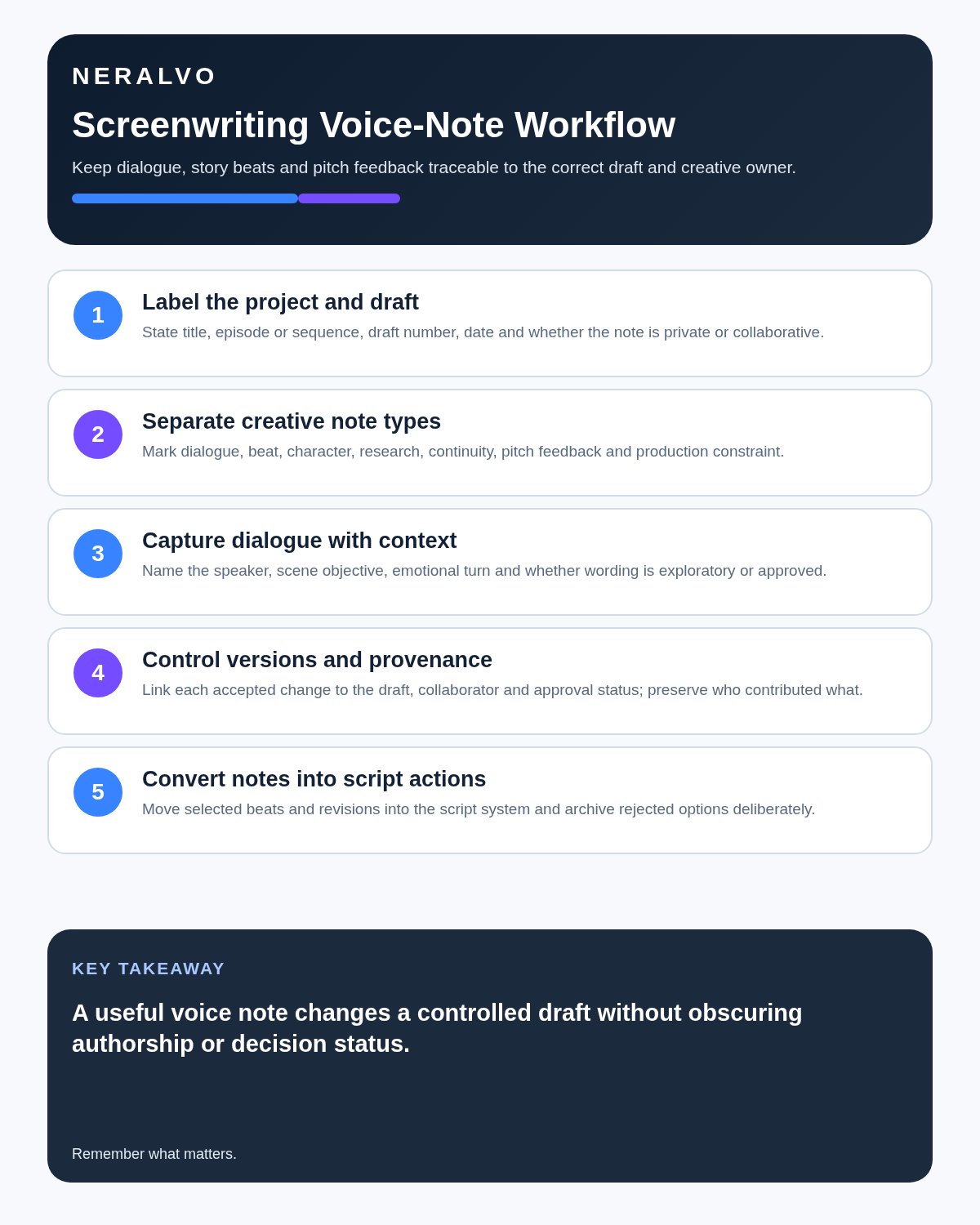
- Name the project and current draft before recording.
- State the scene or sequence purpose.
- Record the experiment.
- Generate a transcript where searchable text helps.
- Correct character names and story terms.
- Select only useful lines, beats or questions.
- Rewrite them in screenplay form.
- Save a new numbered draft or revision note.
- Record the reason for any major structural change.
Never paste a long transcript directly into the official screenplay. Spoken improvisation and screen action solve different problems.
Create a revision record
Identify the scene, problem, evidence from the current script, proposed change, knock-on effect, decision authority and version to update. Check continuity across earlier and later scenes before accepting the change.
What the transcript cannot preserve
Text may lose pause length, irony, visual business, overlapping speech and the difference between an actor’s delivery and the actual line. Speaker separation may also confuse fast exchanges or repeated character names.
Keep the audio available while evaluating rhythm, but capture the final creative decision in the screenplay or revision log.
Use a scene-lab naming system
- 2026-07-21_ProjectX_S12_DialogueTest_D3
- 2026-07-21_ProjectX_Act2_BeatWalk
- 2026-07-21_ProjectX_Pitch_2Minute_V4
- 2026-07-21_ProjectX_DevNotes_Triage
The filename should connect the recording to the screenplay version it was testing.
Protect confidential projects and authorship
Writers’ rooms, development calls and rehearsals may contain confidential ideas, unreleased material and contributions from several people. Agree whether recording is permitted, who can access it and when it will be deleted.
A dated recording can document a creative timeline, but it does not decide authorship, credit, copyright ownership or contractual rights. Use written agreements and the production’s recognised records.
How NERALVO Halo supports the scene lab
NERALVO Halo can capture dialogue experiments, pitch rehearsals, private beat walks and permitted development meetings. It provides NOTE mode, supported CALL mode, 64GB local storage, up to 35 hours of recording and Bluetooth sync with DOWAY. DOWAY can create transcripts, summaries, templates, translations, mind maps and exports, with one year of DOWAY Max included.
Halo is not screenplay software and should not replace secure draft storage, rights records, production documentation or professional sound equipment.
Red flags that mean the workflow is failing
- Recordings are not tied to a project or draft.
- AI-generated dialogue is accepted without character-level rewriting.
- Development comments are treated as decisions without authority.
- Confidential room audio is shared through public links.
- The recording archive is larger than the revision log.
- No one can identify which screenplay version reflects the discussion.
Final screenwriting checklist
- Project, scene and draft labelled.
- Character objective, obstacle and change clear.
- Visual action separated from exposition.
- Dialogue tested aloud.
- Idea and note status visible.
- Authority behind development notes confirmed.
- Continuity impact checked.
- Current script version updated.
- Collaborative rights and confidentiality respected.
Bottom line: the strongest workflow is simple: test aloud, diagnose precisely, rewrite deliberately and save the decision in the controlled draft.
Cloud software, a dedicated recorder or manual notes?
For Screenwriters, the right answer changes with the setting. This matrix deliberately gives each method a situation where it can be the strongest choice.
| Situation | Best starting point | Reason |
|---|---|---|
| scheduled remote meetings | Cloud meeting software | Auto-join and central collaboration can remove routine admin. |
| in-person or mobile work | Dedicated recorder | Dedicated hardware suits movement, variable rooms and offline source capture. |
| recording is refused or prohibited | Manual notes or an approved alternative | A clear alternative respects policy and participant choice. |
| mixed online and offline work | Governed hybrid | One governed process prevents gaps between desk and field work. |
Related guides
See the guides for authors, songwriters and choosing an AI voice recorder.
On this page
Related guides
See whether Halo fits this workflow
Review the NERALVO Halo specifications, included services, delivery information and current offer only after completing the guide.
Found an error or an out-of-date claim? Email support@neralvo.com with the article address and a supporting source.