The 60-second verdict
Quick answer: the questions buyers are asking right now are not mainly about headline AI features. They are about whether the microphone works in a real room, whether long lectures and conference days are practical, whether phone calls and earbuds work, how quickly transcription allowances disappear, whether recordings and transcripts can be exported, and what happens to the data afterwards.
Best buying rule: judge the complete workflow: capture quality → recoverable source audio → accurate-enough transcript → checked summary → usable export → clear storage/deletion route. A polished AI summary cannot rescue audio that was never captured clearly.
How these 50 questions were researched
Research window: 7 August to 4 September 2026. We reviewed recent public discussions from people considering or using AI recorders and AI note-taking tools, then distilled recurring questions into clearer buyer-language. The questions are paraphrased rather than copied verbatim.
- Genuine-question rule: every question below is tied to at least one public discussion inside the 28-day research window. Source codes S1-S15 appear beside the answers and link to the original discussions in the source register at the end.
- Accuracy rule: general answers distinguish audio capture from AI processing and flag variables such as room acoustics, phone model, operating system, app, case, Bluetooth route, plan allowance and local rules.
- Evidence limit: Reddit and community discussions are useful buyer-signal, not a representative scientific sample. Some commenters disclose affiliations; individual experiences should not be treated as universal performance tests.
- Product-fact rule: current Halo statements were checked against the live NERALVO product information on 4 September 2026.
| If your main concern is… | Start here |
|---|---|
| Whether hardware is worth it | Questions 1-8 |
| Microphones and difficult rooms | Questions 9-18 |
| Lectures, meetings and calls | Questions 19-25 |
| Offline recording, storage and ownership | Questions 26-30 |
| Subscriptions, exports and integrations | Questions 31-39 |
| Privacy, consent and workplace use | Questions 40-48 |
| NERALVO Halo specifically | Questions 49-50 |
Buying an AI voice recorder
1. Is a dedicated AI voice recorder actually better than using my phone?
Short answer: not automatically. A phone can be the better choice for occasional voice notes or online meetings because you already own it and there is no extra device to charge. Dedicated hardware becomes more compelling when you record frequently, need one-button capture, want to preserve phone battery, need to place the microphone independently of the phone or cannot risk a call or notification interrupting capture.
The comparison should be made with your hardest normal use case, not a quiet desk demo. Test the farthest speaker, your normal room, a real meeting duration and an incoming-call interruption. If the phone passes reliably, hardware may add little. If it fails because of placement or interruptions, dedicated capture can solve a real problem. See our AI recorder vs smartphone voice memo comparison.
Recent buyer signal: S5, S11.
2. Is an AI recorder worth buying if I already use Otter, Granola, Zoom, Teams or another meeting app?
Short answer: only if it covers conversations your existing software misses or makes capture materially more reliable. Meeting software is often strongest for scheduled online calls because it can receive clean digital audio, calendar context and participant information. Hardware is usually more useful when your work moves between rooms, calls, lectures, interviews and spontaneous notes.
List where your important conversations actually happen for one week. If 90% are on Zoom or Teams at a laptop, an approved software workflow may be simpler. If half happen away from the laptop, a recorder can create continuity. Our AI recorder vs meeting bot guide explains the trade-off.
Recent buyer signal: S5, S11.
3. What is the biggest real-world advantage of dedicated AI recorder hardware?
Short answer: reducing capture friction while preserving an independent source recording. Recent users repeatedly describe the value of being able to press a physical control, stay focused on the conversation and avoid opening a phone app while a thought or detail disappears.
That advantage matters only if the hardware is genuinely reliable. A tactile button, recording indicator, adequate battery, enough storage and an exportable source file are more important than a long list of AI templates. If capture fails, every downstream AI feature becomes irrelevant.
Recent buyer signal: S1, S14.
4. What is the biggest downside of an AI voice recorder?
Short answer: it can create a second ecosystem you have to manage. You may be buying hardware, learning another app, paying for AI processing and accumulating another archive of recordings. The true cost therefore includes subscription or minute charges, correction time, filing time and the effort required to export or delete data.
Before buying, calculate a two-year ownership cost and ask what remains usable if you cancel the AI plan. Also confirm whether the source audio can be moved into ordinary storage. Our hardware vs software subscription cost guide covers this in detail.
Recent buyer signal: S1, S5.
5. Can one recorder handle a full day of back-to-back meetings?
Short answer: yes, but advertised battery time is only one part of the test. Your real day may include Bluetooth transfers, screen use, app sync, setup time, forgotten charging and a meeting that runs late. Choose a recorder with a meaningful safety margin above your longest realistic day and test it under the same settings you will actually use.
Also check what happens at low battery: whether recording stops cleanly, whether the current file is saved and how obvious the warning is. For business-critical days, charging during lunch or carrying a small power source is sensible even when the headline battery figure looks generous.
Recent buyer signal: S4, S5.
6. How much battery life do I actually need?
Short answer: plan for the longest session or day, then add at least a practical safety margin rather than buying to your average. A typical one-hour meeting tells you very little about a conference, field day or training session.
Battery requirements also depend on whether you record continuously or in separate sessions, whether the device is transferring while you work and whether you can charge between events. Treat battery as a workflow requirement: longest event + delays + travel + margin. The 15-test AI voice recorder buying checklist includes a full battery test.
Recent buyer signal: S4.
7. Can an AI recorder handle a five-hour conference in a 200-person hall?
Short answer: the recording duration may be easy; the acoustics are the real problem. A recorder at the back of a large reverberant hall hears the public-address system after reflections, audience noise and distance have already degraded the signal. AI cannot reconstruct words that were never captured clearly.
First ask whether the organiser provides a recording, caption feed, assistive-listening feed or audio from the mixer. A clean venue recording will normally beat a pocket recorder in the audience. If you must capture locally, sit near a loudspeaker, keep the recorder fixed and unobstructed, record session-by-session and test the first 10-20 minutes before relying on it for the day.
Recent buyer signal: S2.
8. Can an AI recorder handle 25-30 hours of lectures every week?
Short answer: hardware can, but the real bottlenecks may be transcription allowance, file organisation and review time. Thirty hours is 1,800 minutes every week; a small monthly AI allowance can disappear in days.
Students should compare four numbers together: real battery life, local storage, monthly processing allowance and the time it takes to turn raw transcripts into useful revision material. The best workflow may also be to use university-provided recordings where available. For accessible study workflows, see creating accessible notes from recordings.
Recent buyer signal: S1, S3.
Recording quality in real rooms
9. Will an AI recorder pick up someone at the far end of a meeting table?
Short answer: maybe, but microphone distance and room conditions dominate. A person at the far end can be quieter than laptop fans, air conditioning, paper movement or nearby speakers. Put the recorder near the centre of the conversation rather than beside the loudest participant.
Run a repeatable test from the worst seat you normally use and listen to the source audio before reading the transcript. If the distant voice is difficult for a human to hear on playback, changing transcription software is unlikely to solve the underlying capture problem.
Recent buyer signal: S15.
10. How well do AI recorders work in noisy rooms, restaurants or trade-show halls?
Short answer: results vary dramatically. Directional microphones and multiple-mic arrays can help, but they do not cancel the laws of acoustics. Crowd babble, amplified presentations and hard reflective surfaces can mask speech or create reverberation that confuses both humans and speech recognition.
Get the microphone closer, avoid covering it with fabric, place it away from vibration and use a fixed position where possible. In a very noisy environment, a wearable close to the speaker can outperform a technically superior recorder sitting several metres away. Compare devices using the exact environment you care about, not vendor pickup-distance claims.
Recent buyer signal: S4.
11. What happens when people talk over each other?
Short answer: overlapping speech is a failure case for both transcription and speaker separation. Two voices occupying the same moment can cause dropped words, merged sentences or incorrect attribution, even if the recording itself sounds acceptable.
For consequential meetings, do not rely on speaker labels during overlap. Verify the specific passage against audio and restate critical decisions after interruptions: “To confirm, Alex owns this action by Friday.” Our guide to handling overlapping speech in AI transcripts shows how to review these sections.
Recent buyer signal: S4, S5.
12. Can AI voice recorders separate different speakers?
Short answer: many transcription systems attempt speaker diarisation, but diarisation means “separate voice segments,” not “prove who said what.” Similar voices, short interjections, background speakers and overlap can all cause errors.
Use speaker labels to accelerate review, then verify important quotations, commitments and disputed statements against audio. A simple introduction round and clear use of names during action assignment can improve later review. See what speaker identification can and cannot prove.
Recent buyer signal: S5, S15.
13. Are AI speaker labels always accurate?
Short answer: no. A system can split one person into two labels or merge two people into one, and corrected names may not always carry through every export or integration.
For ordinary personal notes, that may be tolerable. For HR, legal, clinical, financial or contractual work, attribution is a material fact and should be checked. The source audio should remain available until the final record has been reviewed and approved.
Recent buyer signal: S5, S15.
14. Do accents reduce transcription quality?
Short answer: they can, but accent alone is not the only variable. Microphone distance, noise, speech rate, language switching and the transcription model's training coverage all matter. A strong model with clean close audio can handle diverse speakers much better than a weak recording fed to the same model.
Do a representative test with the actual speakers and vocabulary you expect. If your work is multilingual, include code-switching and names rather than testing only a clean monologue.
Recent buyer signal: S1, S5.
15. Can an AI recorder understand technical terms, names and jargon?
Short answer: often, but these are exactly the details most worth checking. A transcript can be 98% readable while still getting the product name, dosage, surname, model number or legal term wrong.
Create a review pass specifically for names, acronyms, numbers and specialist terms. If the software supports a vocabulary or glossary feature, test it with real examples. Our guide to correcting names, acronyms and technical terms gives a practical workflow.
Recent buyer signal: S1, S5.
16. How accurate are AI-generated transcripts in practice?
Short answer: there is no honest universal accuracy percentage. Accuracy changes by room, microphone placement, speaker, language, noise, overlap and vocabulary. Word-error rate can also hide the mistakes that matter most.
Benchmark with representative recordings and score critical details separately: names, dates, amounts, negatives, decisions and speaker attribution. Time how long correction takes, because a transcript that is technically accurate but expensive to clean may still be poor for your workflow. See how to benchmark AI transcription accuracy.
Recent buyer signal: S1, S5, S15.
17. Should I trust an AI-generated meeting summary without checking it?
Short answer: no for material decisions. A summary is generated from a transcript that may already contain errors, and the summarisation stage can omit objections, change certainty or turn a proposal into an apparent decision.
Review the items with consequences: actions, owners, deadlines, money, legal commitments, decisions, objections and unresolved questions. A useful summary should make uncertainty visible rather than inventing certainty. See what makes a good AI meeting summary.
Recent buyer signal: S1, S5.
18. Can AI reliably identify action items and decisions?
Short answer: it can surface likely actions quickly, but it should not be the final authority. Ambiguous language such as “we should probably” or “maybe Sam can” is easy for a model to over-interpret.
Make actions explicit during the meeting: owner + task + deadline + condition. Then check generated actions against the source before pushing them into a CRM or project system. Our meeting-summary audit guide covers missing details and changed meaning.
Recent buyer signal: S5.
Lectures, meetings and phone calls
19. Can I turn a lecture or speech into a readable article?
Short answer: yes, and recent users are explicitly asking for this workflow. The safe sequence is capture → transcript → correction → structure → article draft → fact/quotation check. Do not ask a model to create polished prose from poor audio and then assume the result preserves the speaker's meaning.
For long material, work in sections and preserve timestamps or source references for claims you may need to verify. Our plain-English transcript workflow is useful for turning spoken material into readable text without silently changing meaning.
Recent buyer signal: S8.
20. Can I use a recorder to create study notes instead of writing everything down?
Short answer: yes, especially when writing causes you to miss the lecture itself. Recording can let you listen first, then use a transcript to create an outline, summary, flashcards or questions afterwards.
It should still be an active learning process. Review the notes, correct errors, compare them with slides/readings and mark what you do not understand. Also check the lecturer's recording policy and any accessibility process. Automatic notes are a study aid, not proof that the content is correct.
Recent buyer signal: S3.
21. Can I record ordinary face-to-face conversations?
Short answer: technically many recorders can, but technical capability is separate from permission and appropriateness. The context may involve privacy, confidentiality, employment policy, professional duties or laws that affect whether and how you should record.
Use a defined purpose and tell participants where required or appropriate. If someone objects, pause rather than treating subtle hardware as permission to continue. For practical scripts, see how to explain AI meeting recording to participants.
Recent buyer signal: S5, S9.
22. Can an AI voice recorder record phone calls?
Short answer: some can, but “call recording” is not one universal technical pathway. Results can depend on the phone, operating system, call app, case thickness, speaker route and the recorder's physical capture method.
Test an ordinary mobile call and your actual internet calling apps separately, with both sides speaking at normal volume. Check the source audio before assuming the transcript proves both sides were captured. Our two-sided client-call capture test gives a repeatable method.
Recent buyer signal: S10.
23. Can it capture both sides of a call while I am using AirPods or other Bluetooth earbuds?
Short answer: do not assume so. Earbuds can route the remote person's audio directly to your ears, leaving an external recorder with only your side or a weak acoustic version of the other side. Recent buyers are still explicitly asking whether Zoom on an iPhone with AirPods can be captured reliably.
If earbud use is essential, test the exact phone, buds, call app and recorder before purchase. A desktop meeting recorder or a headset/earbud product designed to capture the digital audio path may be a better fit than trying to make a room recorder hear audio that never reaches the room.
Recent buyer signal: S10.
24. Will an AI recorder work with Zoom, Microsoft Teams and Google Meet?
Short answer: it can record sound from a computer or phone speaker, but that is not the same as native meeting capture. Software can receive a cleaner audio stream and may offer calendar, participant and collaboration features that room hardware cannot reproduce.
If most of your work is remote, compare hardware with a software or meeting-bot workflow before buying. If you need the same recorder for online and in-person work, test both routes independently. See our AI recorder vs meeting bot comparison.
Recent buyer signal: S11.
25. Do I need to put a phone call on speakerphone to record it?
Short answer: it depends on how the specific recorder captures call audio. An external microphone-based setup normally needs the remote voice to be physically audible; a device with a supported dedicated call mode may use a different capture route.
Do not extrapolate from one phone to another. Cases, magnetic mounting, call apps and OS changes can all alter results. Also check the recording rules that apply to the call. UK readers can use our UK phone-call recording checklist.
Recent buyer signal: S10.
Offline use, storage and ownership
26. Can a recorder work without staying connected to my phone?
Short answer: many dedicated recorders can capture independently if they have onboard storage, but you must distinguish recording from later syncing or AI processing. The phone may be unnecessary during capture yet required to transfer, transcribe or manage files afterwards.
Test the failure case: turn off the phone connection, make a recording, restart the recorder and confirm the source file still exists. If independent capture matters, this is more useful than relying on marketing language. See local storage vs cloud AI recorders.
Recent buyer signal: S5, S11.
27. Can I record without an internet connection?
Short answer: local-storage hardware can often capture without internet, but transcription, summaries, translation and search may still require later connectivity. “Offline recording” and “offline AI” are different claims.
Ask the vendor to map each stage: capture, storage, transfer, transcription, summarisation, search and export. If your work cannot leave a controlled network, do not assume local hardware means the AI stage is local too.
Recent buyer signal: S2, S5.
28. Where is the audio stored before and after transcription?
Short answer: you need a data-flow answer, not a single storage label. The original may sit on the recorder, another copy may be created on the phone during sync, and cloud processing can create further service-side copies, transcripts and summaries.
Ask what exists at every stage, which copy is authoritative, how long each is retained and how deletion works. A recent Plaud discussion shows buyers are explicitly asking whether deleting in a web app is a true deletion or a soft-delete step. This is exactly the level of detail worth checking.
Recent buyer signal: S7.
29. How much onboard storage should I look for?
Short answer: enough to cover the maximum period between safe transfers, plus a margin. Gigabytes alone do not tell you recording hours because file size depends on format, bitrate and device settings.
Record one representative hour, note its file size and multiply by your expected hours between transfers. Then add capacity for a busy week or failed sync. More storage is useful only if you also have a naming, backup and deletion routine. See our AI voice recorder storage formula.
Recent buyer signal: S1, S2.
30. Can I still use the recorder if I stop paying for the AI subscription?
Short answer: this must be checked product by product. Hardware recording, cloud history, transcription, summaries, search, integrations and exports can all have different entitlement rules.
Before committing, ask what survives cancellation and test source-audio export while you are still inside the return period. Do not build years of records around a feature you cannot retrieve without an ongoing plan. The 20 AI voice recorder buying mistakes includes subscription and exit-plan checks.
Recent buyer signal: S1, S5.
Transcription limits, subscriptions, exports and integrations
31. Why do so many AI recorders charge for transcription minutes?
Short answer: recording a file on hardware has little incremental cost, while speech recognition and generative processing create ongoing compute/service costs. Vendors therefore recover those costs through subscriptions, minute allowances, bundles or pay-as-you-go processing.
The useful comparison is cost per month at your real usage. Convert your meetings or lectures into minutes before choosing a plan. If you already pay for other AI tools, also compare the cost and effort of exporting audio for separate processing.
Recent buyer signal: S1.
32. Are 300 free transcription minutes per month enough?
Short answer: only for light use. Three hundred minutes is five hours. A student with several lectures or a manager with a meeting-heavy week can consume that in a few days.
Track one normal week and multiply by 4.3 for a monthly estimate. Then include reprocessing, imported files or extra projects if the service meters them. Recent users explicitly describe burning through minute allowances, so this should be a first-page buying calculation rather than a surprise after purchase.
Recent buyer signal: S1.
33. Is unlimited transcription worth paying for?
Short answer: it can be for heavy users if minute limits make you avoid useful recordings or create administrative work. But “unlimited” should still be checked for fair-use rules, file limits, model restrictions or other conditions.
Compare the premium with your actual alternative: buying extra minutes, processing externally or using fewer recordings. The cheapest plan is not the best plan if you spend time rationing it; equally, unlimited is wasteful for someone who records two hours a month.
Recent buyer signal: S1.
34. What happens when I reach my monthly transcription limit?
Short answer: provider behaviour varies. You may have to wait for renewal, buy extra processing, upgrade, or use another transcription route. The crucial question is whether the source audio remains accessible while AI processing is unavailable.
Test this before you depend on the workflow. A recorder that continues capturing locally but temporarily cannot transcribe is a very different failure from a system that also blocks access to the original file.
Recent buyer signal: S1.
35. Can I export the raw audio?
Short answer: you should strongly prefer a recorder that allows it. Raw audio is the evidence layer you can re-listen to, re-transcribe with another service or archive independently if the vendor changes its software.
Do a real export, not just read the feature list. Open the file on another device, check duration and playback, confirm the format and make sure you can identify which session it belongs to. If export requires many manual steps, that matters when you have hundreds of recordings.
Recent buyer signal: S5, S8.
36. Can I export the transcript as normal editable text?
Short answer: this should be a standard buying test. Confirm the actual formats, whether timestamps and speaker labels survive, and whether the export contains the corrected version you see in the app.
Open it in the software you actually use—Word, Google Docs, Notion, Obsidian, a CRM or another AI tool. Portability is only real when the exported file is useful outside the recorder ecosystem.
Recent buyer signal: S5.
37. Can I move recordings or transcripts into ChatGPT, Claude, Gemini, Notion or Obsidian?
Short answer: usually if you have a compatible audio/text export or a supported integration, but compatibility and privacy are separate questions. Some AI tools accept audio directly; others work better from a transcript, and long files may need chunking.
Do not automatically send client, employee, medical, legal or confidential material to a consumer AI account. Check your organisation's approved services first. For workflow design, compare a recorder with a note-taking app workflow rather than assuming one system must do everything.
Recent buyer signal: S6, S8.
38. Can I automatically create tasks and calendar actions from recorded conversations?
Short answer: yes with the right integration layer, but fully automatic action creation can propagate transcription mistakes into business systems. The safer design is extract → review → approve → create.
Ask whether the integration sends the transcript, the summary or structured action fields, and whether you can see exactly what was created. For high-volume use, measure correction and routing time, not just how quickly the transcript appears.
Recent buyer signal: S5, S6.
39. Can I search old recordings instead of replaying them?
Short answer: searchable transcripts can turn a large audio archive into something genuinely useful, but only if the search corpus is accurate enough and organised. A wrong speaker name or incorrect date can quietly distort later retrieval.
Keep a source link from the search result back to the original recording or timestamp whenever possible. For long-term knowledge work, also decide whether the recorder app is your permanent archive or merely a processing step before files move elsewhere.
Recent buyer signal: S5, S6.
Privacy, consent and workplace use
40. Can I keep the audio private and only retain the notes?
Short answer: potentially, but first define what “private” means. The recording may exist on the device, phone, cloud service, backup systems and exported folders even if you only intend to keep the final notes.
Map the complete data route and define the deletion point for source audio and duplicate copies. Keeping less data can reduce risk, but deleting too early can remove the evidence needed to verify a disputed transcript. Our voice recording and data-minimisation guide covers this balance.
Recent buyer signal: S7, S13.
41. Does my recording have to be uploaded to the cloud?
Short answer: not necessarily for recording, but cloud processing may still be part of transcription or summarisation. A device can have local storage and still use a cloud AI service later.
Ask separately: where is audio captured, where is it transferred, where is transcription performed, where are derived notes stored and what can be deleted? Our local vs cloud recorder guide explains the difference.
Recent buyer signal: S7, S9.
42. Who can see an AI note-taker recording?
Short answer: the answer depends on account configuration and provider architecture. Possible access paths can include the account owner, workspace admins, people you share with, connected integrations and service providers involved in hosting or processing.
Check sharing defaults, admin access, link permissions, subprocessors, data region, retention and deletion. For a company, the account should normally be organisation-controlled rather than a personal login if work data is involved.
Recent buyer signal: S7, S9.
43. Do AI recorder companies use recordings to train their models?
Short answer: policies differ and can change, so this cannot be answered for the whole category. Do not infer training policy from words such as “secure,” “private” or “encrypted.” Read the current privacy terms for the recording app and any AI processor it uses.
For sensitive work, look for explicit language about model training, service improvement, human review, subprocessors, retention and opt-outs. Hardware specifications alone do not answer these questions.
Recent buyer signal: S7, S9.
44. Should I tell people before I record them?
Short answer: as a practical default, yes. Clear notice reduces surprise, lets people raise objections and supports trust. The exact legal requirement varies by jurisdiction, context and purpose, but small or discreet hardware does not remove those responsibilities.
Explain what is being recorded, why, how the output will be used and what happens if someone objects. Our participant explanation guide and refusal workflow provide practical wording and alternatives.
Recent buyer signal: S9, S13.
45. Is it legal to record a meeting, lecture or phone call?
Short answer: there is no universal yes/no answer. Country or state law, data protection, workplace policy, confidentiality, sector rules, ownership of lecture material and how the recording is later used can all change the answer.
Do not use an ecommerce FAQ as legal advice. UK readers can start with our meeting recording legal/privacy checklist and phone-call recording checklist, then follow the policy or professional advice that applies to the specific situation.
Recent buyer signal: S13.
46. What should a business check before allowing AI recorders at work?
Short answer: the complete workflow, not just the device. Define approved purposes, who may record, participant notice, excluded information, approved accounts, storage, access, transcript review, authoritative record location, retention, deletion, incidents and offboarding.
Then test the actual phone/device/app combination and failure cases. A business should know what happens if sync fails, a device is lost, the transcript is wrong or someone objects. Use our AI voice recorder acceptance-testing checklist before rollout.
Recent buyer signal: S9, S10.
47. What happens if the app or recorder company shuts down or changes its service?
Short answer: your exposure depends on portability. If important audio and transcripts only exist in a proprietary cloud workspace, a service change can become a records problem.
Keep important final records in systems you control, export source files where appropriate and document what happens after cancellation. Re-test exports after major app changes. The goal is not to avoid every cloud service; it is to avoid making one vendor the only place your essential information exists.
Recent buyer signal: S7.
48. How do I avoid being locked into one AI recorder ecosystem?
Short answer: prioritise exportable source audio, editable transcript formats, transparent plan terms and a workflow that can move approved records into normal storage. Test the exit route before the return period ends.
Also avoid allowing proprietary folders or AI summaries to become the sole organisation system for years of work. Our buying-mistakes guide and 15-test buyer checklist both include exit and portability tests.
Recent buyer signal: S5, S7.
NERALVO Halo questions
49. What does NERALVO Halo offer for buyers worried about battery, storage and ongoing AI access?
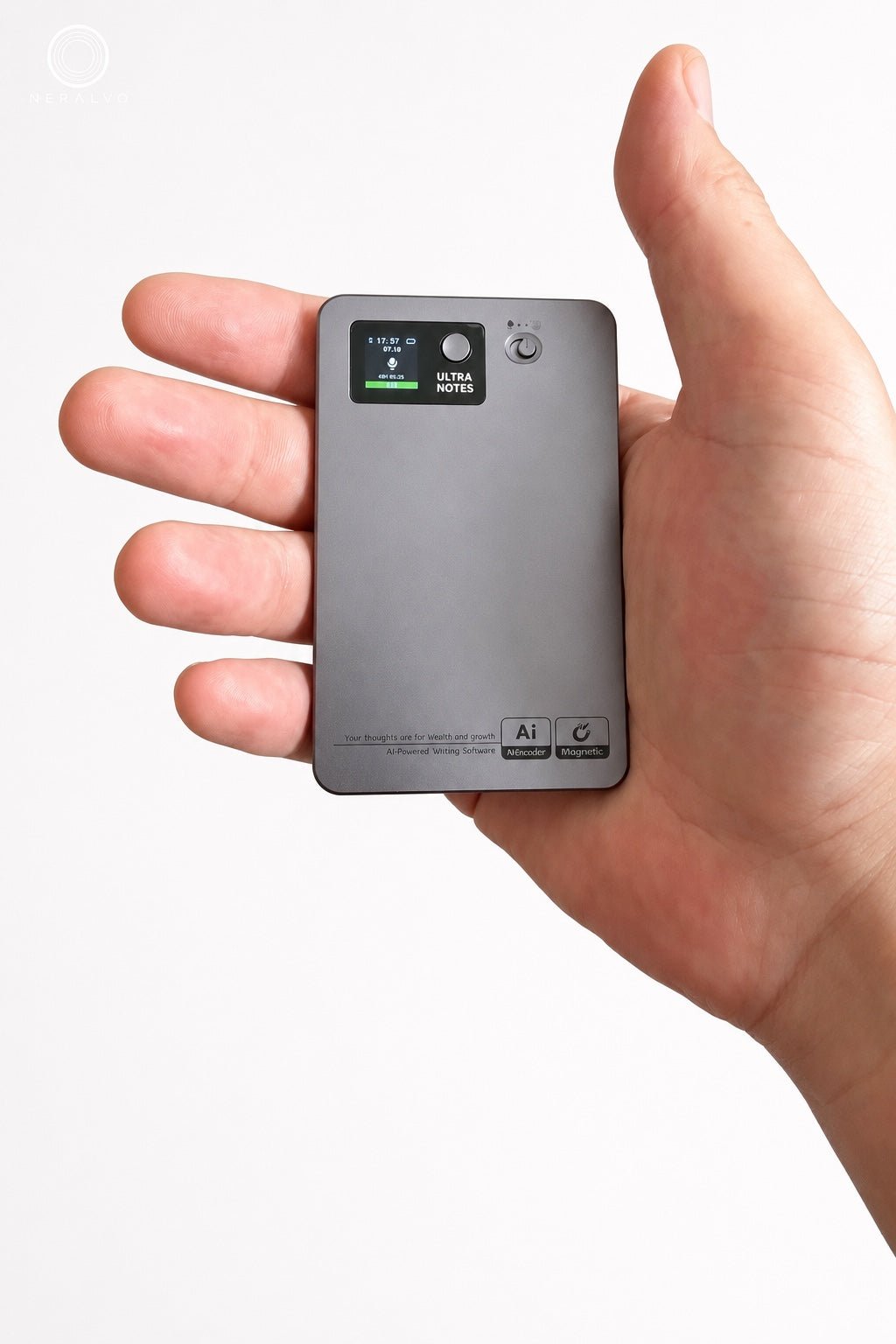
Current verified product facts: NERALVO Halo has 64GB local storage and is specified for up to 35 hours of recording. The current package includes one year of DOWAY Max access. Halo syncs with the DOWAY app over Bluetooth for transcripts, summaries, templates, translations and mind maps, and current product information lists export of transcripts, summaries, mind maps and audio files.
Those specifications address several of the recent buyer concerns, but they are not a substitute for testing your own room or checking future DOWAY plan terms. If monthly AI allowances or post-year pricing matter to your decision, verify the current terms at the time you buy. View the current Halo specifications.
Recent buyer signal: S1, S2. Halo facts checked against current NERALVO product information on 4 September 2026.
50. Is NERALVO Halo better suited to meetings, lectures, phone calls or quick ideas?
Short answer: Halo is designed to span several of those use cases rather than only one. Its current NOTE mode is for meetings, lectures, interviews, voice notes and spoken ideas. Its CALL mode is for supported phone-call and social-app voice recording where recording is allowed and consented to.
The limitation is important: call support can depend on phone model, app, case thickness, setup and local rules. If your main use case is Zoom on an iPhone with AirPods, test that exact route rather than assuming CALL mode covers it. If your main use is a 200-person lecture hall, microphone position and access to a clean venue recording may matter more than the device model. Compare Halo against your exact use case.
Recent buyer signal: S2, S3, S10, S14. Halo facts checked against current NERALVO product information on 4 September 2026.
Which recording route fits which situation?
| Situation | Usually worth testing first | Main reason |
|---|---|---|
| Mostly scheduled Zoom/Teams/Meet calls | Approved meeting software | Cleaner digital audio and easier meeting integrations. |
| In-person meetings, interviews and mobile work | Dedicated recorder | Independent placement, battery and capture. |
| Large lecture/conference hall | Venue/organiser recording or clean PA feed | Source quality usually matters more than recorder specifications. |
| Occasional personal voice notes | Phone recorder | No extra hardware or plan may be necessary. |
| Recording is refused, restricted or unnecessary | Manual notes / no recording | The correct workflow can be not to record. |
Final buyer checklist
- Test your hardest real room, not a quiet demo.
- Listen to source audio before judging the AI transcript.
- Calculate monthly recording minutes before choosing a plan.
- Test the exact phone, call app, case and earbud route you use.
- Export a real audio file and editable transcript before the return period ends.
- Check what remains available if the AI plan changes or ends.
- Map where audio, transcripts, summaries and backups are stored.
- Define participant notice, permission and refusal handling.
- Verify names, numbers, decisions, owners and deadlines before relying on AI output.
- Move final records into the system where they actually belong.
Recent-question source register: 7 August-4 September 2026
These links are included so readers can see the public buyer questions behind this FAQ. They are evidence of current concerns, not endorsements of products or proof that every comment is correct.
- S1 — 1 September 2026: AI recording for lectures and meetings: minute caps, microphones, subscriptions and post-meeting usefulness.
- S2 — 19 August 2026: AI note-taker for a 200-person conference and five-hour speaker days.
- S3 — 31 August 2026: Recording lectures and turning them into summarised notes.
- S4 — 9 August 2026: Recording in noisy conference/vendor halls and microphone placement.
- S5 — 17 August 2026: Real-world questions about transcription, summaries, subscriptions, exports, privacy and dedicated hardware.
- S6 — 27 August 2026: Combining multiple voice notes, continuous thought capture and AI integrations.
- S7 — 24 August 2026: Deletion, retention and whether removing a recording is a soft delete.
- S8 — 24 August 2026: Turning lectures and speeches into readable articles.
- S9 — 13 August 2026: Using AI recording devices inside large-company security and policy environments.
- S10 — 24 August 2026: Zoom on iPhone with AirPods, two-sided capture and recording announcements.
- S11 — 11 August 2026: Phone-app recording interrupted by incoming calls and hardware vs app trade-offs.
- S12 — 27 August 2026: Long-form spoken stories, editing and building recordings into a book.
- S13 — 31 August 2026: Lecture recording, privacy and misuse concerns in an academic setting.
- S14 — 19 August 2026: One-button thought capture, wearability and friction for spontaneous notes.
- S15 — 21 August 2026: Across-the-table microphone quality, multiple speakers and transcription limits.
Related NERALVO guides
- AI Voice Recorder Buying Checklist: 15 Tests Before You Buy
- 20 AI Voice Recorder Buying Mistakes to Avoid
- Is an AI Voice Recorder Worth It? A Real Cost-and-Time Test
- How to Compare AI Transcription Systems Fairly
- Local Storage vs Cloud AI Voice Recorders
- AI Voice Recorder Acceptance Testing Checklist
Bottom line: buy for the conversation you actually need to capture, not the feature list. If the source audio is clear, portable and recoverable, the AI layer can save substantial review time. If the source is weak or the data route is unclear, more AI features do not fix the underlying problem.
Freshness note: public buyer-question research covers 7 August-4 September 2026. Product plans, phone compatibility, third-party app behaviour and privacy terms can change; verify current details before purchase or deployment.
On this page
Related guides
See whether Halo fits this workflow
Review the NERALVO Halo specifications, included services, delivery information and current offer only after completing the guide.
Found an error or an out-of-date claim? Email support@neralvo.com with the article address and a supporting source.