The 60-second verdict
Quick answer: Supernormal now behaves more like an AI work platform than a conventional meeting notetaker. Meetings can become notes, documents, presentations, spreadsheets and project outputs, with work paid for through shared usage credits. The right buying test is a representative credit experiment, not a feature checklist.
Best fit: readers comparing Supernormal AI against the purchase, workflow and evidence factors below. Do not buy on: headline features alone; a failed compatibility, privacy, recovery or cost requirement should override the overall score.

Evidence basis and limits
- Decision factors covered: What Supernormal is designed to do; Current shared-credit plans; One credit is not one fixed task.
- Evidence rule: Claims are weighted by consequence: capture failure, changed meaning, access and recovery matter more than polished wording.
- Boundary: Manufacturer-controlled prices, plans, compatibility and specifications can change. Retain the article’s stated check date, verify the live supplier terms before purchase and treat community reports as leads unless the original source is linked.
Current plan facts checked in July 2026: Free is $0 with 15 monthly credits and a maximum of five credits used per day. Team is $20 per month for each 50-credit shared pool, removes the daily cap and supports rollover. Business is $40 per month for each 50-credit pool and adds SSO, audit logs, retention and administration. Team and Business currently allow unlimited seats to share the pool. The desktop app requires Apple Silicon with macOS 14.4.1 or later, or Windows 11 or later; Intel Macs, Windows 10 and Chromebooks are not supported.
What Supernormal is designed to do
Supernormal can capture compatible computer-based meetings without adding a visible meeting bot, then use meeting or project context to create:
- Meeting summaries and actions.
- Project briefs and documents.
- Presentations.
- Spreadsheets.
- Email and follow-up copy.
- Images and other generated assets.
- Answers across related project meetings.
The buying decision is broader than transcription quality. It includes the usefulness, traceability and cost of generated work.
Current shared-credit plans
| Plan | Current price | Included credits | Main boundary |
|---|---|---|---|
| Free | $0/month | 15 monthly credits | Maximum five credits of use per day |
| Team | $20/month per 50 credits | 50 shared credits | No daily cap; rollover available; unlimited seats share the pool |
| Business | $40/month per 50 credits | 50 shared credits | Adds SSO, audit logs, retention and administration; unlimited seats share the pool |
Team and Business can be cheaper than per-seat software where many colleagues collaborate but only a few generate heavy AI work. They can also become unpredictable when one heavy user consumes the shared pool.
One credit is not one fixed task
Credit use depends on task type, model and complexity. Two teams with the same meeting count can have very different costs if one creates only notes while another creates presentations, spreadsheets and cross-project answers.
Ask the supplier to explain credit calculation and use the platform itself to measure representative consumption.
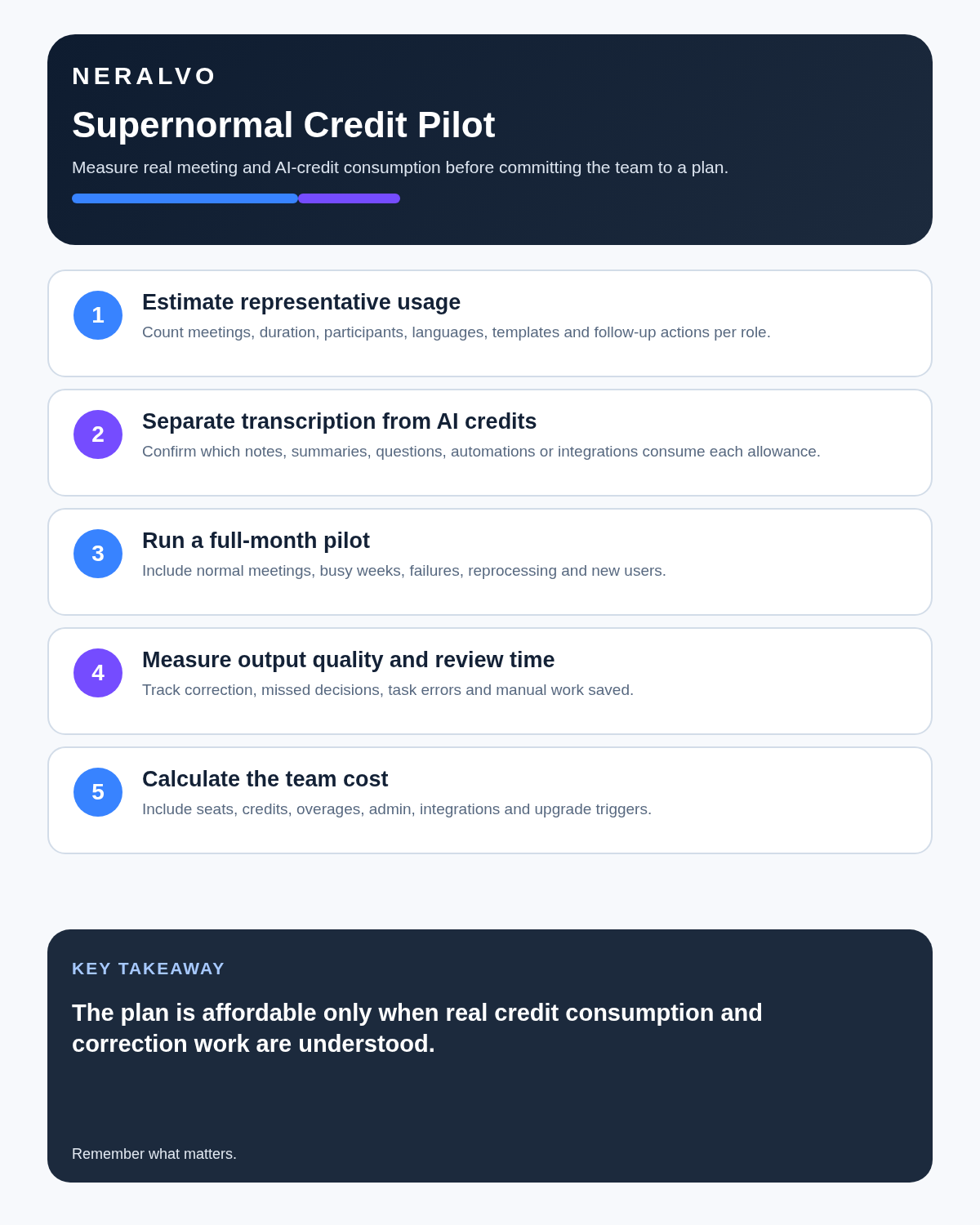
Run a seven-day credit experiment
Day 1: baseline meeting notes
Record one normal meeting and create only the default notes. Record credits, processing time and correction effort.
Day 2: real follow-up document
Create the client recap, project update or internal brief the team normally produces manually. Measure usable content rather than generated word count.
Day 3: presentation
Generate a short deck from the meeting. Check facts, structure, claims and whether the slides reduce real work.
Day 4: cross-meeting context
Group several related meetings and ask a question that includes disagreement or changing decisions. Verify every conclusion against source meetings.
Day 5: shared-team behaviour
Invite several colleagues. Measure whether one user or one task type dominates the credit pool and whether administrators can see consumption clearly.
Day 6: repeat the highest-value task
Repeat the workflow most likely to justify the subscription. A second result tests consistency.
Day 7: calculate effective cost
Estimate a normal month using credits per useful output, review time, failed outputs and expected team growth.
Extend the test to a representative month
A seven-day experiment reveals mechanics; a longer pilot reveals monthly behaviour. Include busy weeks, quieter weeks, several meeting types, new users and a period where the team approaches the credit limit.
- Credits consumed by output type.
- Useful outputs approved.
- Outputs abandoned or rewritten.
- Correction and fact-checking time.
- Credits unused or expired.
- Users unable to complete high-value work.
- Cost per accepted output.
Understand rollover
Team and Business support credit rollover under current terms. Monthly-plan credits roll into the following month, while annual-plan credits can roll for longer. Confirm the exact expiry window, whether purchased top-ups behave differently and what happens after downgrade or cancellation.
Compatibility can end the decision immediately
Supernormal’s current desktop requirements exclude common older equipment:
- Apple Silicon Mac, not Intel Mac.
- macOS 14.4.1 or later.
- Windows 11 or later.
- Windows 10 is not supported.
- Chromebooks are not supported.
Confirm every recorder user’s exact machine, operating system, permissions and update policy before buying shared credits.
- Install under the company’s administration controls.
- Test the real headset, speakers and meeting platforms.
- Check behaviour during screen sharing and calls.
- Test failure recovery after restart or update.
- Keep an approved fallback for unsupported equipment.
Bot-free capture still requires transparency
A desktop recorder may avoid a visible notetaker participant, but it can also make recording less obvious. Define:
- How participants are informed.
- Which meetings are excluded.
- Who can start capture.
- Which audio routes are recorded.
- Where source files and generated outputs are processed.
- How source material is deleted.
The absence of a bot does not remove legal, contractual, workplace or professional obligations.
Trace generated work back to the source
A transcript error becomes harder to notice after it is transformed into a polished document or slide deck. Review:
- Names and organisations.
- Figures, dates and percentages.
- Action owners and deadlines.
- Contractual and legal statements.
- Technical specifications.
- Claims presented without source support.
- Whether disagreement has been turned into consensus.
Keep the original meeting available until the important output has been checked and accepted.
Use a generated-output approval gate
| Output | Minimum review | Authoritative destination |
|---|---|---|
| Meeting recap | Speakers, decisions, actions and figures | Project or client record |
| Document | Facts, claims, tone, confidentiality and owner | Controlled document system |
| Presentation | Sources, charts, narrative and audience permissions | Approved deck repository |
| Spreadsheet | Inputs, formulas, units and totals | Authoritative workbook or system |
| Cross-meeting answer | Citations, conflicting sources and time period | Decision or research record |
When Supernormal earns its price
- Consultants who repeatedly turn meetings into client briefs.
- Founders who create updates and planning materials.
- Project teams producing status documents.
- Product teams turning interviews into findings and presentations.
- Sales teams creating reviewed follow-up materials.
If the team only needs a transcript and short summary, a simpler service may be easier to budget and govern.
Choose Team or Business deliberately
Choose Team when shared credits, no daily cap and rollover solve the usage problem. Choose Business only when SSO, audit logs, retention controls, member visibility and administration are genuine organisational requirements.
Calculate total cost
Include credit pools, top-ups, unused or expired credits, administration, correction time, onboarding, support and work that has to be recreated. Compare the result with the manual time genuinely removed.
Direct comparison matrix: Supernormal AI and NERALVO Halo
How to read this matrix: it is not scored to force a Halo win. The competing option leads where its deployment, integrations, placement or ecosystem is stronger; Halo leads only where its dedicated capture workflow is the better fit.
Supernormal is strongest after a compatible computer-based meeting when conversation context must become finished work. Compare NERALVO Halo with Supernormal AI for this workflow is strongest at portable source capture, with 64GB local storage, up to 35 hours of recording and one year of DOWAY Max.
Is cloud software or a physical recorder right for this workflow?
- Choose Supernormal AI when remote or desktop meetings, calendar automation and native workspace integrations are central—and its current plan covers the real team workload.
- Choose NERALVO Halo when in-person, mobile or offline source capture matters more than an auto-joining cloud workflow.
- Use neither when recording is not authorised or a mandatory privacy, compatibility or recovery gate fails.
One public user signal
“It took detailed, well-written and concise notes.”
Read the original Reddit discussion. This is one person’s public report, not a controlled test or community consensus.
Why it matters here: The post describes one early test. Use it as a prompt to test your own meeting type, templates and credit consumption before buying.
How community feedback is used
Public reviews can reveal recurring friction, but an anonymous anecdote is not treated as measured proof. A pull-quote should appear only when it links to the original post, identifies the relevant product version or date and is presented as one user’s experience—not as universal fact.
Frequently asked questions
How much work does one credit buy?
It varies by task and complexity. Measure the exact workflows the team plans to use.
Can unlimited collaborators make the plan cheap?
Potentially, but only if shared consumption is visible and controlled.
Can the Free plan prove value?
It can test capture and several outputs, but the five-credit daily cap and 15-credit monthly pool limit a busy simulation.
Does Supernormal work on Intel Macs or Windows 10?
No under the current published requirements. It requires Apple Silicon with macOS 14.4.1 or later, or Windows 11 or later.
Does bot-free mean participants need no notice?
No. The required transparency and recording process still apply.
Can generated documents be trusted without review?
No. Verify material facts and route the approved version into the authoritative system.
Official sources and related reading
- Official Supernormal pricing
- Official usage-credit guidance
- Tactiq Review
- Best AI Voice Recorders for Meetings
Final buying checklist
- Current plan prices, credit pools and daily cap confirmed.
- Representative outputs identified.
- Seven-day and monthly credit tests completed.
- Rollover and expiry understood.
- Compatibility confirmed for every recorder user.
- Participant transparency defined.
- Source traceability tested.
- Generated-output approval gate assigned.
- Governance tier justified.
- Total cost per accepted output calculated.
Verdict: Supernormal is compelling when meetings routinely need to become finished work. Its credit model is an advantage only when the team measures consumption, compatibility, review burden and useful outputs before committing.
Software-first route
Need Zoom, Teams, calendar or CRM automation?
Choose cloud software for that job. This page completes the software workflow and evidence first. NERALVO Halo remains an optional later route only when offline, in-person or phone-attached capture matters more than native integrations.
On this page
Related guides
Keep the solution aligned with your original intent
- Choose the reviewed cloud software when Zoom, Teams, calendar automation, CRM workflows or unattended bot capture are essential.
- Consider dedicated hardware later only when offline, in-person, mobile or phone-attached capture is the actual requirement.
- Use neither when permission, governance, compatibility or retention requirements cannot be met.
Check current Supernormal details at the official source
Verify current plans, compatibility, limits and integrations with Supernormal before buying. Halo remains a separate optional comparison only for offline, in-person, mobile or phone-attached capture.
Found an error or an out-of-date claim? Email support@neralvo.com with the article address and a supporting source.