
The 60-second verdict
Quick answer: estate agents can use an AI voice recorder for authorised valuations, viewings and property visits, then verify every address, price, date, dimension and property claim before saving a concise CRM record.
Best fit: Estate Agents who need recoverable audio and human-verified notes in an authorised workflow. Use another method when: recording is prohibited, a participant declines or the approved process requires manual notes.
Evidence basis and limits
- Decision factors covered: Before entering the property; Use verbal labels during the appointment; Do not turn the valuation into a life story.
- Evidence rule: Claims are weighted by consequence: capture failure, changed meaning, access and recovery matter more than polished wording.
- Boundary: Examples and workflow recommendations must be tested with representative recordings, the intended users and the actual approval process before rollout.
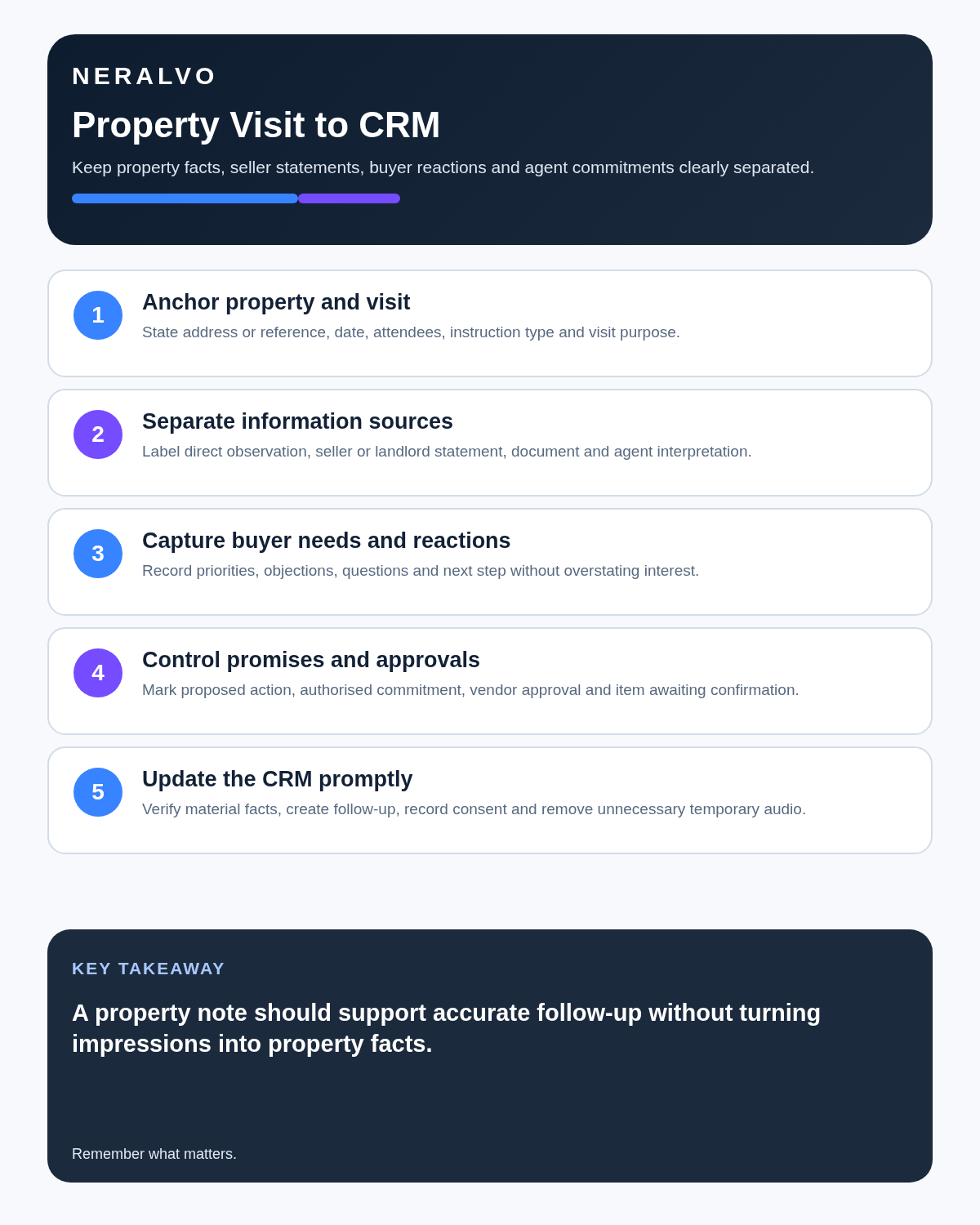
An estate agent does not need another archive of property conversations. They need an accurate CRM note that another colleague can understand and act on.
Before entering the property
- Purpose: is recording needed for an accurate valuation, viewing or maintenance note?
- Policy: does the agency permit the device and processing route?
- Notice: how will the client or visitor be informed?
- Scope: which part of the appointment needs capture?
- Device: is charge, storage and mode correct?
Use a specific explanation such as preparing the property note rather than vague wording such as “for our records”.
Use verbal labels during the appointment
- property improvement
- seller priority
- access arrangement
- buyer objection
- document to verify
- next action
Repeat addresses, prices, dates, dimensions and names because these are easily mistranscribed.
Do not turn the valuation into a life story
Sellers may discuss bereavement, illness, debt, divorce or family conflict. Capture only the context genuinely needed for timescale, communication and service. Stop recording when the stated purpose ends.
Turn the recording into five sections
| Section | What belongs there |
|---|---|
| Property facts | Condition, improvements, defects, tenure questions and documents to verify |
| Client priorities | Timescale, access, communication and marketing preferences |
| Commercial discussion | Price expectations, competing agents and service questions |
| Actions | Who supplies documents, arranges photography, calls or investigates |
| Uncertainty | Anything stated but not yet verified |
Make viewing feedback useful
Weak: “Not interested—rooms too small.”
Useful: “Buyer liked the location and kitchen but said the second bedroom would not fit their desk setup. Asked whether the vendor would consider the current asking price if no chain.”
The stronger note explains the objection and identifies a possible next step.
Structure property-management visits by location
- property and visit reference
- room or external area
- visible condition
- tenant, landlord or contractor statement
- photograph or document reference
- immediate action already taken
- follow-up owner and deadline
Audio should explain photographs, not replace them.
Verify before saving
- full address and postcode
- names and contact preferences
- price, rent or quoted cost
- measurements
- dates and deadlines
- tenure, lease or service-charge statements
- planning, building-regulation or guarantee claims
The recorder captures what somebody said. It does not prove the statement is correct.
Protect personal data
Use recording for a defined purpose, inform participants, minimise unrelated discussion, use approved accounts, restrict access, correct inaccurate details and delete temporary audio and duplicate exports under the agency’s retention policy.
Review the ICO’s data-protection principles.
The ten-minute post-appointment routine
- Rename the file using a property reference.
- Generate the transcript and structured summary.
- Correct property facts and figures.
- Remove irrelevant personal information.
- Separate statements from verified facts.
- Create the concise CRM note.
- Assign actions and dates.
- Send only a reviewed client recap.
- Secure or delete the source under policy.
How NERALVO Halo fits
Check whether NERALVO Halo fits estate agents work provides NOTE mode, supported CALL capture, 64GB local storage, up to 35 hours of recording and DOWAY transcripts and structured notes, with one year of DOWAY Max. Test the exact handset, case and call route before relying on CALL mode.
Cloud software, a dedicated recorder or manual notes?
For Estate Agents, the right answer changes with the setting. This matrix deliberately gives each method a situation where it can be the strongest choice.
| Situation | Best starting point | Reason |
|---|---|---|
| scheduled remote client meetings | Cloud meeting software | Calendar automation and shared integrations are usually the strongest advantage. |
| in-person visits and travel | Dedicated recorder | Independent capture reduces reliance on an active phone or laptop. |
| a client declines or policy requires manual notes | Manual notes or an approved alternative | The boundary takes priority over convenience. |
| mixed CRM and field work | Governed hybrid | Use each method only in the setting it actually fits. |
Related guides
Frequently asked questions
Should the full transcript enter the CRM?
Usually no. Save the relevant verified property and client record.
Can a seller’s statement be treated as a verified property fact?
No. Mark it as reported until checked against suitable evidence.
Should sensitive personal reasons for moving be stored?
Only the minimum information genuinely needed for the agency purpose.
Can audio replace photographs or measurements?
No. It should remain linked to the source evidence.
Final CRM-note checklist
- Property and appointment identified
- Client priorities clear
- Reported and verified facts separated
- Prices, dates and dimensions checked
- Buyer objections specific
- Actions owned and dated
- Personal information minimised
- CRM updated promptly
Bottom line: record selectively, verify property facts and create a better handover—not a larger audio archive.
On this page
Related guides
See whether Halo fits this workflow
Review the NERALVO Halo specifications, included services, delivery information and current offer only after completing the guide.
Found an error or an out-of-date claim? Email support@neralvo.com with the article address and a supporting source.