
The 60-second verdict
Quick answer: an AI voice recorder can help turn a permitted online lesson into searchable notes, questions and revision material, but recording the whole course is not automatically allowed and a transcript is not the same as learning. Check the provider’s terms, capture only what is justified and use active recall after every lesson.
Best fit: Online Courses who need recoverable audio and human-verified notes in an authorised workflow. Use another method when: recording is prohibited, a participant declines or the approved process requires manual notes.
Evidence basis and limits
- Decision factors covered: Permission comes before capture; Recording solves capture, not understanding; Plan the course before recording anything.
- Evidence rule: Claims are weighted by consequence: capture failure, changed meaning, access and recovery matter more than polished wording.
- Boundary: Examples and workflow recommendations must be tested with representative recordings, the intended users and the actual approval process before rollout.
Permission comes before capture
Online courses may contain copyrighted video, audio, slides, demonstrations, music, guest contributions and downloadable resources. Platform terms can also restrict recording, transcription, automated processing and redistribution.
UK copyright exceptions can permit limited fair dealing for genuine non-commercial research or private study, but they do not create a blanket right to copy an entire paid course. Before recording:
- Read the course and platform terms.
- Check whether the teacher or provider has given permission.
- Use official transcripts or downloadable materials where available.
- Capture only the lesson or extract needed for the study purpose.
- Do not share recordings, transcripts or proprietary examples.
- Do not upload course material into an unapproved AI service.
- Ask the provider or institution when the position is unclear.
Students using an accessibility adjustment should follow the institution’s approved process and any limits placed on use and sharing.
Recording solves capture, not understanding
A complete transcript can create false confidence because the information feels available. Real understanding requires the learner to select, explain, retrieve and apply the material.
| Stage | Weak workflow | Stronger workflow |
|---|---|---|
| Watching | Play the entire module passively | Watch with a question and pause at concept boundaries |
| Recording | Capture hours without labels | Use permitted named files by lesson or concept |
| Transcription | Accept the first draft | Correct terminology against official course materials |
| Notes | Keep the transcript unchanged | Create concise notes in your own words |
| Revision | Reread repeatedly | Answer questions from memory and check afterwards |
Plan the course before recording anything
Create a course map covering:
- Course title and provider.
- Learning objectives.
- Modules and lesson names.
- Assessment dates.
- Official slides, readings and transcripts.
- Topics requiring permission to record.
- Terms, people and formulas likely to be misheard.
- How each lesson connects to assessment or practical use.
This prevents the recorder becoming a substitute for deciding what matters.
Record in small purposeful sections
Where capture is permitted, avoid one enormous course file. Use a naming convention such as:
Course – Module – Lesson – Topic – Date
At the start of each file, state:
- Course and lesson title.
- The question the lesson should answer.
- The official source or slide deck being used.
- Whether the file is original course audio or the learner’s own spoken recap.
A post-lesson explanation in the learner’s own words is often safer and more valuable than copying the full lesson. It forces active processing and reduces the amount of copyrighted source material stored.
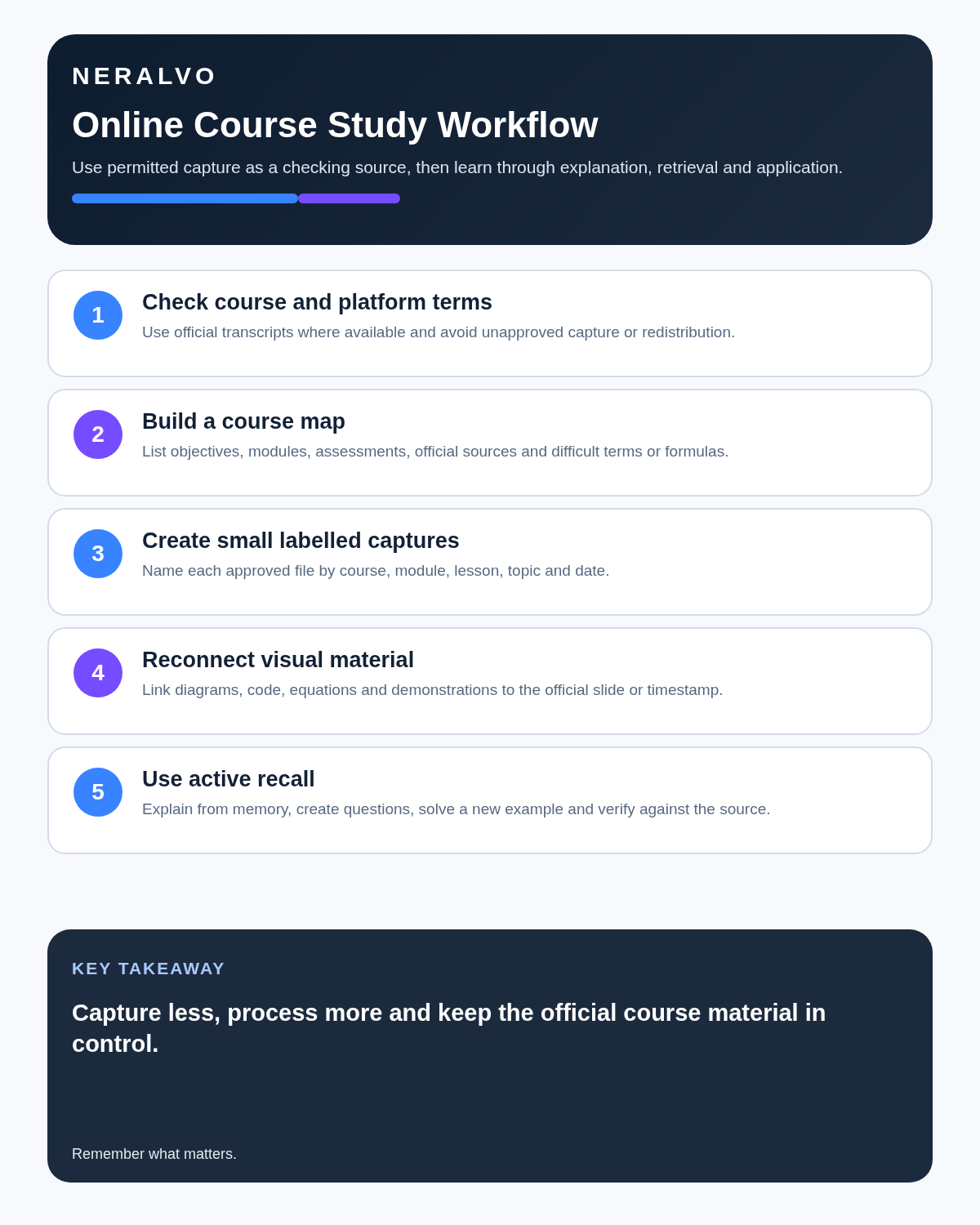
A practical lesson workflow
- Preview: read headings, objectives and assessment criteria.
- Set a question: decide what needs to be understood.
- Watch actively: pause at definitions, processes and examples.
- Capture selectively: use short named sections only where permitted.
- Mark uncertainty: note timestamps for confusing material.
- Close the source: explain the lesson from memory.
- Correct the transcript: check terms, names, figures and formulas against official material.
- Create final notes: preserve definitions, reasoning, steps, exceptions and examples.
- Generate retrieval questions: answer them without looking.
- Schedule review: revisit difficult material over several sessions.
Use this study-note template
- Lesson and learning objective.
- Central idea in my own words.
- Key terms and definitions.
- Process or argument.
- Worked example.
- Exception or limitation.
- What I still do not understand.
- Five retrieval questions.
- Practical application.
- Next review date.
Correct the transcript against authoritative material
Online-course transcripts commonly fail on:
- Instructor and author names.
- Technical vocabulary.
- Equations and symbols.
- Code and command syntax.
- Legal citations.
- Medical terminology.
- Dates, percentages and units.
- Words shown only on screen.
Use the course’s slides, workbook, reading list and captions as checking sources. Do not “correct” a lesson solely because the AI summary sounds more fluent.
Audio cannot capture the whole lesson
Screen demonstrations, diagrams, code, physical technique and slide references such as “this part here” may be meaningless in an audio transcript. Link each final note to the official timestamp, slide or resource rather than trying to recreate protected materials unnecessarily.
Turn the lesson into active recall
- Write five to ten questions.
- Answer without looking at the transcript.
- Explain the concept aloud as though teaching it.
- Draw a process or mind map from memory.
- Complete a new example.
- Compare the response with official material.
- Record errors and misconceptions separately.
- Review difficult questions again later.
The transcript should function as a checking source, not the object being memorised.
Use AI summaries cautiously
An automated summary may:
- Remove a qualification that changes the rule.
- Prefer a memorable example over the actual principle.
- Misstate an equation or code sample.
- Turn a disputed theory into settled fact.
- Ignore material shown visually.
- Combine the instructor’s view with a quoted source.
- Invent a clean sequence where the lesson was exploratory.
Compare assessment-critical content with the official course source.
Protect other learners
Live courses and webinars may include student names, questions, faces and personal experiences. Permission from the course provider does not necessarily authorise uncontrolled reuse of participant contributions.
- Do not publish class recordings or transcripts.
- Remove unnecessary personal data from final study notes.
- Use approved institutional systems.
- Do not share another student’s question as content without permission.
- Delete source recordings when the approved study purpose ends.
How NERALVO Halo fits an approved study workflow
Check whether NERALVO Halo fits online courses work provides NOTE mode for permitted lessons and personal spoken recaps, supported CALL mode for compatible sessions where recording is lawful and permitted, 64GB local storage, up to 35 hours of recording and Bluetooth sync with DOWAY. DOWAY provides transcripts, summaries, templates, translation, mind maps and exports, with one year of DOWAY Max included.
Halo supports a deliberate study system. It does not grant permission to record a course or guarantee that an AI summary matches the official syllabus.
Common online-course mistakes
- Recording an entire paid course without checking terms.
- Confusing access with ownership.
- Keeping hours of unlabelled audio.
- Reading transcripts instead of retrieving from memory.
- Using AI summaries as the only exam source.
- Ignoring diagrams and screen demonstrations.
- Sharing proprietary transcripts with classmates.
- Uploading course material into an unapproved service.
Cloud software, a dedicated recorder or manual notes?
For Online Courses, the right answer changes with the setting. This matrix deliberately gives each method a situation where it can be the strongest choice.
| Situation | Best starting point | Reason |
|---|---|---|
| scheduled remote meetings | Cloud meeting software | Calendar automation and shared integrations are usually the strongest advantage. |
| in-person or mobile work | Dedicated recorder | Independent capture reduces reliance on an active phone or laptop. |
| recording is refused or prohibited | Manual notes or an approved alternative | The boundary takes priority over convenience. |
| mixed online and offline work | Governed hybrid | Use each method only in the setting it actually fits. |
Frequently asked questions
Can I record any course I have paid for?
No. Payment gives access under the provider’s terms; it does not automatically grant an unlimited copying or redistribution right.
Does private study always allow recording the whole course?
No. UK exceptions are limited and subject to fair dealing. Check the provider’s terms and seek appropriate advice when uncertain.
Should every transcript be kept?
No. Keep only what is justified, useful and permitted. Concise notes and retrieval questions are usually easier to revise.
Are AI summaries enough for an exam?
No. Verify them against the official syllabus, lessons, readings and assessment guidance.
Can Halo record my own post-lesson explanation?
Yes. Recording a personal recap can be a strong active-learning method and avoids copying more source material than necessary.
Can recordings be shared with another student?
Not unless the provider, law and participant permissions allow it. Share independently written notes instead.
Official UK copyright guidance
Final online-course checklist
- Provider terms and permission checked.
- Course map prepared.
- Files divided by lesson and purpose.
- Visual context linked to official material.
- Terms, formulas and citations verified.
- Notes written in the learner’s own words.
- Active recall and spaced review created.
- Participant information protected.
- Redundant source material deleted.
Bottom line: an AI recorder can make approved course material easier to search and review, but learning improves when the learner closes the transcript, explains the idea and retrieves it later. Capture less and process more.
Related guides
See the guides for distance learners, university students and choosing an AI voice recorder.
On this page
Related guides
See whether Halo fits long-form study capture
After checking permission and your institution’s rules, compare Halo’s stated battery, storage and export workflow with the way you actually study.
Found an error or an out-of-date claim? Email support@neralvo.com with the article address and a supporting source.