The 60-second verdict
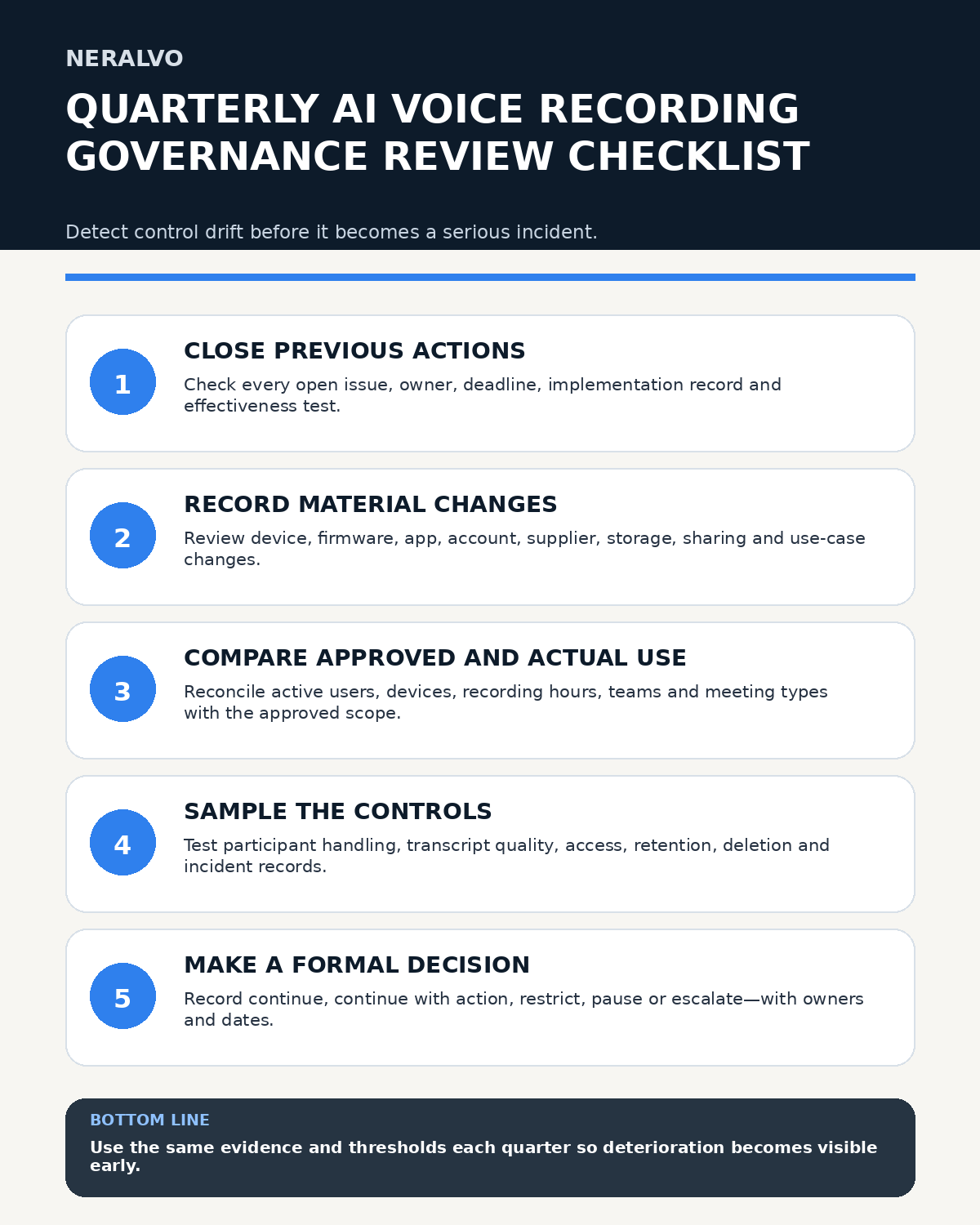
Quick answer: a quarterly AI voice-recording governance review should prove that approved use remains lawful, controlled, secure, accurate and operationally worthwhile. Review previous actions, material system changes, actual usage, participant handling, transcript quality, accounts, suppliers, retention, deletion, incidents, exceptions and backlog. Finish with a documented decision to continue, restrict, pause or escalate each use case, plus named owners, deadlines and evidence-based closure tests.
Decision focus: use the method below only where it produces a recoverable source, a verifiable output and a clear next action. If one of those fails, change the workflow rather than trusting a polished summary.
Evidence basis and limits
- Decision factors covered: What the quarterly review must decide; Define scope, ownership and evidence cut-off; 1. Test previous actions for effectiveness.
- Evidence rule: A claim earns weight only when the source, date, configuration and limitation are clear enough for a reader to check.
- Boundary: Examples and workflow recommendations must be tested with representative recordings, the intended users and the actual approval process before rollout.
A quarterly review is the control point between daily operations and the deeper annual assessment. Its purpose is not to produce another report. It is to detect drift early: unapproved users, unexplained recording growth, expired exceptions, weak deletion, repeated transcript defects, supplier changes and actions that have been marked complete without improving the underlying risk.
What the quarterly review must decide
Every review should answer five questions:
- Are people using the workflow only for approved purposes?
- Are participants informed and given the required choices?
- Are recordings, transcripts and summaries accurate enough for their intended use?
- Are access, storage, sharing, retention and deletion controls working in practice?
- Should each use case continue unchanged, continue with action, be restricted, paused or escalated?
Do not treat “no reported complaints” as proof that controls are effective. The review should combine operational records, targeted samples, system evidence, interviews and trend data.
Define scope, ownership and evidence cut-off
Record the review period, evidence cut-off date, business units, devices, accounts, applications, integrations, suppliers, languages, approved meeting types and information classes covered.
| Field | Required entry |
|---|---|
| Review owner | Named accountable person responsible for completion and escalation |
| Decision authority | Role or committee authorised to continue, restrict or pause use |
| Evidence contributors | Operations, privacy, security, legal, procurement, IT and quality roles as relevant |
| Included systems | Recorder, paired phone, application, workspace, exports and downstream systems |
| Excluded areas | Explicit exclusions with reason, owner and follow-up date |
| Evidence period | Start date, end date and cut-off for late evidence |
| Risk tolerance | Pre-agreed thresholds for defects, incidents, overdue actions and deletion failures |
1. Test previous actions for effectiveness
For every action carried forward from the prior quarter, record the original issue, risk, owner, due date, implementation evidence, validation method, result and residual risk.
An action is not complete merely because a policy, training slide or procedure was updated. Test whether the relevant outcome improved. For example:
- If the action addressed late deletion, sample records that should now be deleted.
- If it addressed participant notice, observe or inspect real meeting evidence.
- If it addressed transcript quality, compare new samples with the previous defect rate.
- If it addressed leaver access, test removal from every linked system.
- If it addressed accidental recordings, review recurrence and detection time.
Action effectiveness rate = actions proven effective ÷ actions tested.
Report implemented-but-untested actions separately from actions shown to be effective.
2. Maintain a complete change register
List every material change since the last review:
- Recorder model, accessory, firmware or microphone configuration.
- Paired phones, operating systems, permissions or device-management settings.
- Application versions, transcription models, summary prompts or language settings.
- Storage, exports, integrations, backups or sharing routes.
- User populations, administrator roles or business ownership.
- Supplier terms, subprocessors, processing locations, plan limits or support arrangements.
- Approved use cases, information classes or retention rules.
- Participant notices, consent or objection procedures.
- Security controls, authentication or incident-response routes.
| Change | Risk created | Evidence required | Decision |
|---|---|---|---|
| New transcription model | Changed error pattern or unsupported additions | Representative regression test | Approve, limit or roll back |
| New phone operating system | Capture or transfer failure | Compatibility and recovery test | Approve listed configurations only |
| Supplier term change | Different processing, retention or subprocessor route | Contract, privacy and security review | Accept, renegotiate or pause |
| New integration | Uncontrolled copies or broader access | Data-flow and access test | Approve with controls or reject |
Link each material change to testing, approval, training and any required update to the data-protection impact assessment, record of processing, supplier register, security assessment or retention schedule.
3. Compare actual use with approved scope
Reconcile authorised users, active users, registered devices, recording count, audio hours, departments, meeting categories and processing features against the approved operating scope.
Investigate:
- Unexplained growth in recording volume.
- Dormant accounts that still retain access.
- Personal or shared accounts.
- Recording outside approved meeting types.
- Use of translation, summaries or exports not covered by approval.
- Capture of more information than the stated purpose requires.
- Teams retaining audio simply because storage remains available.
Out-of-scope use rate = confirmed out-of-scope recordings ÷ recordings sampled.
High recording volume is not a success measure if files remain unprocessed, actions are not transferred or deletion is overdue.
4. Use a stable quarterly metrics table
Keep metric names and denominators consistent from quarter to quarter. Where definitions change, show the old and new basis rather than presenting a broken trend as improvement.
| Metric | Calculation | Why it matters |
|---|---|---|
| High-severity transcript defect rate | High-severity defects ÷ critical fields checked | Shows risk hidden by general word accuracy |
| Deletion success rate | Records deleted from every required location ÷ records tested | Tests real retention control |
| Overdue action rate | Overdue governance actions ÷ open actions | Shows remediation drift |
| Participant objection rate | Objections or refusal requests ÷ recorded meetings sampled | Supports transparency review without treating objections as failure |
| Alternative-method success | Usable non-recorded alternatives provided ÷ alternatives requested | Tests whether choice is genuine |
| Unprocessed backlog age | Median days from recording to approved output or disposal | Identifies uncontrolled accumulation |
| Access-removal success | Leaver or role-change accounts removed from all systems ÷ accounts tested | Tests identity lifecycle control |
| Incident recurrence rate | Repeated incidents with same root cause ÷ incidents reviewed | Shows ineffective corrective action |
| Exception expiry rate | Expired exceptions still active ÷ exceptions reviewed | Exposes temporary controls becoming permanent |
For every percentage, include the raw numerator and denominator. Five high-severity errors in fifty checks is more informative than “90% accurate.”
5. Sample participant handling
Select a risk-based sample covering ordinary meetings, sensitive discussions, hybrid attendance, late arrivals, accessibility needs and cases where somebody objected or asked for a pause.
Check whether participants received:
- A clear purpose for recording.
- An explanation of audio, transcript, summary, translation and action outputs.
- Accurate information about access, sharing and retention.
- A usable route to ask questions, object or request a pause.
- A genuine non-recorded alternative where required.
- A repeated explanation for late arrivals.
- Accessible or translated information where needed.
Do not assess success by counting how few people objected. An objection can demonstrate that the process gave participants a meaningful choice.
6. Audit transcript, summary and action quality
Sample recordings across teams, environments, durations, speaker counts, accents, languages and specialist vocabulary. Include recent system changes, complaints and known difficult conditions.
Check source audio against transcripts and summaries for:
- Names, organisations and speaker identity.
- Dates, times, amounts, percentages and units.
- Negations and conditional wording.
- Decisions, proposals and approval status.
- Actions, owners, deadlines and dependencies.
- Risks, objections and dissent.
- Unsupported explanations, reasons or conclusions.
- Omitted limitations and evidence gaps.
Set automatic blockers. For example, an invented decision, changed amount, wrong action owner or removed safety condition should fail approval even if the overall transcript reads well.
Critical-detail accuracy = correct critical details ÷ total critical details checked.
Unsupported-addition rate = unsupported material claims ÷ material claims reviewed.
7. Review backlog and downstream completion
Measure the number, age and status of recordings that remain unprocessed, partially reviewed or outside the final system of record.
Trace a sample from capture to completion:
- Recording created.
- Source transferred to the approved workspace.
- Transcript or summary reviewed.
- Decisions and actions confirmed.
- Actions entered into the normal task, customer, project or case system.
- Final record approved.
- Temporary copies removed under policy.
A growing backlog may indicate over-recording, unclear ownership, insufficient review capacity or a workflow that creates more administration than it saves.
8. Reconcile accounts, roles and devices
Compare HR or identity records with active application accounts, administrators, shared workspaces, paired phones and registered recorders.
Test:
- Leaver removal across every connected system.
- Role-change access reduction.
- Administrator privileges and emergency access.
- Shared or generic credentials.
- Personal accounts and personal cloud backups.
- Lost-device reporting and remote account protection.
- Orphan files owned by former staff.
Document how quickly access was removed and whether residual copies remained.
9. Test retention and deletion end to end
Select records that should remain, records that should be deleted and records subject to a formal hold or exception. Trace each one across:
- Recorder storage.
- Paired phone.
- Application or cloud workspace.
- Downloads and local folders.
- Email and messaging.
- Shared drives or collaboration tools.
- Task, customer, project or case systems.
- Backups where the policy requires verification.
Record residual copies, failed deletion, delayed deletion, legal holds and supplier limitations.
Deletion success rate = records removed from every required location ÷ records selected for deletion testing.
Failure to delete from one uncontrolled export should not be hidden by successful deletion from the main application.
10. Review incidents, near misses and complaints
Group events by severity, root cause, team, information type and control failure. Include:
- Accidental or unauthorised recording.
- Wrong-account transfer.
- Incorrect sharing or export.
- Lost device or compromised account.
- Serious transcript or summary error.
- Participant complaint or objection mishandling.
- Retention or deletion failure.
- Unapproved feature or supplier use.
Confirm containment, investigation, notification decisions, corrective action and effectiveness testing. Repeated low-level events may justify escalation even when no single event appears severe.
11. Review suppliers and AI service changes
Quarterly supplier checks should cover service availability, support issues, security notices, subprocessor changes, processing locations, retention behaviour, plan limits, export capability and deletion assurance.
Where the supplier changes a model, application or processing feature, require regression testing against representative recordings before relying on the new output for professional use.
Do not assume that an unchanged product name means the underlying AI workflow is unchanged.
12. Review and expire exceptions
For every exception, confirm:
- Reason and business necessity.
- Scope and information class.
- Compensating safeguards.
- Approver and start date.
- Expiry date and review trigger.
- Evidence that the safeguard still works.
Close expired exceptions, renew them with fresh evidence or treat repeated exceptions as a proposed process change requiring full review.
13. Apply a clear decision framework
| Decision | Use when | Required output |
|---|---|---|
| Continue | Controls and metrics remain within tolerance | Recorded approval and next review date |
| Continue with action | Issue is controlled temporarily and residual risk is accepted | Owner, deadline, evidence and mid-quarter checkpoint |
| Restrict | Only some users, features, rooms, languages or information classes remain acceptable | Exact restriction, effective date and enforcement method |
| Pause | Control failure creates unacceptable or unknown risk | Stop instruction, containment, investigation and restart criteria |
| Escalate | Decision requires privacy, security, legal, procurement or senior authority | Evidence pack, interim control and decision deadline |
When to pause use immediately
Consider pausing the affected workflow when:
- Recording occurs without required authority or participant information.
- Access cannot be removed from former users.
- Source audio or transcripts are exposed outside approved systems.
- High-risk errors repeatedly alter decisions, amounts, owners or safety information.
- Deletion cannot be completed or evidenced.
- A material supplier or processing change has not been assessed.
- The only source file is being lost during transfer or processing.
- A serious incident remains uncontrolled.
- The organisation cannot identify where recordings or derived copies are stored.
Define restart criteria before resuming use.
Build the next-quarter action plan
Every action should include:
- Issue and affected control.
- Expected outcome.
- Risk and priority.
- Named owner.
- Deadline and dependency.
- Interim safeguard.
- Evidence required for closure.
- Effectiveness test.
- Escalation date if overdue.
Prioritise participant harm, confidentiality, uncontrolled access, high-risk output errors and deletion failures over cosmetic improvements.
Create a concise review pack
- Executive status, major changes and formal decisions.
- Previous-action closure and effectiveness.
- Usage, trends and out-of-scope findings.
- Participant, quality, access and deletion results.
- Incidents, complaints, suppliers and exceptions.
- Open risks and next-quarter actions.
- Approvals, restrictions, pause decisions and review dates.
Keep confidential case detail and source recordings in controlled evidence repositories rather than the widely circulated review pack.
How NERALVO Halo fits into governance
Apply this guide before assessing NERALVO Halo can form one part of an approved recording workflow. It offers NOTE mode, supported capture for compatible lawful call workflows, 64GB local storage, up to 35 hours of recording and Bluetooth transfer to DOWAY for transcripts, summaries, templates, translations and structured notes. One year of DOWAY Max is included from activation.
Quarterly governance should still test the complete real-world chain: device, phone, account, transfer, AI processing, human review, exports, downstream systems, retention and deletion. Product specifications do not replace organisational acceptance testing or legal, privacy and security review.
Workflow choice matrix for Quarterly AI Voice Recording Governance Review
Choose the method that protects the source and reduces downstream correction. The table makes the non-hardware options explicit.
| Condition | Preferred route | Why |
|---|---|---|
| High-risk or mixed work | Governed hybrid | Separate capture, review, approval and retention rather than trusting one tool. |
| Recording is refused, prohibited or unnecessary | Manual notes / no recording | Respecting the boundary is the correct workflow, not a product failure. |
| In-person, mobile or unreliable-connectivity work | Dedicated recorder | Independent capture and a recoverable local source are usually more resilient. |
| Repeatable remote work with approved integrations | Cloud software | Automation and central collaboration may outweigh device independence. |
Frequently asked questions
Who should own the quarterly review?
A named accountable owner should coordinate it, with operational, privacy, security, legal, procurement and quality input proportionate to the use case.
How large should the sample be?
Use a documented risk-based sample covering ordinary use, sensitive use, recent changes, difficult environments, complaints and known failures. Increase the sample when defects appear.
Should every quarter use the same sample size?
Not necessarily, but definitions and selection rules should remain stable enough for comparison. Explain every material change in denominator.
Is a policy review enough?
No. Test actual behaviour, system settings, recordings, transcripts, access removal and deletion evidence.
What evidence should be retained?
Retain the scope, metrics, samples, findings, incident evidence, decisions, action owners, deadlines and proof that corrective actions worked.
What should trigger an unscheduled review?
A serious incident, repeated critical errors, material supplier change, uncontrolled recording, deletion failure, security notice or significant expansion of use.
Can the workflow continue while actions remain open?
Only where residual risk is understood, accepted by the authorised role and protected by a specific interim control. Some failures require immediate restriction or pause.
Quarterly governance checklist
- Scope, owners, systems and risk thresholds defined.
- Previous actions tested for effectiveness.
- Material changes recorded and assessed.
- Actual use reconciled with approved scope.
- Metrics reported with raw counts and stable denominators.
- Participant handling sampled.
- Transcript, summary and action quality checked against source.
- Backlog and downstream completion reviewed.
- Accounts, roles and devices reconciled.
- Retention and deletion tested end to end.
- Incidents, complaints and recurring causes assessed.
- Supplier and AI service changes reviewed.
- Exceptions closed, renewed or escalated.
- Continue, restrict, pause or escalate decisions documented.
- Next-quarter actions include owners, deadlines and effectiveness tests.
Bottom line: a strong quarterly AI voice-recording review does not ask whether the technology still appears useful. It asks whether every approved use remains controlled, evidenced and worth the risk. Where the evidence is weak, the correct governance response is to restrict, pause or escalate—not to assume the annual review will fix it later.
Related guides
Workflow map
Visual map for Quarterly AI Voice Recording Governance Review: Complete Audit Checklist and Decision Framework
- Define the decisionState the question, required output and acceptance rule.
- Capture the sourceUse the approved route and preserve context, identity and limitations.
- Verify material detailsReplay or check names, numbers, negatives, decisions and actions.
- Move into the real recordAssign an owner, retain evidence and apply the deletion rule.
On this page
Related guides
See whether Halo fits this workflow
Review the NERALVO Halo specifications, included services, delivery information and current offer only after completing the guide.
Found an error or an out-of-date claim? Email support@neralvo.com with the article address and a supporting source.