
The 60-second verdict
Quick answer: executive assistants can use an AI voice recorder to preserve executive decisions, conditions, delegations and communications, but a discussion, preference, request, instruction and formal approval are different states. The calendar, task, governance and executive-office systems remain authoritative.
Best fit: Executive Assistants who need recoverable audio and human-verified notes in an authorised workflow. Use another method when: recording is prohibited, a participant declines or the approved process requires manual notes.
Evidence basis and limits
- Decision factors covered: The six executive-output types; The context → status → authority → rationale → action → communication → closure workflow; Prepare the decision frame before the meeting.
- Evidence rule: Claims are weighted by consequence: capture failure, changed meaning, access and recovery matter more than polished wording.
- Boundary: Examples and workflow recommendations must be tested with representative recordings, the intended users and the actual approval process before rollout.
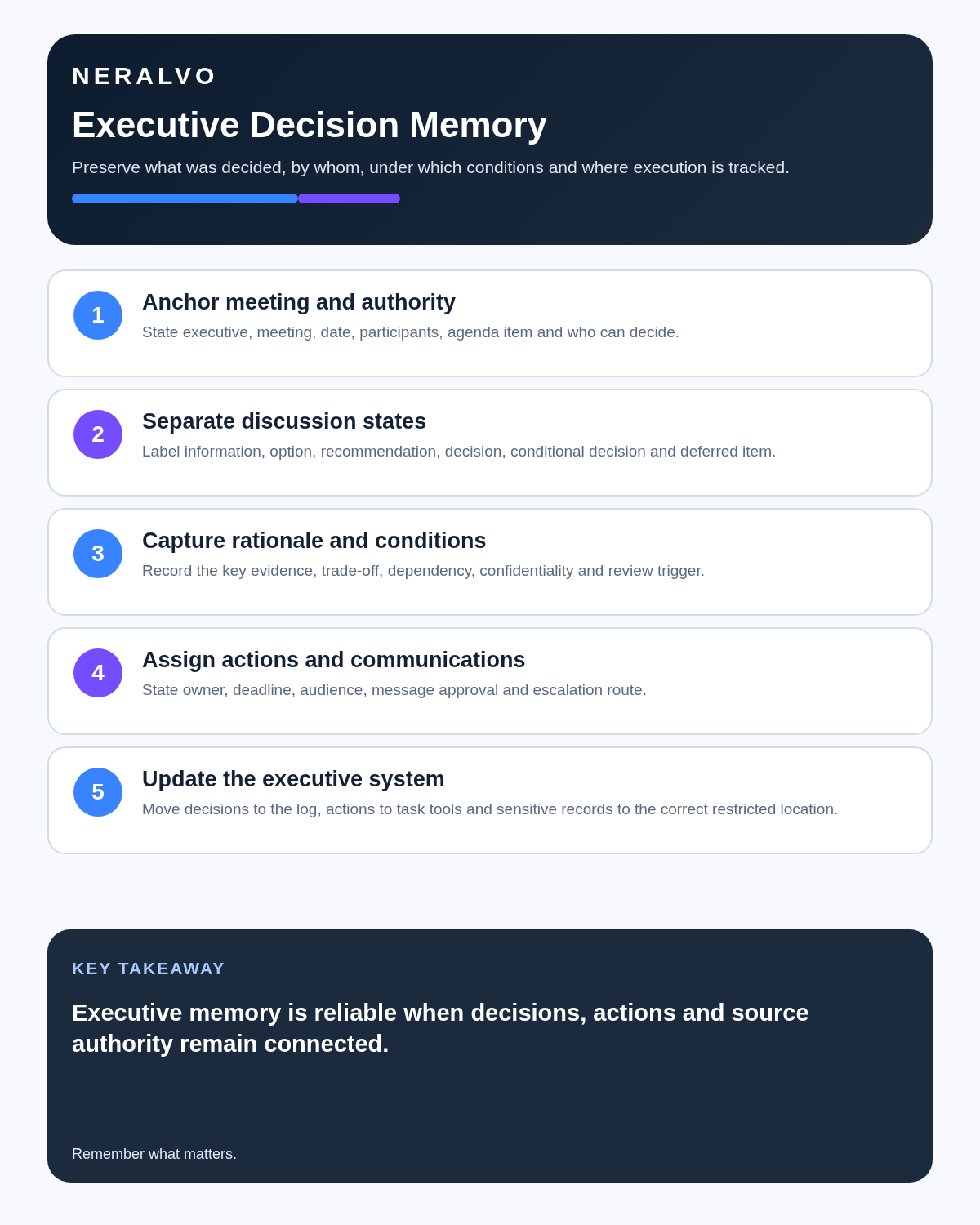
An executive assistant does not need a longer meeting record. They need a reliable decision memory: what was approved, who owns it, when it is due, who must be informed and which details remain restricted.
The six executive-output types
| Output | Meaning | Correct destination |
|---|---|---|
| Decision | An authorised choice has been made | Decision log, minutes or governance record |
| Action | A specific task has an owner | Task system or calendar |
| Request | Information or support is needed | Follow-up list with format and due date |
| Proposal | An option is under consideration | Briefing paper or next agenda |
| Dependency | Another approval, document or event is required | Project or executive tracker |
| Restricted context | Material needed by a limited audience | Approved confidential record |
The context → status → authority → rationale → action → communication → closure workflow
| Stage | Question | Output |
|---|---|---|
| Context | Which meeting, project and decision? | Stable anchor |
| Status | Was it an idea, preference, recommendation or decision? | Accurate classification |
| Authority | Who can approve and delegate? | Decision owner |
| Rationale | Why was the decision made and under which assumptions? | Traceable reasoning |
| Action | What exactly happens next? | Owned task |
| Communication | Who needs to know, by whom and when? | Controlled message |
| Closure | What proves implementation? | Completed record |
Prepare the decision frame before the meeting
Review the agenda and identify:
- which decisions are expected;
- who has authority to make them;
- previous actions still open;
- papers or evidence being considered;
- which sections may be confidential or legally sensitive;
- whether recording is permitted and proportionate.
A recorder cannot repair unclear authority. If nobody knows who can approve an option, the transcript will only preserve the uncertainty.
Use executive decision statuses
- question for exploration;
- personal preference;
- recommendation requested;
- provisional direction;
- decision subject to conditions;
- formal approval;
- delegated instruction;
- communication approved;
- implemented and closed.
Listen for confirmation language
- “To confirm, the decision is…”
- “Who owns the next step?”
- “Is Friday the agreed deadline or an estimate?”
- “Who needs to receive this information?”
- “Does this require legal, finance or board approval?”
- “Should this appear in the general or restricted record?”
These checks improve the meeting and reduce the chance that AI converts a suggestion into a commitment.
Use a decision-memory card
| Field | Record |
|---|---|
| Decision or action | One precise sentence |
| Authority | Person or body that approved it |
| Owner | Named accountable person |
| Deadline | Date and time where material |
| Dependency | Approval, information or preceding task |
| People to inform | Audience and channel |
| Evidence of completion | Document, result or meeting required |
| Confidentiality | General, restricted, confidential or highly restricted |
| Review point | When progress will be checked |
Capture authority explicitly
Identify whether the executive is acting as manager, director, budget holder, committee member or project sponsor. Attendance and seniority do not automatically create authority for every decision.
Preserve rationale without creating a transcript-shaped record
Record the issue, evidence, options, trade-offs, assumptions, risks, selected outcome, conditions and review trigger. This helps future teams understand why the direction was reasonable at the time.
Turn actions into executive-ready tasks
- exact outcome;
- one accountable owner;
- contributors and dependencies;
- deadline and time zone;
- approval or budget needed;
- communication requirement;
- evidence of completion;
- escalation trigger.
Control communications
| Message status | Meaning |
|---|---|
| Draft requested | Assistant may prepare wording |
| Content approved | Meaning accepted |
| Recipient list approved | Distribution accepted |
| Send authorised | Message may be issued |
| Sent | Delivery completed |
| Acknowledged | Recipient confirmed receipt or understanding |
An executive saying “we should tell the team” is not always authority to send an immediate message.
Private executive briefings
An executive may dictate priorities while travelling or between meetings. Process the briefing promptly:
- Confirm the speaker and date.
- Separate ideas from authorised instructions.
- Clarify ambiguous names, figures and deadlines.
- Move each approved task into the official system.
- Ask for confirmation where the instruction affects money, people, contracts or public communication.
- Delete duplicate audio when its purpose ends.
A private voice note can still contain strategic, personal or market-sensitive information. It should remain in business-controlled accounts rather than personal consumer storage.
Board and committee meetings
A transcript may help confirm attendance, declarations, papers considered, material challenge, resolutions, votes and actions. It is not itself the formal minute.
The chair, company secretary or governance lead should control:
- whether the meeting may be recorded;
- how legally privileged or restricted sections are handled;
- who reviews the draft;
- which material belongs in confidential minutes;
- approval and retention of the official record.
Use a controlled post-meeting routine
- Generate the transcript and summary through the approved account.
- Correct names, dates, amounts, entities and speaker attribution.
- Mark each output as decision, action, request, proposal, dependency or restricted context.
- Confirm uncertain wording with the executive or chair.
- Update the decision log, calendar and task system.
- Prepare proportionate minutes or briefing notes.
- Send each audience only the information it needs.
- Apply the retention rule to audio, transcript and final record separately.
Classify confidentiality
- General internal: routine operational information.
- Restricted: limited leadership or project audience.
- Confidential: sensitive employee, customer or commercial material.
- Highly restricted: board, transaction, legal or market-sensitive information.
A complete transcript is often more sensitive than the final action list because it contains incidental comments and information about people not present.
Data-protection and supplier checks
Leadership recordings may contain personal data, financial plans and confidential strategy. Confirm which devices and accounts are approved, where processing occurs, whether content is used for model training, which subprocessors receive it, who can export files and how deletion works.
How NERALVO Halo fits executive assistants
Check whether NERALVO Halo fits executive assistants work includes NOTE mode, supported CALL mode, 64GB local storage, up to 35 hours of recording and Bluetooth sync with DOWAY. CALL mode is not universal, so test the exact phone, case and route. DOWAY provides transcripts, summaries, speaker-separated notes, templates, translations, mind maps and exports, with one year of DOWAY Max included.
Cloud software, a dedicated recorder or manual notes?
For Executive Assistants, the right answer changes with the setting. This matrix deliberately gives each method a situation where it can be the strongest choice.
| Situation | Best starting point | Reason |
|---|---|---|
| scheduled remote meetings | Cloud meeting software | Calendar automation and shared integrations are usually the strongest advantage. |
| in-person or mobile work | Dedicated recorder | Independent capture reduces reliance on an active phone or laptop. |
| recording is refused or prohibited | Manual notes or an approved alternative | The boundary takes priority over convenience. |
| mixed online and offline work | Governed hybrid | Use each method only in the setting it actually fits. |
Frequently asked questions
Does an executive preference count as a decision?
No. Confirm status, authority and conditions.
Can the assistant send an AI-drafted message immediately?
Only after the content, recipients and send authority are clear.
Should board discussions remain in a general meeting workspace?
No. Use the approved restricted governance process.
Final executive-assistant checklist
- Meeting and decision context identified.
- Idea, preference and decision separated.
- Authority and conditions recorded.
- Rationale and review trigger preserved.
- Actions precise and owned.
- Communication approval explicit.
- Sensitive records routed correctly.
- Executive systems updated and source controlled.
Bottom line: an executive assistant creates leverage by turning ambiguous conversation into verified decisions, controlled communications and completed action without inventing authority.
Related guides
On this page
Related guides
See whether Halo fits this workflow
Review the NERALVO Halo specifications, included services, delivery information and current offer only after completing the guide.
Found an error or an out-of-date claim? Email support@neralvo.com with the article address and a supporting source.