Reviewed and fact-checked: 21 July 2026.
The 60-second verdict
Training sessions often contain more practical value than the slide deck: demonstrations, participant questions, real examples, corrections and explanations shaped by the room. An AI voice recorder for training sessions can help preserve that material, but recording an entire day without structure can create an unusable transcript and collect confidential information that was never needed.
Best fit: Training Sessions who need recoverable audio and human-verified notes in an authorised workflow. Use another method when: recording is prohibited, a participant declines or the approved process requires manual notes.
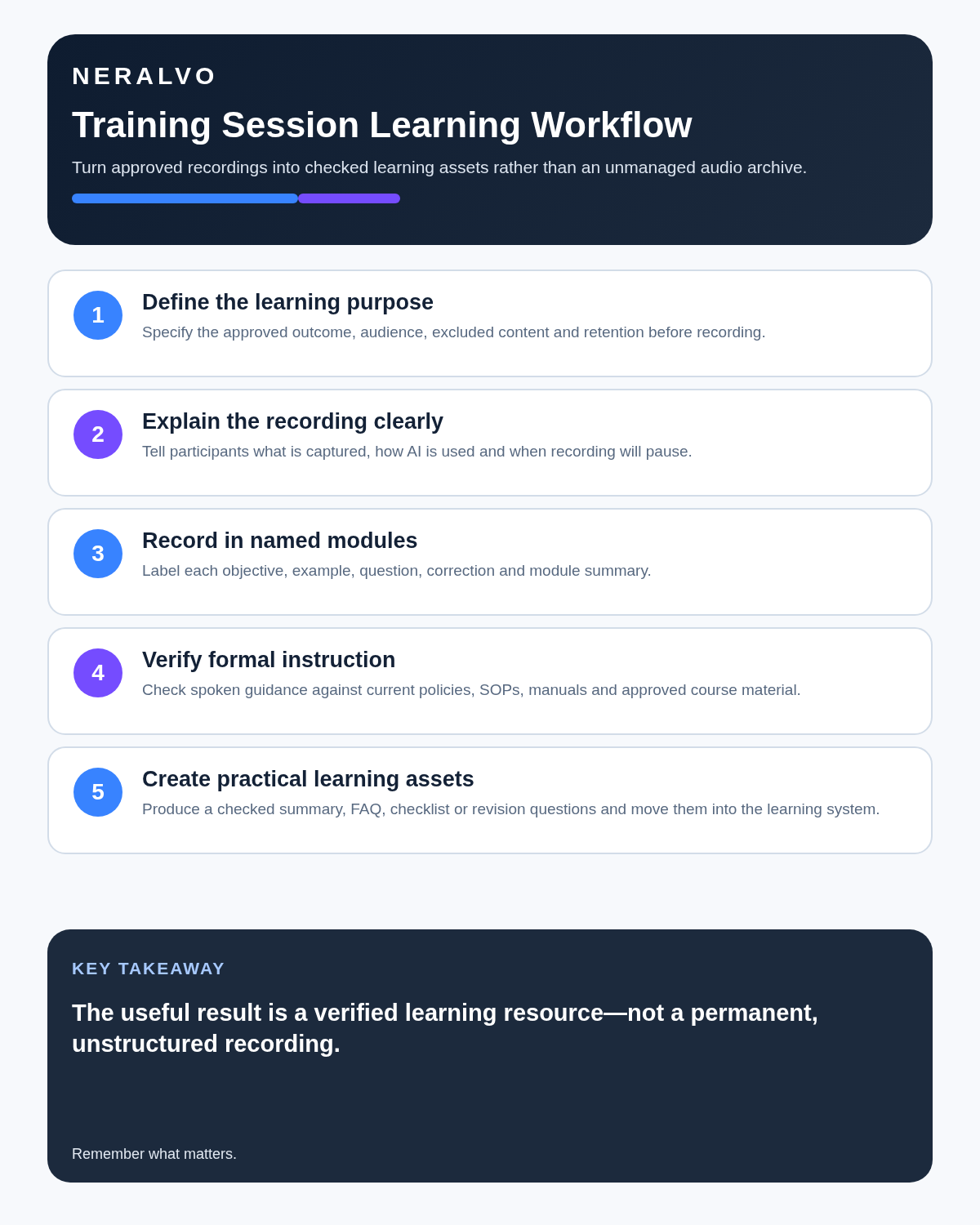
Quick verdict: define the learning purpose, tell participants exactly what will be captured, record in named modules, pause during private discussion, verify spoken instructions against controlled documents and convert the source into concise learning assets rather than treating the raw transcript as the course.
Evidence basis and limits
- Decision factors covered: Decide what the recording is for; Define the boundary before the session; Explain the recording clearly.
- Evidence rule: Claims are weighted by consequence: capture failure, changed meaning, access and recovery matter more than polished wording.
- Boundary: Examples and workflow recommendations must be tested with representative recordings, the intended users and the actual approval process before rollout.
Decide what the recording is for
A training recording may support:
- Personal revision.
- A checked trainer summary.
- Frequently asked questions.
- Improvement of future course materials.
- Evidence that a session took place.
- An accessibility arrangement.
- Approved internal knowledge resources.
These purposes are not interchangeable. A recording made for one learner’s private revision should not automatically become a permanent company training library.
Define the boundary before the session
| Question | Decision required |
|---|---|
| Who is recorded? | Trainer only, participant questions or the whole room |
| What is excluded? | Breaks, personal disclosures, assessments or confidential scenarios |
| Who can access it? | Named learner, trainer, course owner or approved team |
| What will be created? | Transcript, summary, FAQ, checklist or course-improvement note |
| Where will it be stored? | Approved learning or document system |
| How long will it be kept? | Defined period for each record type |
| Can it be reused? | Only within the stated and approved purpose |
Explain the recording clearly
Before starting, tell participants:
- Why the session is being recorded.
- Whether their questions and voices will be included.
- Which tool or service will process the audio.
- Who can access the source and outputs.
- Whether any material may be reused in future training.
- How to raise a concern or use an alternative participation method.
- When recording will pause or stop.
Do not rely on a small device or quiet setup to make the recording unobtrusive. Transparency should be deliberate.
Record in named modules
One all-day file creates difficult navigation and may capture breaks or unrelated discussion. A better structure is:
- State the course title, date and module number.
- Read the learning objective aloud.
- Record the main explanation and approved questions.
- Close with a short recap.
- Stop or pause before the break.
- Start a new clearly labelled file for the next module.
How NERALVO Halo may fit a training workflow
Check whether NERALVO Halo fits training sessions work is an ultra-slim, phone-mounted AI voice recorder with NOTE mode for suitable room training, supported CALL mode for lawful and disclosed compatible remote sessions, 64GB local storage, up to 35 hours of recording and Bluetooth sync with DOWAY. DOWAY can generate transcripts, summaries, templates, translations, mind maps and exports. One year of DOWAY Max is included.
Halo can support portable approved capture, but the trainer still needs to test the room, control the session and move final materials into the organisation’s approved learning system.
Test the real room
- Place the recorder where it will remain.
- Test the trainer at normal volume.
- Test a participant question from the farthest seat.
- Include projector, ventilation and keyboard noise.
- Play the sample back through headphones.
- Move the recorder or change the room if important speech is unclear.
If accurate group questions are essential, a venue microphone or approved specialist setup may be better than one compact recorder.
Use verbal markers during delivery
- Learning objective: the outcome for the module.
- Key rule: an important controlled instruction.
- Example: an illustration rather than the formal rule.
- Common mistake: an error to avoid.
- Question: the participant issue being addressed.
- Correction: a change to something said earlier.
- Action: a task for the learner.
- Module summary: the closing recap.
Pause for sensitive or unsuitable sections
Recording may need to stop during:
- Personal performance discussion.
- Confidential customer or patient examples.
- Role-play involving sensitive scenarios.
- Private accessibility discussions.
- Tests or assessments where recording is not approved.
- Commercially restricted demonstrations.
- Breaks and informal conversation.
When recording resumes, announce the module and participants present.
Separate formal instruction from discussion
| Content type | How to treat it |
|---|---|
| Controlled procedure | Verify against the current approved document |
| Trainer explanation | Useful context, subject to checking |
| Participant suggestion | Discussion, not official instruction |
| Case example | Illustration with identifying details removed |
| Answer requiring follow-up | Mark as pending rather than inventing certainty |
| Course correction | Update the final resource and change log |
Check demonstrations against the source of truth
Spoken demonstrations can be simplified, incomplete or overtaken by later changes. Before turning the transcript into permanent guidance, compare it with:
- Current policies and standard operating procedures.
- Manufacturer instructions.
- Approved safety documentation.
- Current software or system screens.
- Course specifications.
- Relevant professional or regulatory guidance.
If the controlled document and spoken explanation conflict, escalate the difference. Do not silently choose whichever sounds more convenient.
Turn questions into a checked FAQ
- Extract participant questions.
- Remove names and unnecessary personal context.
- Merge genuine duplicates.
- Check the answer against approved sources.
- Identify an owner for unanswered questions.
- Add a review date.
- Publish only through the approved training channel.
Create practical outputs
A well-reviewed recording can produce:
- A one-page module summary.
- A process checklist.
- A verified FAQ.
- A glossary of specialist terms.
- Revision questions.
- A list of common errors.
- A trainer improvement log.
- Follow-up actions for learners.
The raw transcript is usually too long and too uncertain to be the final learning asset.
Use the recording to improve the course
After each delivery, review:
- Questions asked repeatedly.
- Sections requiring long clarification.
- Examples that improved understanding.
- Instructions that participants misinterpreted.
- Content that is outdated.
- Accessibility barriers.
- Activities that generated useful practice.
Update the controlled course materials rather than relying on the recording to compensate for weak content indefinitely.
Protect participant information
Training audio may reveal names, roles, health information, workplace problems or customer details. Restrict access, remove unnecessary identifiers and avoid emailing raw files or placing them in personal storage. Use separate retention periods for source audio, working transcript, approved learning asset and attendance record.
Training-session checklist
| Before | During | After |
|---|---|---|
| Define purpose and permission | Use module markers | Secure and label files |
| Explain participant capture | Pause sensitive sections | Correct names and terms |
| Test the real room | Repeat unclear questions | Verify official instructions |
| Prepare module structure | Record corrections | Create concise outputs |
| Set access and retention | Stop during breaks | Delete redundant drafts |
Cloud software, a dedicated recorder or manual notes?
For Training Sessions, the right answer changes with the setting. This matrix deliberately gives each method a situation where it can be the strongest choice.
| Situation | Best starting point | Reason |
|---|---|---|
| scheduled remote meetings | Cloud meeting software | Calendar automation and shared integrations are usually the strongest advantage. |
| in-person or mobile work | Dedicated recorder | Independent capture reduces reliance on an active phone or laptop. |
| recording is refused or prohibited | Manual notes or an approved alternative | The boundary takes priority over convenience. |
| mixed online and offline work | Governed hybrid | Use each method only in the setting it actually fits. |
Frequently asked questions
Can the transcript replace the training manual?
No. The current approved manual, procedure or course resource remains the source of truth.
Should every participant question be included?
No. Include only appropriate, useful questions within the stated purpose, and remove identifying or confidential detail.
Can AI decide whether the learner understood the course?
No. Understanding and competence require suitable assessment and human judgement.
Should an entire training day be one file?
Usually not. Named module files are easier to review, protect and retain.
Can recordings be reused for future courses?
Only when the original notice, permissions, rights and organisational policy support that reuse.
Build a better course, not just an archive
A useful training recording preserves real questions and practical explanation while keeping participant privacy and controlled documentation in charge. The goal is improved learning, not a permanent pile of audio.
Related guides
Profession workflow
Visual map for AI Voice Recorder for Training Sessions: Modules, Learning, Questions and Improvement
- Prepare the approved useDefine purpose, safe position, permission and the required formal record.
- Capture context firstState the case, asset, person, location or event identifier before detail.
- Human-verify evidenceCheck technical terms, units, names, dates, decisions and uncertainty.
- Complete the formal recordTransfer only verified information and apply access and retention controls.
On this page
Related guides
See whether Halo fits this workflow
Review the NERALVO Halo specifications, included services, delivery information and current offer only after completing the guide.
Found an error or an out-of-date claim? Email support@neralvo.com with the article address and a supporting source.