The 60-second verdict
Quick answer: Circleback is most valuable after a meeting and most risky at the same point. It can identify actions, assign owners, search across conversations and send outputs into connected applications. The safe workflow requires a human approval gate before any summary, task, CRM update or client communication spreads beyond the source meeting.
Best fit: readers comparing Circleback AI against the purchase, workflow and evidence factors below. Do not buy on: headline features alone; a failed compatibility, privacy, recovery or cost requirement should override the overall score.

Evidence basis and limits
- Decision factors covered: What Circleback is designed to do; Current plan structure; The safe automation rule.
- Evidence rule: A claim earns weight only when the source, date, configuration and limitation are clear enough for a reader to check.
- Boundary: Manufacturer-controlled prices, plans, compatibility and specifications can change. Retain the article’s stated check date, verify the live supplier terms before purchase and treat community reports as leads unless the original source is linked.
Current plan facts checked in July 2026: Individual is currently $20.83 per user per month on annual billing. Team is $25 per user per month annually and adds shared search, comments, team automations, central billing, retention settings and stronger access controls. Enterprise is custom-priced. Circleback currently advertises more than 1,000 integrations and support for more than 100 languages.
What Circleback is designed to do
Depending on the plan and connected workflow, Circleback can support:
- AI notes for unlimited online and in-person meetings.
- Transcription, speaker recognition and support for more than 100 languages.
- Automatically suggested or assigned actions.
- Audio and video playback.
- Search and questions across conversations.
- Imports of earlier recordings.
- After-meeting automations.
- More than 1,000 connected applications.
- Shared team search, comments and access controls.
Its value is not unlimited notes alone. It is the movement from verified conversation to useful follow-up.
Current plan structure
| Plan | Current annual-billing price | Main fit |
|---|---|---|
| Individual | $20.83 per user/month | Personal unlimited meeting notes, search, imports, automations and integrations |
| Team | $25 per user/month | Shared search, comments, standardised automations, billing, retention and access control |
| Enterprise | Custom | Contracted deployment and organisation-level requirements |
Confirm monthly billing, taxes, implementation, data terms and any feature or usage boundaries in the live proposal.
The safe automation rule
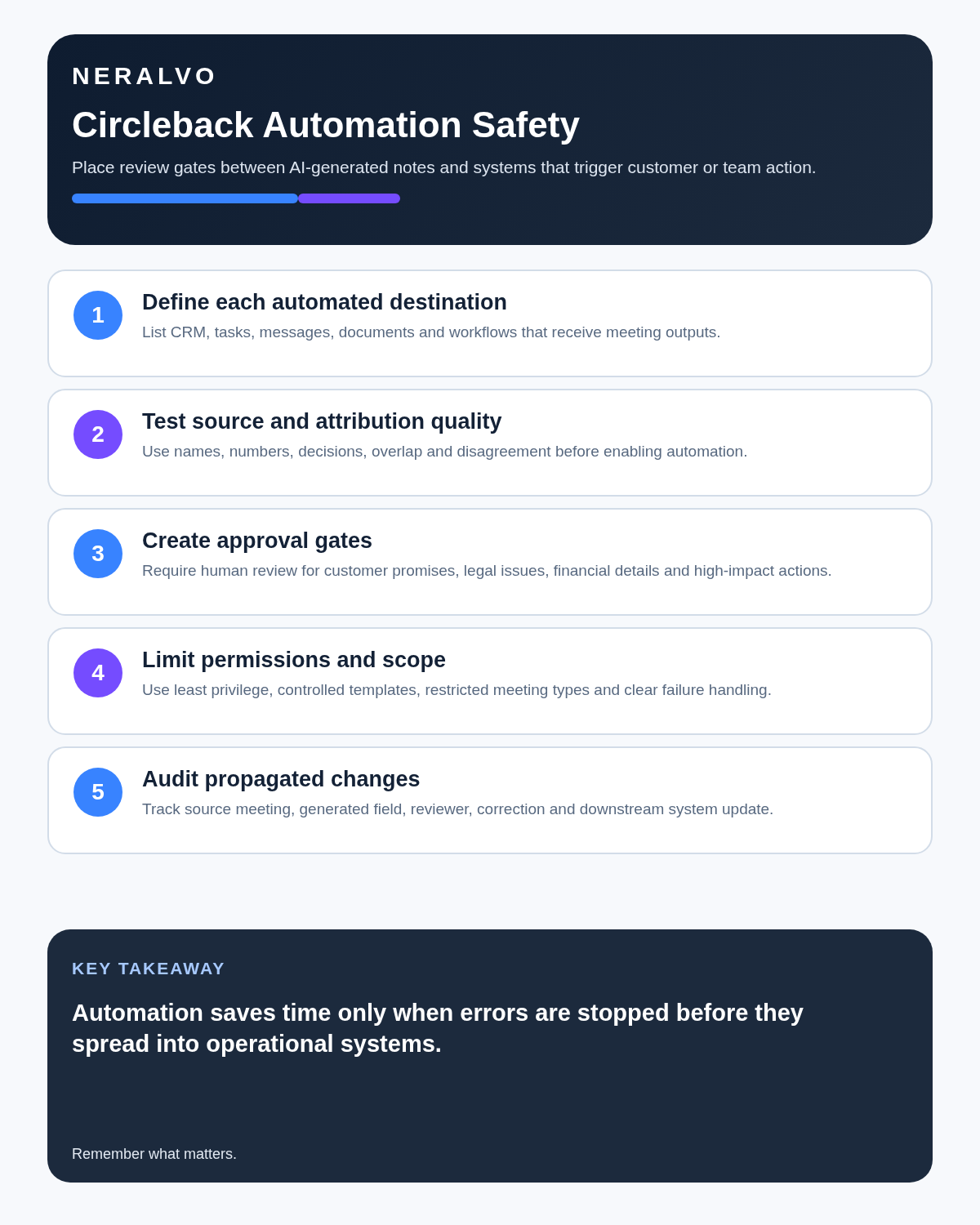
Do not automate an output until the facts that can create work, liability or customer commitments have been checked.
| Output | Main risk | Required check |
|---|---|---|
| General summary | Omitted nuance or false certainty | Review material points against transcript or playback |
| Action item | Wrong owner, wording or date | Confirm task, owner, deadline and dependency |
| CRM update | Error becomes an account fact | Approve every material field before synchronisation |
| Project task | Duplicate or unauthorised work | Check destination, status and decision authority |
| Client follow-up | Creates or misstates a commitment | Human review before sending |
| Cross-meeting insight | Merges different contexts | Open cited source moments and preserve contradictions |
Use a reviewed Circleback workflow
- Capture: record the authorised online or in-person conversation, or import an approved source file.
- Label: add a useful project, account or purpose reference without unnecessary personal data.
- Correct: verify participants, speakers, names, dates and figures.
- Confirm decisions: separate proposals, conditions and final agreements.
- Approve actions: check owner, deadline, dependency and completion condition.
- Run automations: move only approved fields and tasks into connected systems.
- Audit: detect failed, duplicate or conflicting updates.
- Retain: apply separate rules to source media, transcript and final records.
Unlimited notes should not mean unlimited recording
Selective capture improves search and reduces privacy exposure. Before recording a meeting type automatically, ask:
- Will someone need to verify exact wording?
- Will the source support a decision, action or reusable insight?
- Is recording proportionate to the purpose?
- Can unsuitable calendar categories be excluded?
- Can private or unrelated discussion be kept outside the source?
- Who will review and close the resulting work?
Screen-aware notes require verification
Screen-derived context can help when a participant points to a slide, timeline, document or dashboard without reading the labels aloud. It can also introduce errors because small text may be misread, values may change during the meeting and confidential information may appear briefly.
For every material screen-derived fact, record:
- Document, dashboard or slide reference.
- Version and time displayed.
- Exact value or claim.
- Whether it was verified after the call.
- Whether the information may enter the final record.
Cross-conversation search must remain traceable
Questions across several meetings can reveal repeated objections, customer needs, project risks or unresolved commitments. A dependable answer should identify the source meetings and relevant moments.
Do not accept a cross-meeting conclusion when:
- The population or time period is unclear.
- Different customers or projects have been merged improperly.
- Contradictory cases are missing.
- Private notes are included unexpectedly.
- The result cannot link back to individual sources.
Individual versus Team
Choose Individual when:
- One person records and manages their own meetings.
- Automations remain personal.
- Shared workspace policies are not required.
- The $20.83 annual-billing rate replaces meaningful follow-up work.
Choose Team when:
- Several people need access to the same meeting knowledge.
- Shared search is part of the workflow.
- The organisation needs retention and access controls.
- Team-level automations must be standardised.
- Comments and central billing matter.
Count the people who need to record, administer and act on meetings. Do not assign a paid seat merely because someone occasionally reads a final note.
In-person capture needs a source-quality test
Software cannot overcome poor microphone placement. Test the normal room with:
- Several speakers around the table.
- A quiet participant.
- Overlapping speech.
- Background ventilation or traffic.
- A phone or connected-device interruption.
- A decision and several action owners.
Measure missing speech, speaker errors and correction time. For frequent mobile work, dedicated hardware may create a more dependable source than a general-purpose phone.
Imports create another data path
Before importing existing files, verify supported formats, maximum duration, speaker separation, processing time, source retention, duplicate detection and permanent deletion. Confirm whether imported meetings can trigger the same automations as live capture.
Audit connected applications
| Connection | Control question |
|---|---|
| CRM | Which fields may be written and who approves them? |
| Project tool | How are duplicate tasks and existing owners handled? |
| Slack or chat | Which channels receive summaries and sensitive information? |
| Documents or Notion | Which page is authoritative and how are versions controlled? |
| Can drafts be reviewed before sending? | |
| Automation platform | How are failures, retries and unintended loops detected? |
Use the minimum permissions required. A broad integration token can expose more meeting information than the intended automation needs.
Run a propagated-error test
- Create a test meeting containing a deliberately ambiguous action.
- Observe the suggested owner and deadline.
- Check whether the automation waits for approval.
- Send the approved action into a test destination.
- Correct the source and see whether downstream systems update or conflict.
- Test failed delivery, duplicate retry and revoked access.
- Confirm the audit trail shows who approved each change.
This test reveals whether one meeting error can spread silently through the stack.
Security and permission controls
Circleback publishes SOC 2 Type II, encryption and privacy information and states that customer data is not used to train models. Those credentials are useful but do not decide whether a meeting should be recorded or shared.
- Participant notice and applicable consent.
- Workspace sharing defaults.
- External links and downloads.
- Connected-application permissions.
- Data-processing terms and subprocessors.
- Retention and legal holds.
- Offboarding and account transfer.
- Deletion across source, exports and connected systems.
When Circleback earns its price
Circleback is strongest for consultants, agencies, product researchers, customer-success teams and project managers who repeatedly turn conversations into controlled assigned work. It is poor value when users record a few meetings, read the summary and ignore search, integrations and action follow-through.
Direct comparison matrix: Circleback AI and NERALVO Halo
How to read this matrix: it is not scored to force a Halo win. The competing option leads where its deployment, integrations, placement or ecosystem is stronger; Halo leads only where its dedicated capture workflow is the better fit.
Circleback manages meeting intelligence and connected follow-up. Check the Halo specification against the Circleback AI decision matrix provides dedicated local source capture, with 64GB storage, up to 35 hours of recording and one year of DOWAY Max. Choose Circleback when connected automation is the main need; choose dedicated hardware when portable source quality is the first problem.
Is cloud software or a physical recorder right for this workflow?
- Choose Circleback AI when remote or desktop meetings, calendar automation and native workspace integrations are central—and its current plan covers the real team workload.
- Choose NERALVO Halo when in-person, mobile or offline source capture matters more than an auto-joining cloud workflow.
- A governed hybrid can be best when the same team works both online and in person.
One public user signal
“Transcriptions are accurate enough that I stopped double checking them.”
Read the original Reddit discussion. This is one person’s public report, not a controlled test or community consensus.
Why it matters here: That confidence is one person’s experience, not an accuracy benchmark. High-stakes names, numbers and commitments should still be checked against audio.
How community feedback is used
Public reviews can reveal recurring friction, but an anonymous anecdote is not treated as measured proof. A pull-quote should appear only when it links to the original post, identifies the relevant product version or date and is presented as one user’s experience—not as universal fact.
Frequently asked questions
Can Circleback send actions directly to another system?
It can support connected automation, but material tasks and commitments should pass a human approval gate.
Does unlimited meeting capture mean every meeting should be recorded?
No. Record selectively according to purpose, proportionality and policy.
Can cross-meeting search be treated as research evidence?
Only when the sources, population, period, contradictions and method remain visible.
Are in-person notes as reliable as online capture?
That depends on microphone placement and the room. Test the real environment.
What is the biggest implementation risk?
An unverified error spreading through automations into customer, project or CRM systems.
Official source and related reading
- Official Circleback pricing and features
- Bluedot Review
- Fellow Review
- Best AI Voice Recorders for Meetings
Final deployment checklist
- Current Individual and Team pricing confirmed.
- Human approval gate defined.
- Speakers, decisions and actions tested.
- Calendar recording scope controlled.
- Screen-derived facts verified.
- Cross-meeting results remain traceable.
- In-person capture tested.
- Integration permissions minimised.
- Propagated-error and retry tests passed.
- Retention, offboarding and deletion verified.
Verdict: Circleback can turn meetings into useful work when every material output is checked before automation. The safest rule remains simple: verify the speaker, decision, owner and deadline before information leaves the platform.
Software-first route
Need Zoom, Teams, calendar or CRM automation?
Choose cloud software for that job. This page completes the software workflow and evidence first. NERALVO Halo remains an optional later route only when offline, in-person or phone-attached capture matters more than native integrations.
On this page
Related guides
Keep the solution aligned with your original intent
- Choose the reviewed cloud software when Zoom, Teams, calendar automation, CRM workflows or unattended bot capture are essential.
- Consider dedicated hardware later only when offline, in-person, mobile or phone-attached capture is the actual requirement.
- Use neither when permission, governance, compatibility or retention requirements cannot be met.
Check current Circleback details at the official source
Verify current plans, compatibility, limits and integrations with Circleback before buying. Halo remains a separate optional comparison only for offline, in-person, mobile or phone-attached capture.
Found an error or an out-of-date claim? Email support@neralvo.com with the article address and a supporting source.